
1. ບົດແນະນຳ
Thank you for choosing the FITNATION Vertical Cycle Trainer. This manual provides essential information for the safe and effective use of your new fitness equipment. Please read this manual thoroughly before assembly and operation to ensure proper use, maximize your workout benefits, and prevent injury.
The FITNATION Vertical Cycle Trainer is designed for indoor use, offering a compact and efficient way to engage in cardiovascular exercise. Its vertical design allows for a space-saving footprint while providing a full cycling experience.
2. ຄໍາແນະນໍາຄວາມປອດໄພທີ່ສໍາຄັນ
WARNING: Before starting any exercise program, consult your physician. This is especially important for individuals over the age of 35 or those with pre-existing health conditions.
- Always place the cycle trainer on a flat, stable surface.
- ຮັບປະກັນວ່າລອດ ແລະ ແກ່ນໝາກໄມ້ທັງໝົດຖືກຮັດຢ່າງປອດໄພກ່ອນການນຳໃຊ້ແຕ່ລະຄັ້ງ.
- ຮັກສາເດັກນ້ອຍ ແລະສັດລ້ຽງຢູ່ຫ່າງຈາກອຸປະກອນໃນລະຫວ່າງການປະຕິບັດງານ.
- ໃສ່ເຄື່ອງນຸ່ງແລະເກີບກິລາທີ່ເຫມາະສົມ. ຫຼີກລ້ຽງການນຸ່ງຫົ່ມວ່າງທີ່ສາມາດໄດ້ຮັບການຕິດໃນພາກສ່ວນທີ່ເຄື່ອນໄຫວ.
- Do not exceed the maximum user weight limit (if specified by manufacturer, not available in provided data).
- ຖ້າທ່ານມີອາການເຈັບ, ວິນຫົວ, ຫຼື ຫາຍໃຈຝືດ, ໃຫ້ຢຸດອອກກຳລັງກາຍທັນທີ ແລະ ປຶກສາທ່ານໝໍຂອງທ່ານ.
- Perform regular maintenance checks as described in this manual.
- Do not modify the equipment. Use only manufacturer-approved replacement parts.
3. ເນື້ອໃນຊຸດ
Carefully unpack your FITNATION Vertical Cycle Trainer and verify that all components are present and undamaged. If any parts are missing or damaged, do not assemble the unit. Contact customer support immediately.
ເນື້ອໃນຊຸດປົກກະຕິປະກອບມີ:
- ກອບຫຼັກ
- Handlebar Assembly
- pedals (ຊ້າຍ ແລະຂວາ)
- ເຄື່ອງກັນສັ່ນດ້ານໜ້າ ແລະ ດ້ານຫຼັງ
- ຊຸດຮາດແວ (ສະກູ, ແຜ່ນຮອງ, ນັອດ, ເຄື່ອງມື)
- ຄູ່ມືຜູ້ໃຊ້
4. ສະພານແລະການຕິດຕັ້ງ
Assembly typically requires two people. Follow these steps carefully:
-
Step 1: Attach Stabilizers
Attach the front and rear stabilizer bars to the main frame using the provided bolts and washers. Ensure they are securely fastened to provide a stable base.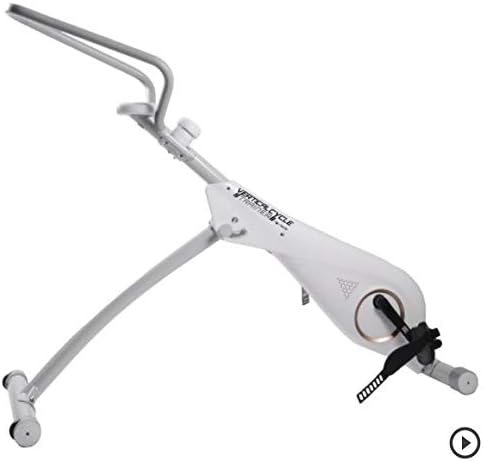
Figure 4.1: Initial assembly showing the main frame and base components.
-
ຂັ້ນຕອນທີ 2: ຕິດຕັ້ງ pedals
Identify the left (L) and right (R) pedals. The left pedal typically threads counter-clockwise, and the right pedal clockwise. Thread them into the crank arms and tighten securely with a wrench. -
Step 3: Attach Handlebar Assembly
Connect the handlebar assembly to the main frame's upright post. Secure it with the designated locking pin or knob, ensuring it is firmly in place and does not wobble.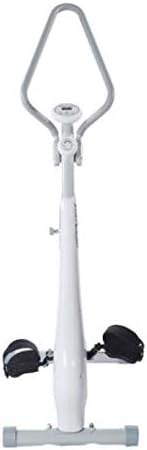
Figure 4.2: Fully assembled FITNATION Vertical Cycle Trainer.
-
ຂັ້ນຕອນທີ 4: ກວດສອບສຸດທ້າຍ
Before first use, double-check all connections, bolts, and nuts to ensure they are tight and secure. Test the stability of the unit by gently rocking it.
5. ຄໍາແນະນໍາການດໍາເນີນງານ
The FITNATION Vertical Cycle Trainer is designed for straightforward operation.
5.1 ການປັບຄວາມຕ້ານທານ
The trainer features an adjustable resistance mechanism. Locate the resistance knob, typically found on the main frame near the handlebars. Turn the knob clockwise to increase resistance for a more challenging workout, and counter-clockwise to decrease resistance for an easier ride.
5.2 Using the Display Console (if applicable)
If your model includes a display console, it typically tracks metrics such as time, distance, speed, and calories burned. Refer to the specific console manual for detailed instructions on mode selection, reset functions, and battery replacement.
5.3 ການເລີ່ມຕົ້ນການອອກກຳລັງກາຍຂອງທ່ານ
- Step onto the pedals, ensuring your feet are securely placed in the foot straps.
- ຈັບແຮນລົດໃຫ້ແໜ້ນ.
- Begin pedaling at a comfortable pace. Adjust resistance as needed throughout your workout.
- Maintain a steady, controlled motion. Avoid jerky movements.
6. ການບໍາລຸງຮັກສາແລະການດູແລ
Regular maintenance will extend the life of your FITNATION Vertical Cycle Trainer and ensure safe operation.
- ທໍາຄວາມສະອາດ: ເຊັດອຸປະກອນທີ່ມີໂຄສະນາamp ຜ້າຫຼັງຈາກແຕ່ລະການນໍາໃຊ້ເພື່ອເອົາເຫື່ອແລະຂີ້ຝຸ່ນ. ຢ່າໃຊ້ເຄື່ອງເຮັດຄວາມສະອາດຂັດຫຼືສານລະລາຍ.
- ການລະບາຍສີ: Periodically check for any moving parts that may require lubrication. Apply a silicone-based lubricant as needed, avoiding contact with the resistance mechanism unless specifically instructed.
- ການກວດສອບຮາດແວ: Every few weeks, inspect all bolts, nuts, and screws. Tighten any that have become loose.
- ການເກັບຮັກສາ: ເກັບຮັກສາເຄື່ອງຝຶກຊ້ອມໄວ້ໃນບ່ອນທີ່ເຢັນ, ແຫ້ງ ແລະ ຫ່າງຈາກແສງແດດໂດຍກົງ ແລະ ອຸນຫະພູມສູງສຸດ.
7. ການແກ້ໄຂບັນຫາ
This section addresses common issues you might encounter with your cycle trainer.
| ບັນຫາ | ສາເຫດທີ່ເປັນໄປໄດ້ | ການແກ້ໄຂ |
|---|---|---|
| ສຽງດັງ ຫຼື ສຽງດັງ | Loose hardware; lack of lubrication; worn parts. | Check and tighten all bolts. Apply lubricant to moving joints. If noise persists, contact customer support. |
| ຫນ່ວຍບໍລິການບໍ່ຫມັ້ນຄົງ | ພື້ນຜິວບໍ່ສະໝໍ່າສະເໝີ; ສະກູຄວບຄຸມຄວາມໝັ້ນຄົງວ່າງ. | Ensure the trainer is on a flat, level surface. Tighten stabilizer bolts. |
| ຄວາມຕ້ານທານບໍ່ປ່ຽນແປງ | Resistance mechanism issue; knob not properly engaged. | Ensure the resistance knob is fully engaged. Check for any obstructions. If problem continues, contact support. |
| ກະເບື້ອງຍ່າງຮູ້ສຶກວ່າງ | Pedals not tightened sufficiently. | Re-tighten pedals firmly with a wrench. Remember the left pedal is reverse-threaded. |
8. ຂໍ້ມູນຈໍາເພາະຂອງຜະລິດຕະພັນ
- ໝາຍເລກຕົວແບບ: YP41ZAFXXX01
- ຍີ່ຫໍ້: FITNATION
- ຜູ້ຜະລິດ: Viatek
- Assembled Dimensions (LxWxH): 55.1 x 19.3 x 47.2 ນິ້ວ
- Compact/Base Dimensions (DxWxH): 15"D x 15"W x 6"H (approximate, may refer to base or folded state)
- ຂະໜາດບັນຈຸ (LxWxH): 51.2 x 18 x 9.8 ນິ້ວ
- ນ້ຳໜັກຊຸດ: 24.04 ກິໂລກຣາມ
- ການນໍາໃຊ້ທີ່ແນະນໍາ: ພາຍໃນ
- UPC: 813061020920
- ASIN: B00A2WHJ32
- ທໍາອິດທີ່ມີຢູ່: ວັນທີ 9 ເມສາ 2014
9. ການຮັບປະກັນແລະການສະຫນັບສະຫນູນລູກຄ້າ
For warranty information, technical assistance, or to order replacement parts, please contact FITNATION customer support. Keep your purchase receipt and model number (YP41ZAFXXX01) readily available when contacting support.
While specific warranty terms are not detailed in this manual, most fitness equipment comes with a limited warranty covering manufacturing defects. Please refer to the warranty card included with your product or visit the official FITNATION website ສໍາລັບນະໂຍບາຍການຮັບປະກັນໃນປະຈຸບັນຫຼາຍທີ່ສຸດ.
For general inquiries or to explore other FITNATION products, you may visit the FITNATION Store on Amazon.