
Intermatic TN111RM40
Intermatic TN111RM40 Mechanical Timer User Manual
Model: TN111RM40 | Brand: Intermatic
ແນະນຳ
The Intermatic TN111RM40 is a mechanical 24-hour timer designed for controlling lamps and small appliances. This timer allows for up to two ON and two OFF events per day, making it suitable for automating various electrical devices, including landscape lighting systems. It features a 2-prong polarized outlet and a manual override function. The timer is housed in a 3R enclosure, indicating its suitability for outdoor use.
This manual provides instructions for the safe and effective operation of your Intermatic TN111RM40 timer.
ຂໍ້ມູນຄວາມປອດໄພ
- ອ່ານຄໍາແນະນໍາທັງຫມົດກ່ອນທີ່ຈະນໍາໃຊ້.
- ຢ່າ immerse ໃນນ້ໍາ.
- Ensure the timer is unplugged before making any adjustments or cleaning.
- Do not exceed the electrical ratings of the timer.
- This timer is designed for use with 2-prong polarized plugs only.
ສິນຄ້າເກີນview
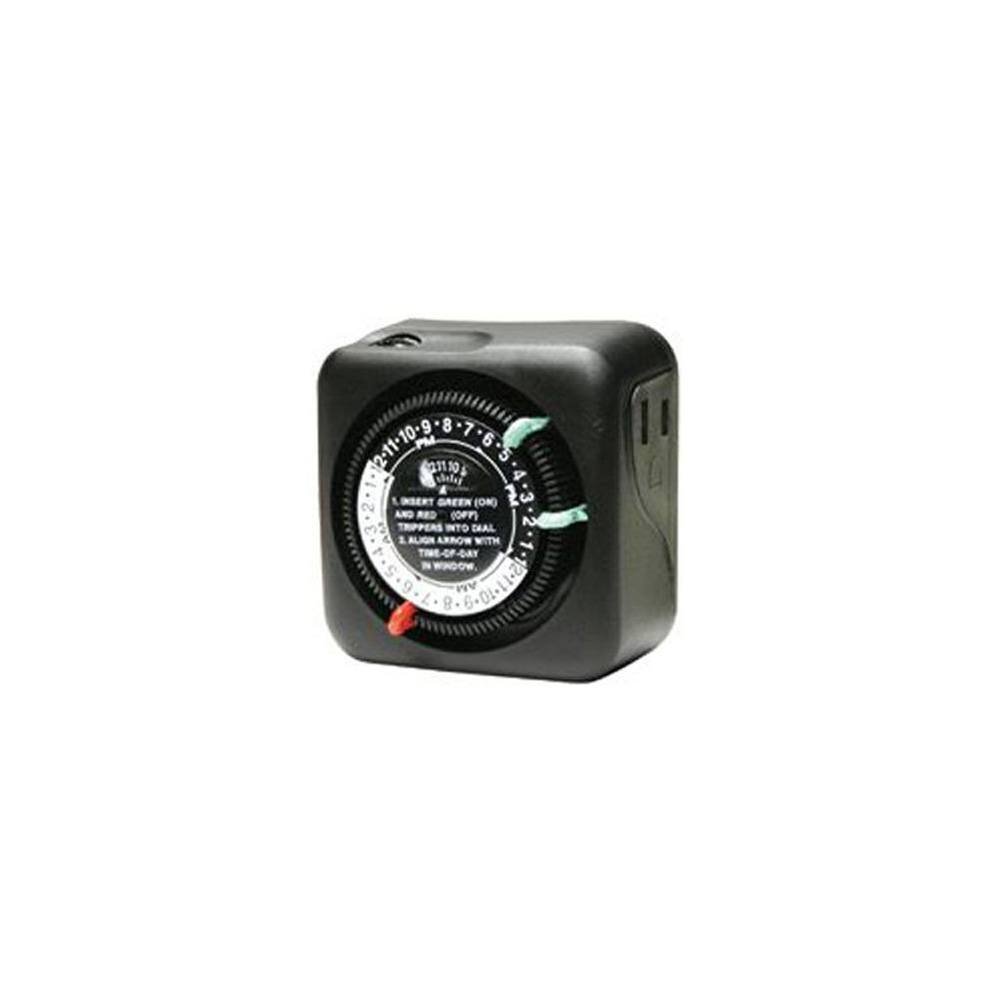
ຮູບ 1: ດ້ານຫນ້າ view of the Intermatic TN111RM40 timer, highlighting the 24-hour dial, green (ON) and red (OFF) trippers, and the time-of-day window. The image also shows the product dimensions: 3 inches deep, 4 inches wide, and 3 inches high.
The Intermatic TN111RM40 timer features a rotating 24-hour dial with markings for AM and PM. It includes removable trippers (pins) for setting ON and OFF times, a manual override switch, and a single 2-prong polarized outlet.
ຕັ້ງຄ່າ
- ຖອດເຄື່ອງຈັບເວລາ: Carefully remove the timer from its packaging. Inspect for any damage.
- ກໍານົດອົງປະກອບ: Locate the green (ON) trippers and red (OFF) trippers. These are small pins that insert into the dial.
- ຕັ້ງເວລາປະຈຸບັນ:
- Rotate the entire dial clockwise until the current time aligns with the "TIME-OF-DAY" arrow in the window. Ensure to distinguish between AM and PM hours.
- Insert ON/OFF Trippers:
- Insert the green (ON) trippers into the dial at the desired times you want the connected appliance to turn ON.
- Insert the red (OFF) trippers into the dial at the desired times you want the connected appliance to turn OFF.
- The timer supports up to two ON and two OFF settings per 24-hour period.
- Plug in the Timer: Plug the timer into a standard 2-prong wall outlet.
- ເຊື່ອມຕໍ່ອຸປະກອນ: ສຽບ lamp or small appliance into the 2-prong polarized outlet on the side of the timer. Ensure the appliance is switched to the ON position if it has its own power switch.
ຄໍາແນະນໍາການດໍາເນີນງານ
Once set up, the timer will automatically turn your connected appliance ON and OFF according to the programmed times. The dial will continuously rotate clockwise, indicating the passage of time.
ຍົກເລີກຄູ່ມື
The Intermatic TN111RM40 includes a manual override feature. This allows you to temporarily turn the connected appliance ON or OFF without disturbing the programmed schedule.
- To manually turn the appliance ON or OFF, locate the manual override switch (often a small lever or button) on the timer.
- Toggle the switch to the desired position. The timer will resume its programmed schedule at the next ON or OFF event.
ບໍາລຸງຮັກສາ
- ທໍາຄວາມສະອາດ: Disconnect the timer from the power outlet before cleaning. Wipe the exterior with a soft, damp ຜ້າ. ຢ່າໃຊ້ເຄື່ອງເຮັດຄວາມສະອາດຂັດຫຼືສານລະລາຍ.
- ການເກັບຮັກສາ: ຖ້າເກັບຮັກສາໂມງຈັບເວລາໄວ້ເປັນເວລາດົນ, ໃຫ້ແນ່ໃຈວ່າມັນສະອາດ ແລະ ແຫ້ງ. ເກັບຮັກສາໄວ້ໃນບ່ອນທີ່ເຢັນ, ແຫ້ງ ແລະ ຫຼີກລ່ຽງແສງແດດໂດຍກົງ.
- ການກວດກາ: Periodically inspect the timer and its cord for any signs of wear or damage. If damage is found, discontinue use and replace the unit.
ການແກ້ໄຂບັນຫາ
| ບັນຫາ | ສາເຫດທີ່ເປັນໄປໄດ້ | ການແກ້ໄຂ |
|---|---|---|
| ເຄື່ອງໃຊ້ບໍ່ເປີດ/ປິດໃນເວລາທີ່ຕັ້ງໂປຣແກຣມໄວ້. |
|
|
| ປຸ່ມຈັບເວລາບໍ່ໄດ້ໝຸນ. |
|
|
ຂໍ້ມູນຈໍາເພາະ
- ຕົວແບບ: TN111RM40
- ຍີ່ຫໍ້: ອິນເຕີແນັດ
- ປະເພດ: ໂມງຈັບເວລາກົນຈັກ 24 ຊົ່ວໂມງ
- ການຕັ້ງຄ່າ: Up to 2 ON/OFF events per day
- ປະເພດຊ່ອງສຽບ: 2-Prong Polarized
- ເອກະສານຄັດຕິດ: 3R (Suitable for outdoor use)
- ສີ: ດຳ
- ວັດສະດຸ: ພາດສະຕິກ
- ຂະໜາດຜະລິດຕະພັນ: 3" (ເລິກ) x 4" (ກວ້າງ) x 3" (ສູງ)
- ນ້ໍາຫນັກລາຍການ: 5.3 ອອນ
- UPC: 702811361973
ການຮັບປະກັນແລະການສະຫນັບສະຫນູນ
ສໍາລັບຂໍ້ມູນການຮັບປະກັນຫຼືການສະຫນັບສະຫນູນດ້ານວິຊາການ, ກະລຸນາເບິ່ງ Intermatic ຢ່າງເປັນທາງການ webເວັບໄຊ ຫຼືຕິດຕໍ່ພະແນກບໍລິການລູກຄ້າຂອງເຂົາເຈົ້າ. ຮັກສາໃບຮັບເງິນການຊື້ຂອງທ່ານສໍາລັບການຮ້ອງຂໍການຮັບປະກັນ.
Intermatic Customer Support: www.intermatic.com/support
Ask a question about this manual
Ask about setup, troubleshooting, compatibility, parts, safety, or missing instructions. Manuals+ will review the question and use this page’s manual context to help answer it.