
ແນະນຳ
This manual provides detailed instructions for the setup, operation, and maintenance of your iLive ISB212B Bluetooth Speaker. This compact speaker delivers audio wirelessly from compatible Bluetooth devices and also supports wired connections. Please read this manual thoroughly before using your speaker.
ເນື້ອໃນຊຸດ
- iLive ISB212B Bluetooth Speaker
- Mini-USB to USB Charging Cable
ຄຸນສົມບັດຜະລິດຕະພັນ
- Wireless audio streaming via Bluetooth
- LED pairing indicator for connection status
- Compact, cylindrical design
- Rechargeable battery with approximately 2 hours of playback
- Mini-USB port for battery recharging
- 3.5mm Audio Input for wired connections
ການຄວບຄຸມແລະຕົວຊີ້ວັດ
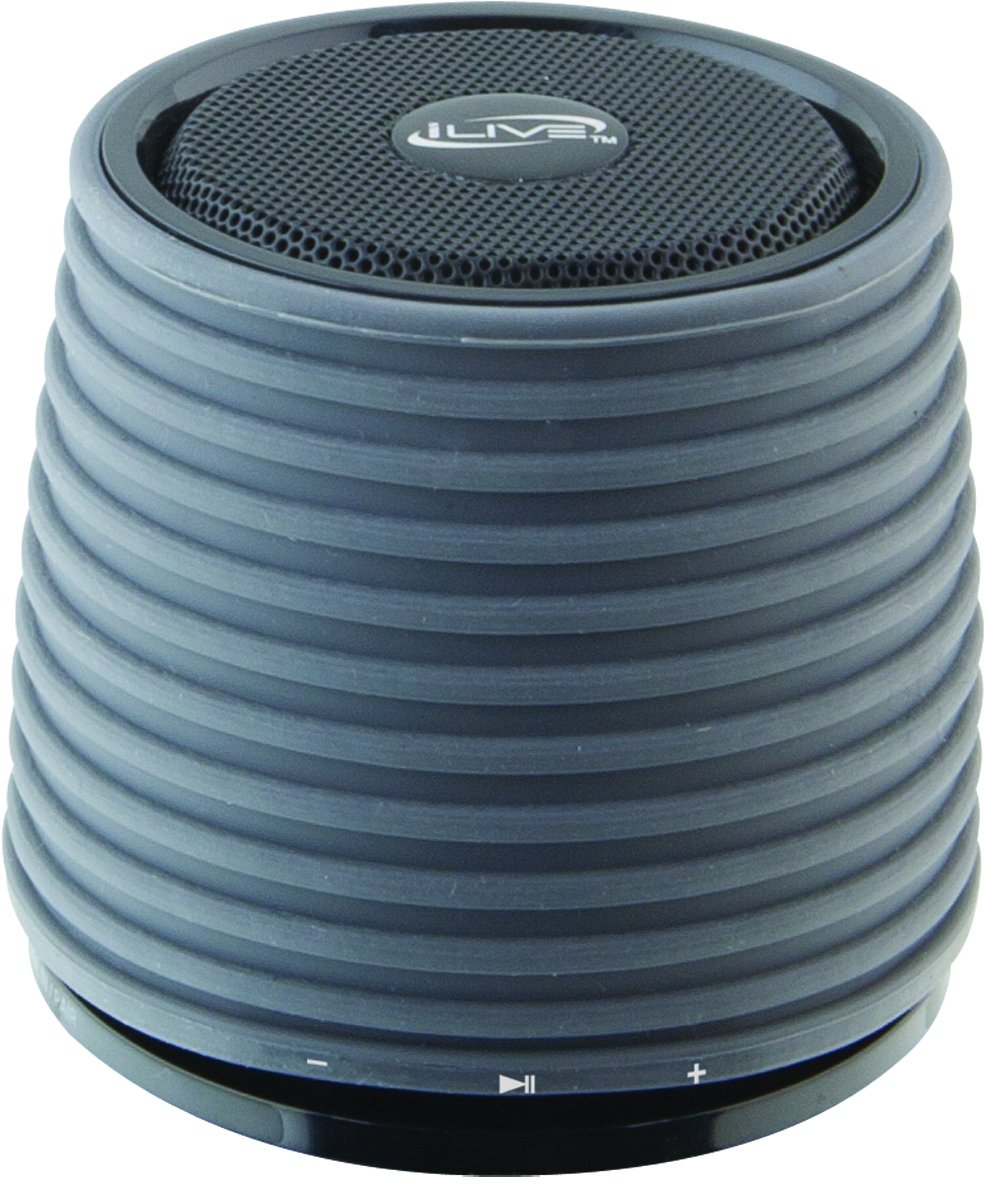
This image displays the iLive ISB212B Bluetooth Speaker. It features a cylindrical shape with a textured grey body and a black speaker grille on top. A band around the middle shows control buttons for play/pause, volume up/next track, and volume down/previous track.
- ປຸ່ມເປີດປິດ: ກົດຄ້າງໄວ້ເພື່ອເປີດ/ປິດ.
- ປຸ່ມຫຼິ້ນ/ຢຸດຊົ່ວຄາວ: ຄວບຄຸມການຫຼິ້ນສຽງ.
- ປະລິມານຂຶ້ນ / ປຸ່ມຕິດຕາມຕໍ່ໄປ: ກົດສັ້ນເພື່ອປະລິມານຂຶ້ນ, ກົດຄ້າງໄວ້ສຳລັບເພງຕໍ່ໄປ.
- ປະລິມານລົງ / ປຸ່ມຕິດຕາມທີ່ຜ່ານມາ: ກົດສັ້ນເພື່ອປະລິມານລົງ, ກົດຄ້າງໄວ້ສຳລັບເພງກ່ອນໜ້າ.
- LED Pairing Indicator: ສະແດງສະຖານະການເຊື່ອມຕໍ່ Bluetooth.
- ພອດ Mini-USB: ສໍາລັບການຊາດຫມໍ້ໄຟພາຍໃນ.
- ວັດສະດຸປ້ອນສຽງ 3.5 ມມ: For connecting external audio devices via an auxiliary cable (not included).
ຕັ້ງຄ່າ
1. ການສາກແບັດເຕີຣີ
- Connect the small end of the included Mini-USB to USB charging cable to the Mini-USB port on the speaker.
- Connect the large end of the USB charging cable to a powered USB port (e.g., computer, USB wall adapter).
- ຕົວຊີ້ວັດ LED ຈະສະຫວ່າງໃນລະຫວ່າງການສາກໄຟ ແລະປິດ ຫຼືປ່ຽນສີເມື່ອສາກເຕັມ.
- ການສາກໄຟເຕັມໃຫ້ເວລາຫຼິ້ນໄດ້ປະມານ 2 ຊົ່ວໂມງ.
2. ເປີດ / ປິດພະລັງງານ
- To power on, press and hold the Power button until the LED indicator illuminates.
- To power off, press and hold the Power button again until the LED indicator turns off.
ຄໍາແນະນໍາການດໍາເນີນງານ
1. ການຈັບຄູ່ Bluetooth
- ກວດໃຫ້ແນ່ໃຈວ່າລຳໂພງເປີດຢູ່ ແລະພາຍໃນ 30 ຟຸດຂອງອຸປະກອນ Bluetooth ຂອງທ່ານ.
- The LED pairing indicator will flash, indicating it is in pairing mode.
- On your Bluetooth device (smartphone, tablet, etc.), enable Bluetooth and search for new devices.
- Select "iLive ISB212B" from the list of available devices.
- Once paired, the LED pairing indicator will become solid, and you may hear an audible confirmation.
- If pairing fails, power off the speaker and your device, then repeat the steps.
2. ຫຼີ້ນສຽງ
- After successful Bluetooth pairing, begin playing audio on your connected device.
- ໃຊ້ປຸ່ມຫຼິ້ນ/ຢຸດຊົ່ວຄາວໃນລຳໂພງເພື່ອຄວບຄຸມການຫຼິ້ນຄືນ.
- Use the Volume Up/Down buttons for volume adjustment. Long press for track navigation.
3. Using the 3.5mm Audio Input
- Connect one end of a 3.5mm audio cable (not included) to the 3.5mm Audio Input port on the speaker.
- ເຊື່ອມຕໍ່ປາຍອີກດ້ານໜຶ່ງຂອງສາຍເຂົ້າກັບຊ່ອງສຽບຫູຟັງ ຫຼື ຊ່ອງສຽບສຽງອອກຂອງອຸປະກອນສຽງພາຍນອກຂອງທ່ານ.
- ລຳໂພງຈະປ່ຽນໄປໃຊ້ໂໝດປ້ອນຂໍ້ມູນຊ່ວຍໂດຍອັດຕະໂນມັດ.
- Adjust volume using your external device and the speaker's volume controls.
ບໍາລຸງຮັກສາ
- ເຮັດຄວາມສະອາດລໍາໂພງດ້ວຍຜ້າອ່ອນໆ, ແຫ້ງ. ຢ່າໃຊ້ເຄື່ອງເຮັດຄວາມສະອາດຂັດຫຼືສານລະລາຍ.
- Keep the speaker away from water, moisture, and extreme temperatures. This product is not waterproof.
- ເກັບຮັກສາລຳໂພງໄວ້ໃນບ່ອນເຢັນ ແລະແຫ້ງເມື່ອບໍ່ໄດ້ໃຊ້ເປັນເວລາດົນ.
- ຢ່າພະຍາຍາມຖອດປະກອບ ຫຼືດັດແປງລຳໂພງ. ນີ້ຈະເປັນການຍົກເລີກການຮັບປະກັນ.
ການແກ້ໄຂບັນຫາ
| ບັນຫາ | ການແກ້ໄຂ |
|---|---|
| ລຳໂພງບໍ່ເປີດ. | Ensure the battery is charged. Connect the speaker to a power source using the Mini-USB cable. |
| ບໍ່ສາມາດຈັບຄູ່ກັບອຸປະກອນ Bluetooth ໄດ້. |
|
| ບໍ່ມີສຽງ ຫຼືສຽງຕໍ່າ. |
|
| ອາຍຸແບັດເຕີຣີສັ້ນ. | Ensure the speaker is fully charged before use. Battery life can vary based on volume level and usage. |
ຂໍ້ມູນຈໍາເພາະ
| ຄຸນສົມບັດ | ລາຍລະອຽດ |
|---|---|
| ໝາຍເລກຕົວແບບ | ISB212B |
| ການເຊື່ອມຕໍ່ | Bluetooth, 3.5mm Auxiliary, Mini-USB (charging) |
| ລຳໂພງກຳລັງອອກ | 3 ວັດ |
| ປະເພດຫມໍ້ໄຟ | 1 Lithium Ion (ລວມ) |
| ອາຍຸແບັດເຕີຣີ (ປະມານ) | 2 ຊົ່ວໂມງ |
| ຂະໜາດສິນຄ້າ | 7.8 x 7.8 x 7.01 cm |
| ນ້ໍາຫນັກລາຍການ | 295 g |
| ປະເທດຕົ້ນກໍາເນີດ | ຈີນ |
| ກັນນ້ຳ | ບໍ່ |
ການຮັບປະກັນແລະການສະຫນັບສະຫນູນ
This iLive ISB212B Bluetooth Speaker comes with a ຮັບປະກັນ 90 ວັນ from the date of purchase. This warranty covers manufacturing defects. For technical support or warranty claims, please refer to the contact information provided with your product packaging or visit the official iLive webເວັບໄຊ.