
ແນະນຳ
Thank you for choosing the BAZZ Smart Home Wi-Fi RGB 10W LED BR30 Bulbs. These smart bulbs offer a wide spectrum of colors, tunable white light, and dimming capabilities, all controllable via Wi-Fi through the BAZZ Smart Home app. This manual provides detailed instructions for installation, operation, maintenance, and troubleshooting to ensure you get the most out of your new smart lighting system.

ຄູ່ມືການຕິດຕັ້ງ
ແມ່ນຫຍັງຢູ່ໃນກ່ອງ
- 4 x BAZZ Smart Home Wi-Fi RGB 10W LED BR30 Bulbs
- 1 x ຄູ່ມືຜູ້ໃຊ້
ການຕິດຕັ້ງ
- Ensure the power to the light fixture is turned OFF before installation.
- Carefully screw the BAZZ Smart Home BR30 LED bulb into a standard E26/E27 screw-base fixture.
- Turn the power to the light fixture ON. The bulb should flash, indicating it is in pairing mode.
ການດາວໂຫຼດແອັບ ແລະ ການຈັບຄູ່
To control your BAZZ Smart Home bulbs, you need to download the BAZZ Smart Home app and pair the devices.
- Download the BAZZ Smart Home app from the Apple App Store or Google Play Store.
- ລົງທະບຽນສຳລັບບັນຊີໃໝ່ ຫຼື ເຂົ້າສູ່ລະບົບຖ້າທ່ານມີບັນຊີແລ້ວ.
- Tap the '+' icon in the top right corner of the app to add a device.
- Select 'Lighting' and then 'Light Source (Wi-Fi)'.
- Follow the on-screen instructions to connect the bulb to your Wi-Fi network. Ensure your Wi-Fi network is 2.4GHz.
- Once successfully paired, you can rename your bulb for easier identification.


ການດໍາເນີນງານ
ການຄວບຄຸມພື້ນຖານ
- ເປີດ/ປິດ: Tap the power icon in the app to turn the bulb on or off.
- ຄວາມສະຫວ່າງ: Use the slider in the app to adjust the brightness level from 1% to 100%.
Color Control (RGB)
Access the color wheel in the app to select from millions of colors. Drag your finger across the wheel to choose your desired hue.
ສາມາດປັບໄດ້ສີຂາວ
Switch to the white light mode to adjust the color temperature from warm white (2700K) to cool daylight (6500K), creating the perfect ambiance for any activity.
ການສ້າງສາກ
The app allows you to create custom scenes with specific colors, brightness levels, and color temperatures. Save your favorite settings for quick access.
ການກຳນົດເວລາ
Set schedules for your bulbs to turn on/off or change settings at specific times, enhancing convenience and energy efficiency.
ການປະສົມປະສານການຄວບຄຸມດ້ວຍສຽງ
Your BAZZ Smart Home bulbs are compatible with popular voice assistants. Link your BAZZ Smart Home account to Amazon Alexa or Google Assistant for hands-free control.
- For Amazon Alexa: Enable the 'BAZZ Smart Home' skill in the Alexa app.
- For Google Assistant: Link the 'BAZZ Smart Home' service in the Google Home app.
ບໍາລຸງຮັກສາ
The BAZZ Smart Home Wi-Fi RGB 10W LED BR30 Bulbs are designed for long-lasting performance with minimal maintenance.
- ທໍາຄວາມສະອາດ: ໃຫ້ແນ່ໃຈວ່າຫລອດໄຟເຢັນແລະໄຟປິດກ່ອນທີ່ຈະທໍາຄວາມສະອາດ. ເຊັດຫລອດໄຟດ້ວຍຜ້າອ່ອນໆ, ແຫ້ງ. ຢ່າໃຊ້ເຄື່ອງເຮັດຄວາມສະອາດຂອງແຫຼວຫຼືວັດສະດຸຂັດ.
- ການເກັບຮັກສາ: If storing the bulbs for an extended period, keep them in their original packaging in a cool, dry place.
- ການຖິ້ມຂີ້ເຫຍື້ອ: Dispose of the bulb according to local electronic waste regulations.
ການແກ້ໄຂບັນຫາ
| ບັນຫາ | ສາເຫດທີ່ເປັນໄປໄດ້ | ການແກ້ໄຂ |
|---|---|---|
| Bulb ບໍ່ເປີດ. | ບໍ່ມີໄຟຟ້າເຂົ້າກັບໂຄມໄຟ; ຫລອດໄຟບໍ່ໄດ້ຂັນສະກູຢ່າງຖືກຕ້ອງ; ຫລອດໄຟມີບັນຫາ. | Check power switch and circuit breaker; Ensure bulb is securely screwed in; Test bulb in another fixture. |
| Bulb is not flashing for pairing. | Not in pairing mode; Power cycle issue. | Turn the bulb off and on 3 times (on-off-on-off-on) with 2-second intervals until it flashes rapidly. |
| ບໍ່ສາມາດເຊື່ອມຕໍ່ກັບ Wi-Fi ໄດ້. | Incorrect Wi-Fi password; Not 2.4GHz network; Too far from router. | Verify Wi-Fi password; Ensure you are connecting to a 2.4GHz network; Move bulb closer to router or use a Wi-Fi extender. |
| ການຄວບຄຸມສຽງບໍ່ເຮັດວຽກ. | Account not linked; Incorrect device name. | Ensure BAZZ Smart Home account is linked in Alexa/Google Home app; Use the exact device name set in the BAZZ app. |
ຂໍ້ມູນຈໍາເພາະ
| ຄຸນສົມບັດ | ຂໍ້ມູນຈໍາເພາະ |
|---|---|
| ຕົວແບບ | ດອກໄຟ BR30 |
| ພະລັງງານ | 10W |
| ປະເພດແສງສະຫວ່າງ | LED RGB + Tunable White |
| ອຸນຫະພູມສີ | 2700K - 6500K |
| ການເຊື່ອມຕໍ່ | Wi-Fi (2.4GHz ເທົ່ານັ້ນ) |
| ປະເພດພື້ນຖານ | E26/E27 Standard Screw Base |
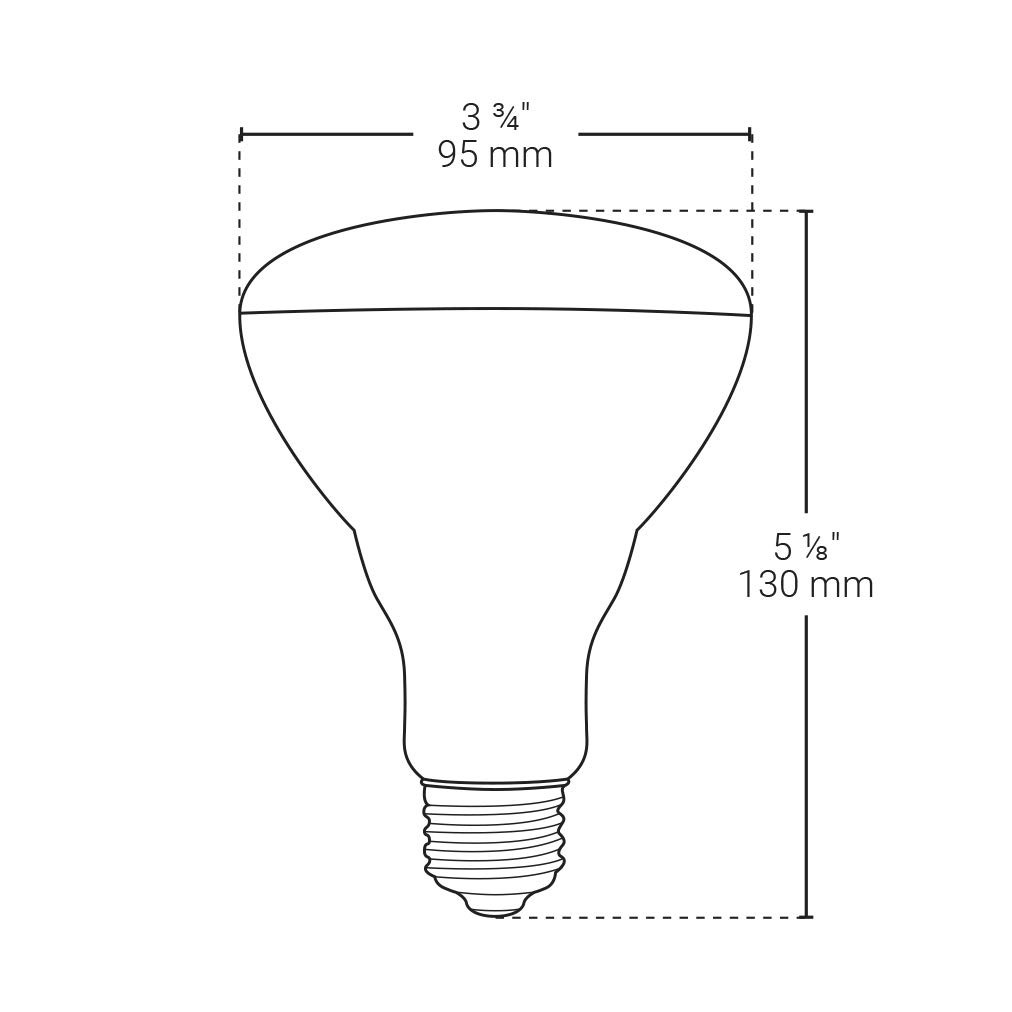
| ຂະໜາດ | 9.53 x 9.53 x 13.02 ຊມ (3.75 x 3.75 x 5.13 ນິ້ວ) |
| ນ້ຳໜັກ | 77.8 ກຣາມ (0.17 ປອນ) |
ການຮັບປະກັນແລະການສະຫນັບສະຫນູນ
BAZZ products are manufactured to the highest quality standards. This product comes with a limited warranty against defects in materials and workmanship from the date of purchase. Please refer to the warranty card included in your product packaging for specific terms and conditions.
For technical support, troubleshooting assistance, or warranty claims, please visit the official BAZZ Smart Home website or contact their customer service. Contact details can typically be found on the product packaging or the official webເວັບໄຊ.
Webເວັບໄຊ: www.bazzsmarthome.com