
1. ບົດແນະນຳ
Thank you for choosing the Coby LEDTV3216 32-Inch 720p 60Hz Slim-Bezel LED HDTV. This manual provides essential information for the safe and efficient operation of your television. Please read these instructions thoroughly before use and retain them for future reference.
The Coby LEDTV3216 offers a 32-inch widescreen display, a built-in digital TV tuner (ATSC/NTSC/QAM), and multiple connectivity options including HDMI and VGA. It features energy-efficient technology, digital noise reduction, and V-chip parental control.
2. ຂໍ້ມູນຄວາມປອດໄພ
ເພື່ອຮັບປະກັນການດໍາເນີນງານທີ່ປອດໄພແລະປ້ອງກັນຄວາມເສຍຫາຍ, ໃຫ້ສັງເກດເບິ່ງຄວາມລະມັດລະວັງຕໍ່ໄປນີ້:
- ແຫຼ່ງພະລັງງານ: ເຊື່ອມຕໍ່ໂທລະພາບພຽງແຕ່ກັບແຫຼ່ງສະຫນອງພະລັງງານ AC 100-240V, 50/60Hz.
- ການລະບາຍອາກາດ: ຫ້າມປິດຊ່ອງລະບາຍອາກາດ. ໃຫ້ແນ່ໃຈວ່າພື້ນທີ່ພຽງພໍຮອບໂທລະພາບສໍາລັບການໄຫຼວຽນຂອງອາກາດທີ່ເຫມາະສົມ.
- ນ້ໍາແລະຄວາມຊຸ່ມ: Do not expose the TV to rain, moisture, or place objects filled with liquids on or near it.
- ແຫຼ່ງຄວາມຮ້ອນ: ຮັກສາໂທລະທັດໃຫ້ຫ່າງຈາກລັງສີ, ເຄື່ອງບັນທຶກຄວາມຮ້ອນ, ເຕົາ ຫຼືເຄື່ອງຜະລິດຄວາມຮ້ອນອື່ນໆ.
- ທໍາຄວາມສະອາດ: Unplug the TV from the wall outlet before cleaning. Use a soft, dry cloth. Do not use liquid or aerosol cleaners.
- ການບໍລິການ: ຢ່າພະຍາຍາມບໍລິການຜະລິດຕະພັນນີ້ດ້ວຍຕົນເອງ. ອ້າງເຖິງການບໍລິການທັງtoົດໃຫ້ກັບພະນັກງານບໍລິການທີ່ມີຄຸນວຸດທິ.
- ຕິດຝາ: If wall-mounting, ensure the mount is VESA 200mm x 200mm compatible and installed by qualified personnel.
3. ເນື້ອໃນຊຸດ
ກວດສອບວ່າລາຍການທັງຫມົດແມ່ນມີຢູ່ໃນຊຸດ:
- Coby LEDTV3216 32-Inch LED HDTV
- ໂທລະທັດ
- ການຄວບຄຸມໄລຍະໄກ (ຕ້ອງການ 2 ຫມໍ້ໄຟ AAA, ລວມ)
- ສາຍໄຟ
- ຄູ່ມືຜູ້ໃຊ້ (ເອກະສານນີ້)
4. ຕັ້ງຄ່າ
4.1 ການຕິດຕັ້ງ
To attach the included stand:
- ວາງໂທລະທັດລົງເທິງພື້ນຜິວທີ່ສະອາດ, ອ່ອນນຸ້ມເພື່ອປ້ອງກັນຄວາມເສຍຫາຍຂອງໜ້າຈໍ.
- ຈັດວາງຖານຂາຕັ້ງດ້ວຍຮູຍຶດຕິດຢູ່ດ້ານລຸ່ມຂອງໂທລະທັດ.
- ຮັບປະກັນຂາຕັ້ງໂດຍໃຊ້ສະກູທີ່ໃຫ້ໄວ້. ໃຫ້ແນ່ໃຈວ່າ screws ທັງຫມົດໄດ້ຖືກ tightened ຢ່າງແຫນ້ນຫນາ.
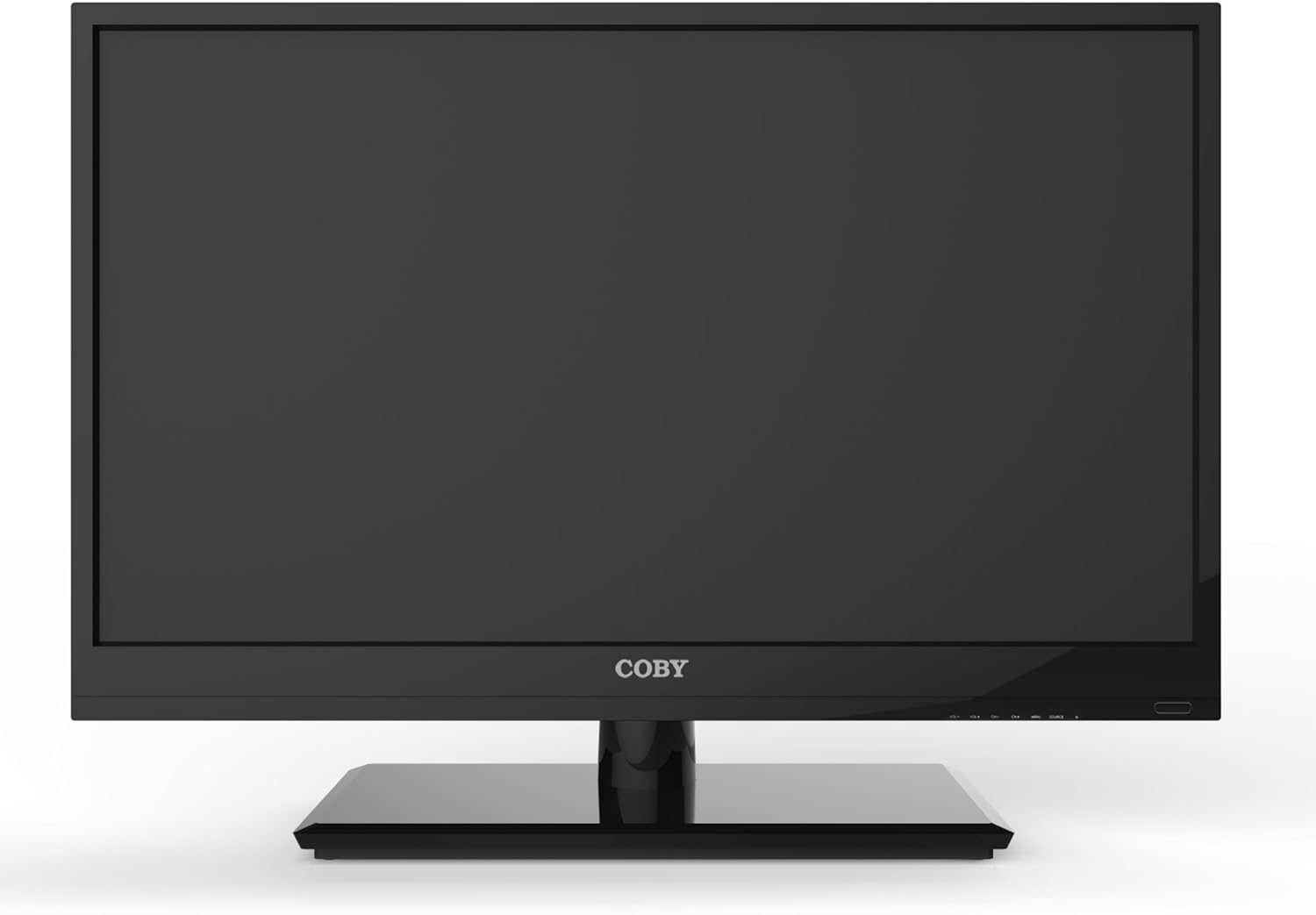
ຮູບ 4.1: ດ້ານຫນ້າ view of the Coby LEDTV3216 with stand.
4.2 ການຕິດຝາ (ທາງເລືອກ)
The TV supports VESA 200mm x 200mm wall mounts. Wall mount hardware is not included. For safe installation, it is recommended to have the TV wall-mounted by a professional.
4.3 ອຸປະກອນເຊື່ອມຕໍ່
The Coby LEDTV3216 offers various input ports on the rear panel for connecting external devices.
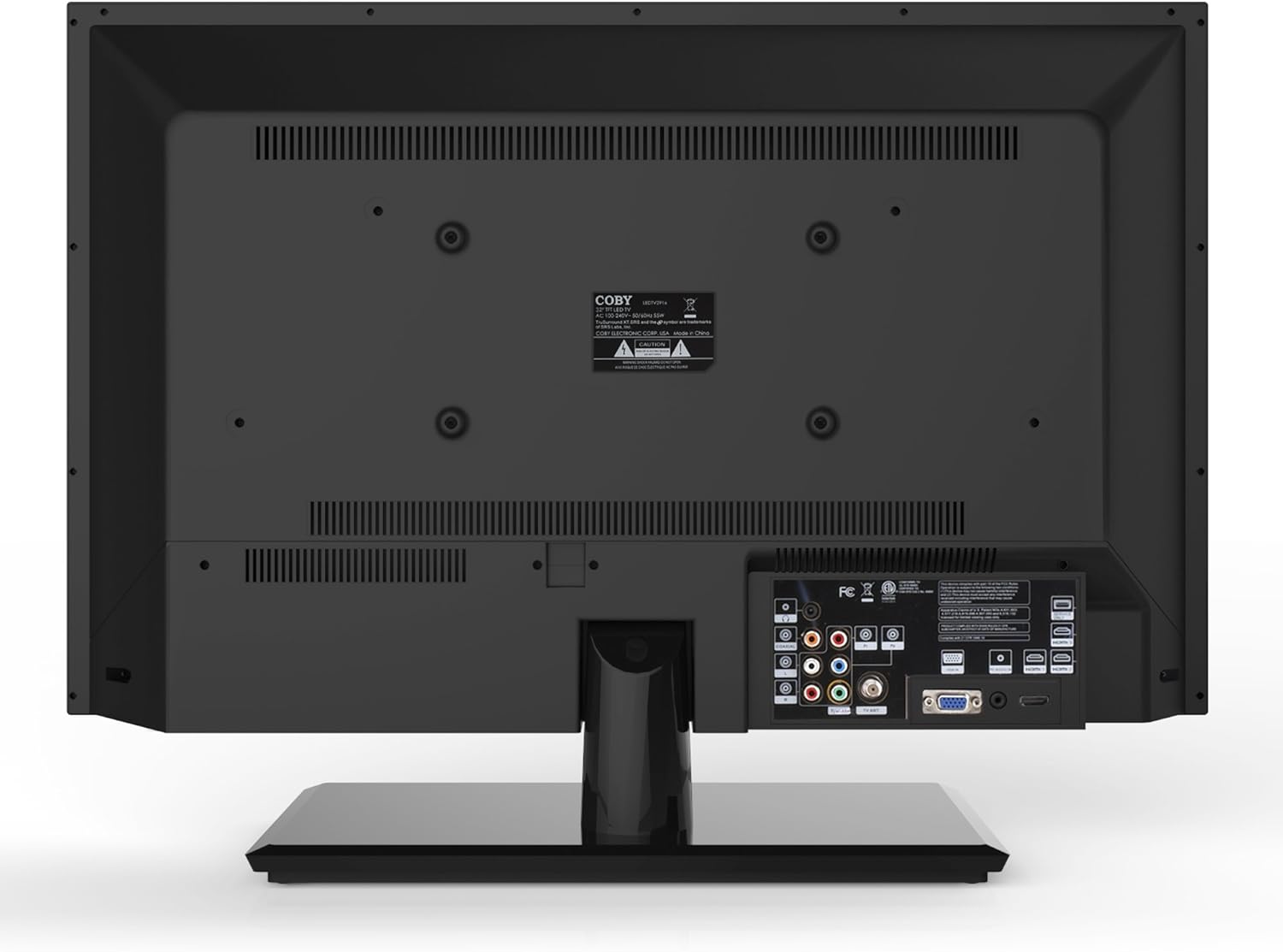
ຮູບ 4.2: ດ້ານຫລັງ view ກັບຜອດປ້ອນຂໍ້ມູນ.
- HDMI: Connect high-definition devices such as Blu-ray players, game consoles, or cable/satellite boxes using an HDMI cable. The TV has 1 HDMI port.
- VGA (ອິນພຸດຄອມພິວເຕີ): Connect a computer to use the TV as a monitor. Use a VGA cable for video and a 3.5mm audio cable for audio input.
- ເສົາອາກາດ/ສາຍ: Connect an antenna or cable TV feed to the RF input for receiving broadcast channels.
- ວິດີໂອອົງປະກອບ (YPbPr): Connect devices using component video cables (red, green, blue) and corresponding audio cables (red, white).
- ວິດີໂອປະສົມ (AV): Connect older devices using composite video (yellow) and stereo audio (red, white) cables.
4.4 ການເປີດເຄື່ອງເບື້ອງຕົ້ນ
After connecting all desired devices and the power cord, press the Power button on the TV or remote control. Follow the on-screen prompts for initial setup, including language selection and channel scanning.
5. ປະຕິບັດການໂທລະພາບ
5.1 ຫນ້າທີ່ຄວບຄຸມໄລຍະໄກ
The remote control allows you to access all TV functions. Insert the two included AAA batteries into the remote control, observing polarity.
- ພະລັງງານ: ເປີດ ຫຼືປິດໂທລະພາບ.
- ການປ້ອນຂໍ້ມູນ/ແຫຼ່ງຂໍ້ມູນ: Selects the input source (HDMI, VGA, TV, AV, Component).
- ປະລິມານ (+/-): ປັບລະດັບສຽງ.
- ຊ່ອງ (CH +/-): ປ່ຽນຊ່ອງໂທລະພາບ.
- ເມນູ: ເປີດເມນູສະແດງຜົນເທິງໜ້າຈໍ (OSD).
- ປຸ່ມນຳທາງ (ຂຶ້ນ/ລົງ/ຊ້າຍ/ຂວາ): ທ່ອງໄປຫາຕົວເລືອກເມນູ.
- ຕົກລົງ/ເຂົ້າ: ຢືນຢັນການເລືອກ.
- ອອກ: ປິດເມນູ.
- ປິດສຽງ: ປິດສຽງ ຫຼືປິດສຽງ.
- ຂໍ້ມູນ: Displays channel or program information.
5.2 ການ ນຳ ທາງເມນູ
ກົດ ເມນູ button on the remote to access the main menu. Use the navigation buttons to select categories such as Picture, Sound, Channel, Time, and Setup. Press OK to enter a sub-menu and adjust settings. Press ອອກໄປ ອອກຈາກເມນູ.
5.3 ການຕັ້ງຄ່າຮູບ
Adjust settings like Brightness, Contrast, Color, Tint, and Sharpness to optimize your viewing experience. Picture modes (e.g., Standard, Dynamic, Movie, User) are available for quick adjustments.

Figure 5.1: Coby LEDTV3216 displaying an image.
5.4 ການຕັ້ງຄ່າສຽງ
Adjust Bass, Treble, and Balance. Sound modes (e.g., Standard, Music, Movie, User) are available. The TV features premium sound powered by SRS Labs.
5.5 ການຕັ້ງຄ່າຊ່ອງ
Perform auto-scan or manual scan to find available channels. The built-in digital TV tuner supports ATSC, NTSC, and QAM standards.
5.6 Parental Control (V-Chip)
The V-chip parental control feature allows you to block programs based on their rating. Access this setting through the menu and follow the on-screen instructions to set up a password and content restrictions.
6. ຄຸນສົມບັດ
Key features of the Coby LEDTV3216 include:
- Energy efficient technology (standby power less than 0.5W).
- Extended backlight life expectancy (30,000 hours).
- Built-in digital TV tuner (ATSC/NTSC/QAM).
- HDMI digital connection for perfect signal transmission.
- PC VGA connection for use as a computer monitor.
- Premium sound powered by SRS Labs.
- ການຫຼຸດຜ່ອນສິ່ງລົບກວນດິຈິຕອນ.
- V-chip parental control, Closed-Caption, and Electronic Program Guide support.
- Energy Star 5.3 compliant.
- Multi-language on-screen display.
- Wall-Mountable design (200mm x 200mm VESA Mount).
7. ຂໍ້ມູນຈໍາເພາະ
| ຄຸນສົມບັດ | ຂໍ້ມູນຈໍາເພາະ |
|---|---|
| ຊື່ຕົວແບບ | ໂທລະພາບ LED 3216 |
| ຂະໜາດໜ້າຈໍ | 32 ນິ້ວ |
| ເຕັກໂນໂລຊີການສະແດງ | LED |
| ຄວາມລະອຽດ | 720p |
| ອັດຕາການໂຫຼດຂໍ້ມູນຄືນໃໝ່ | 60 Hz |
| ອັດຕາສ່ວນກົງກັນຂ້າມ | 3,000:1 |
| ເວລາຕອບສະຫນອງ | 6 ມິນລິວິນາທີ |
| ເຕັກໂນໂລຊີການເຊື່ອມຕໍ່ | hdmi, vga |
| Total Number of HDMI Ports | 1 |
| ປະເພດເຄື່ອງປັບ | ATSC, NTSC, QAM |
| ການຄວບຄຸມຂອງພໍ່ແມ່ | V-Chip |
| VESA Mount Standard | 200 x 200 ມມ |
| ນ້ໍາຫນັກລາຍການ | 18.08 ປອນ |
| ສີ | ດຳ |

Figure 7.1: Estimated Yearly Energy Cost for LEDTV3216.
8. ບໍາລຸງຮັກສາ
8.1 ການທໍາຄວາມສະອາດຫນ້າຈໍ
ເຊັດໜ້າຈໍຢ່າງອ່ອນໂຍນດ້ວຍຜ້າອ່ອນໆ, ບໍ່ມີເຈັ້ຍ. ສໍາລັບຮອຍແຂງ, ເບົາບາງ dampໃສ່ຜ້າດ້ວຍນ້ໍາຫຼືເຄື່ອງເຮັດຄວາມສະອາດຫນ້າຈໍພິເສດ. ຢ່າສີດນ້ຳສະອາດໃສ່ໜ້າຈໍໂດຍກົງ.
8.2 ການທໍາຄວາມສະອາດຕູ້
ເຊັດຕູ້ໂທລະພາບດ້ວຍຜ້າອ່ອນໆແລະແຫ້ງ. ຫຼີກລ່ຽງການໃຊ້ນໍ້າຢາທໍາຄວາມສະອາດທີ່ມີສີຂັດ ຫຼື ຕົວລະລາຍທີ່ອາດຈະທໍາລາຍພື້ນຜິວໄດ້.
9. ການແກ້ໄຂບັນຫາ
ຖ້າຫາກທ່ານພົບບັນຫາກັບໂທລະພາບຂອງທ່ານ, ເບິ່ງບັນຫາທົ່ວໄປດັ່ງຕໍ່ໄປນີ້ແລະການແກ້ໄຂ:
| ບັນຫາ | ສາເຫດ / ການແກ້ໄຂທີ່ເປັນໄປໄດ້ |
|---|---|
| ບໍ່ມີພະລັງງານ | Ensure the power cord is securely plugged into the TV and a working electrical outlet. Check the power indicator light. |
| ບໍ່ມີຮູບ, ແຕ່ສຽງແມ່ນປະຈຸບັນ | ກວດສອບແຫຼ່ງປ້ອນຂໍ້ມູນທີ່ຖືກຕ້ອງຖືກເລືອກ. ກວດເບິ່ງການເຊື່ອມຕໍ່ສາຍກັບອຸປະກອນພາຍນອກ. |
| ບໍ່ມີສຽງ, ແຕ່ມີຮູບພາບ | ກວດສອບລະດັບສຽງ ແລະ ຮັບປະກັນວ່າໂທລະພາບບໍ່ໄດ້ຖືກປິດສຽງ. ກວດສອບການເຊື່ອມຕໍ່ສາຍສຽງສຳລັບອຸປະກອນພາຍນອກ. |
| ຄຸນນະພາບຮູບບໍ່ດີ | Adjust picture settings (brightness, contrast, sharpness). Ensure the antenna or cable connection is secure. For digital channels, perform a channel scan. |
| ການຄວບຄຸມໄລຍະໄກບໍ່ເຮັດວຽກ | ກວດເບິ່ງ ແລະປ່ຽນແບັດເຕີລີ ຖ້າຈຳເປັນ. ກວດໃຫ້ແນ່ໃຈວ່າບໍ່ມີສິ່ງກີດຂວາງລະຫວ່າງຣີໂໝດ ແລະເຊັນເຊີ IR ຂອງໂທລະທັດ. |
10. ການຮັບປະກັນແລະການສະຫນັບສະຫນູນ
The Coby LEDTV3216 comes with a limited warranty. Please refer to the warranty card included with your product for specific terms and conditions. For technical support or service inquiries, please contact Coby customer service through their official webເວັບໄຊ ຫຼືຂໍ້ມູນການຕິດຕໍ່ທີ່ສະໜອງໃຫ້ຢູ່ໃນເອກະສານການຮັບປະກັນຂອງທ່ານ.