
1. ຂໍ້ມູນຄວາມປອດໄພທີ່ສໍາຄັນ
Always observe basic safety precautions when installing, operating, and maintaining electrical equipment. Failure to do so may result in electric shock, fire, or serious injury.
- ໃຫ້ແນ່ໃຈວ່າແຫຼ່ງຈ່າຍໄຟໄດ້ຖືກຕັດການເຊື່ອມຕໍ່ກ່ອນການຕິດຕັ້ງ ຫຼື ວຽກງານບຳລຸງຮັກສາໃດໆ.
- This device operates on 230 V AC 50/60 Hz. Verify your electrical system's compatibility.
- ຫ້າມເປີດເຜີຍ lamp ນ້ໍາຫຼືຄວາມຊຸ່ມຊື່ນຫຼາຍເກີນໄປ.
- ຢ່າພະຍາຍາມເປີດ ຫຼື ດັດແປງ lamp or its components. Refer all servicing to qualified personnel.
- ຮັກສາໃຫ້ໄກຈາກເດັກນ້ອຍ.
2. ຜະລິດຕະພັນເກີນview ແລະອົງປະກອບ
The Gewiss GW30501 is a removable anti-blackout lamp designed to provide emergency lighting during power outages. It features a white LED lamp and an internal Ni-Mh battery for autonomous operation.
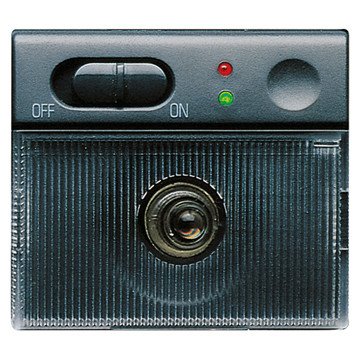
An image showing the compact design of the Gewiss GW30501 removable anti-blackout lamp, suitable for wall mounting.
ເນື້ອໃນຊຸດ:
- 1 x Gewiss GW30501 Removable Anti-Blackout Lamp
- Integrated Ni-Mh Power Batteries
3. ການຕິດຕັ້ງແລະການຕິດຕັ້ງ
The GW30501 lamp is designed for wall mounting and integrates into a 2-module Playbus system.
ຂັ້ນຕອນການຕິດຕັ້ງ:
- ຕັດການເຊື່ອມຕໍ່ພະລັງງານ: Before beginning installation, ensure the main power supply to the installation area is completely disconnected at the circuit breaker.
- ກະກຽມສະຖານທີ່ຕິດຕັ້ງ: Identify a suitable wall location within your electrical system's 2-module Playbus slot.
- ເຊື່ອມຕໍ່ສາຍໄຟ: ເຊື່ອມຕໍ່ຢ່າງລະມັດລະວັງ lamp's electrical wiring to the 230 V AC, 50/60 Hz power supply terminals within the Playbus module. Ensure correct polarity and secure connections.
- ພູ Lamp: Securely insert the lamp into the 2-module Playbus slot on the wall. Ensure it is firmly seated.
- ຄ່າ ທຳ ນຽມ: Once installed, restore power. The lamp's internal Ni-Mh battery will begin charging. Allow at least 12-24 hours for the initial full charge to ensure optimal autonomy.
4. ຄໍາແນະນໍາການດໍາເນີນງານ
The Gewiss GW30501 lamp offers both automatic emergency lighting and a removable portable light function.
Automatic Anti-Blackout Function:
- When installed and connected to the main power supply, the lamp's battery remains charged.
- In the event of a power failure (blackout), the lamp will automatically illuminate using its internal battery, providing emergency lighting for up to 2 hours.
- Once main power is restored, the lamp will turn off (if not manually activated) and begin recharging its battery.
ຖອດອອກໄດ້ Lamp ຟັງຊັນ:
- ທamp can be easily removed from its wall-mounted base.
- ເພື່ອກະຕຸ້ນ lamp when removed, gently touch the designated activation area (Touch-activated style). The white LED will illuminate.
- ເພື່ອປິດ lamp, touch the activation area again.
- ເມື່ອ lamp is reinserted into its wall base, it will resume its automatic anti-blackout function and recharge its battery.
5. ບໍາລຸງຮັກສາ
Regular maintenance ensures the longevity and optimal performance of your anti-blackout lamp.
ການດູແລຫມໍ້ໄຟ:
- The integrated Ni-Mh battery is designed for long life. To maintain its capacity, ensure the lamp is regularly connected to power to allow for charging cycles.
- ຖ້າ lamp is stored for an extended period, fully charge it before storage and recharge every 3-6 months to prevent deep discharge.
ທໍາຄວາມສະອາດ:
- ເຮັດຄວາມສະອາດ lamp's exterior with a soft, dry cloth.
- ຢ່າໃຊ້ເຄື່ອງເຮັດຄວາມສະອາດຂັດ, ສານລະລາຍ, ຫຼືສານເຄມີທີ່ຮຸນແຮງ, ເພາະວ່າສິ່ງເຫຼົ່ານີ້ສາມາດທໍາລາຍການສໍາເລັດຮູບ.
ການກວດສອບການທໍາງານ:
- Periodically test the anti-blackout function by temporarily cutting power to the circuit the lamp is connected to. The lamp ຄວນຈະເຮັດໃຫ້ມີແສງ.
- Test the removable lamp function by removing it from the base and activating it via touch.
6. ການແກ້ໄຂບັນຫາ
If you encounter issues with your Gewiss GW30501 lamp, ອ້າງອີງເຖິງບັນຫາທົ່ວໄປ ແລະວິທີແກ້ໄຂບັນຫາຕໍ່ໄປນີ້:
| ບັນຫາ | ສາເຫດທີ່ເປັນໄປໄດ້ | ການແກ້ໄຂ |
|---|---|---|
| Lamp does not light up during a power outage. | Battery not charged or faulty. No power to the base. | ຮັບປະກັນ lamp has been connected to power for at least 24 hours. Check the circuit breaker for the lamp's power supply. If issues persist, contact support. |
| ຖອດອອກໄດ້ lamp does not turn on when touched. | Battery low or discharged. Faulty touch sensor. | ສົ່ງຄືນ lamp to its base for charging. Ensure the touch area is clean and dry. |
| Short autonomy (less than 2 hours). | ແບັດເຕີຣີບໍ່ໄດ້ສາກເຕັມ ຫຼື ແບັດເຕີຣີເກົ່າ. | Allow for a full 24-hour charge. If the lamp is old, battery capacity may naturally decrease over time. |
| Lamp flickers ຫຼື dims. | Low battery. Loose connection. | ຮັບປະກັນ lamp is fully charged. Check the electrical connections at the wall base (with power disconnected). |
If these solutions do not resolve the issue, please contact Gewiss customer support or a qualified electrician.
7. ຂໍ້ກໍານົດດ້ານວິຊາການ
Detailed specifications for the Gewiss GW30501 Removable Anti-Blackout Lamp:
| ຄຸນສົມບັດ | ຂໍ້ມູນຈໍາເພາະ |
|---|---|
| ໝາຍເລກຕົວແບບ | GW30501 |
| ຍີ່ຫໍ້ | Gewiss |
| ການສະ ໜອງ ພະລັງງານ Voltage | 230 V AC, 50/60 Hz |
| ປົກຄອງຕົນເອງ | 2 ຊົ່ວໂມງ |
| Lamp ປະເພດ | LED ສີຂາວ |
| ປະເພດຫມໍ້ໄຟ | Ni-Mh (included) |
| Number of Modules (Playbus) | 2 |
| ຂະໜາດ (L x W x H) | 6.5 x 5 x 5 cm |
| ນ້ຳໜັກ | 9.07 ກຣາມ |
| ວັດສະດຸ | ໂລຫະ |
| ສີ | ສີເທົາ |
| ປະເພດການຕິດຕັ້ງ | ຕິດຝາ |
| ປ່ຽນແບບ | ແຕະເປີດໃຊ້ງານ |
| ການນໍາໃຊ້ສະເພາະ | For use during power outages or emergencies |
8. ການຮັບປະກັນແລະການສະຫນັບສະຫນູນ
For warranty information, technical support, or service inquiries, please refer to the documentation provided with your purchase or contact your retailer or the manufacturer directly.
ຜູ້ຜະລິດ: Gewiss
Please have your model number (GW30501) and purchase details available when contacting support.