
ສິນຄ້າເກີນview
The iSound Twist Portable Bluetooth Wireless Speaker offers a unique design combined with superior sound quality. Its compact form factor allows for portability, while its advanced features enable wireless music streaming and hands-free calling. The speaker features full stereo sound with 6 watts total output from two 40mm drivers and a passive radiator for enhanced bass.
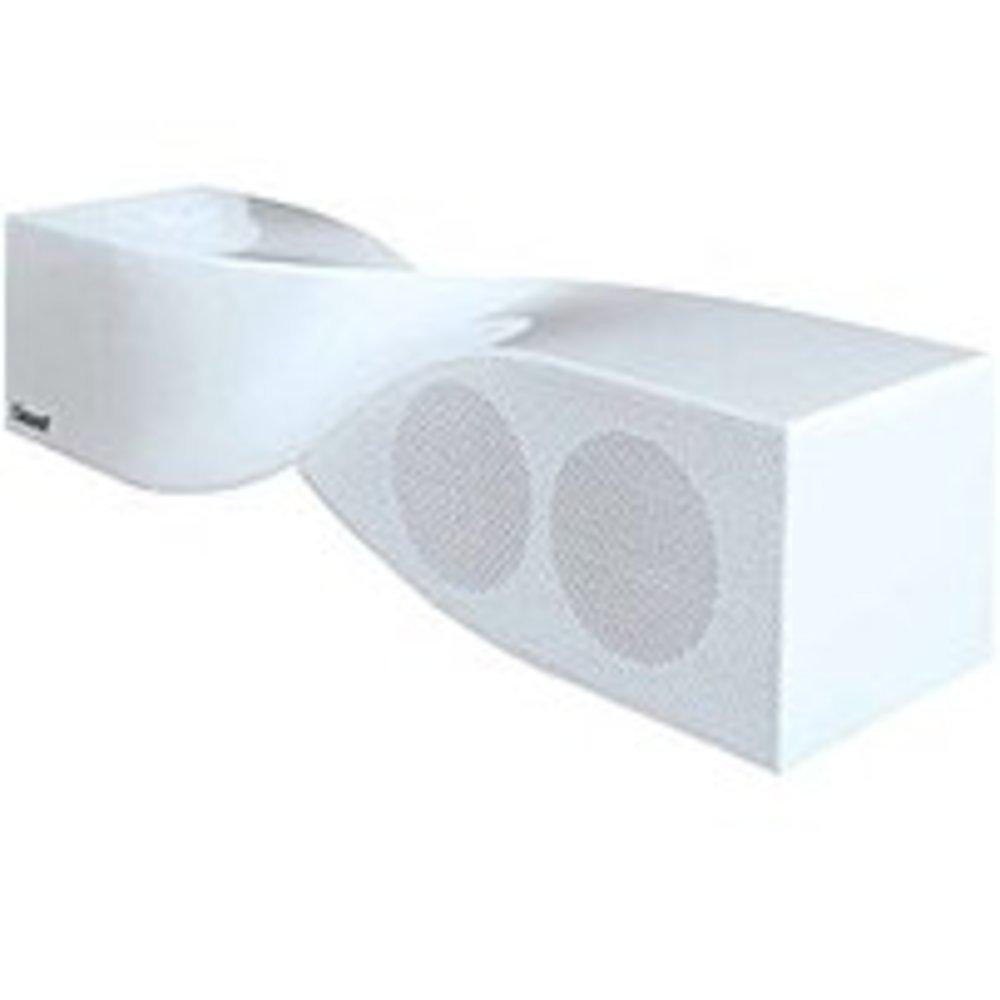
Image: The iSound Twist Portable Bluetooth Wireless Speaker in white, showcasing its unique twisted design.
ເນື້ອໃນຊຸດ
- iSound Twist Portable Bluetooth Wireless Speaker
- ສາຍສາກ USB
- ສາຍສຽບ AUX 3.5 ມມ
- ຄູ່ມືຜູ້ໃຊ້ (ເອກະສານນີ້)
ຕັ້ງຄ່າ
1. ການສາກໄຟ ລຳ ໂພງ
Before initial use, fully charge the iSound Twist speaker. Connect the provided USB charging cable to the speaker's USB charging port and the other end to a powered USB source (e.g., computer, USB wall adapter). The charging indicator light will illuminate during charging and turn off when fully charged. A full charge provides up to 5 hours of continuous play.

Image: Rear panel of the speaker, highlighting the USB charging port, ON/OFF switch, and AUX IN port.
2. ເປີດ / ປິດພະລັງງານ
Locate the ON/OFF switch on the rear panel of the speaker. Slide the switch to the "ON" position to power on the device. Slide it to the "OFF" position to power off.
3. ການຈັບຄູ່ Bluetooth
- Ensure the speaker is powered on and within close proximity to your Bluetooth-enabled device (e.g., smartphone, tablet, laptop).
- The speaker will automatically enter Bluetooth pairing mode. A blue indicator light will flash, indicating it is discoverable.
- ໃນອຸປະກອນຂອງທ່ານ, ໃຫ້ໄປທີ່ການຕັ້ງຄ່າ Bluetooth ແລະເປີດໃຊ້ງານ Bluetooth.
- ຊອກຫາ available devices. The iSound Twist speaker should appear in the list, typically named "iSound Twist" or similar.
- ເລືອກລຳໂພງຈາກລາຍການເພື່ອເລີ່ມຕົ້ນການຈັບຄູ່. ຖ້າຖືກຖາມໃຫ້ໃສ່ລະຫັດຜ່ານ, ໃຫ້ໃສ່ "0000".
- Once successfully paired, the blue indicator light on the speaker will stop flashing and remain solid. You will hear an audible confirmation.
- Your device is now connected, and you can stream audio wirelessly.
4. ການເຊື່ອມຕໍ່ອິນພຸດ AUX
For devices without Bluetooth capability, or if you prefer a wired connection, use the provided 3.5mm AUX cable.
- Connect one end of the 3.5mm AUX cable to the AUX IN port on the rear of the speaker.
- Connect the other end of the cable to the headphone jack or audio output port of your audio device.
- ລຳໂພງຈະປ່ຽນໄປໃຊ້ໂໝດປ້ອນຂໍ້ມູນ AUX ໂດຍອັດຕະໂນມັດ.
ຄໍາແນະນໍາການດໍາເນີນງານ
ຟັງຊັນແຜງຄວບຄຸມ
The speaker features onboard controls located on its top surface for convenient operation.
- ປຸ່ມ Power / Mode: ກົດຄ້າງໄວ້ເພື່ອເປີດ/ປິດ. ກົດສັ້ນເພື່ອສະຫຼັບລະຫວ່າງໂໝດ Bluetooth ແລະ AUX.
- ປຸ່ມຫຼິ້ນ/ຢຸດ/ໂທ: Short press to play or pause music. During an incoming call, short press to answer or end the call. Press and hold to reject an incoming call.
- ປຸ່ມເພີ່ມສຽງຂຶ້ນ/ຕິດຕາມຕໍ່ໄປ: Short press to increase volume. Press and hold to skip to the next track.
- ປະລິມານລົງ/ປຸ່ມຕິດຕາມກ່ອນໜ້າ: ກົດສັ້ນເພື່ອຫຼຸດລະດັບສຽງ. ກົດຄ້າງໄວ້ເພື່ອໄປທີ່ເພງກ່ອນໜ້າ.
ໂທຟຣີ
When connected via Bluetooth, the iSound Twist speaker's built-in microphone allows for hands-free phone calls.
- ຕອບການໂທ: When a call comes in, the music will pause. Press the Play/Pause/Call button once to answer.
- ສິ້ນສຸດການໂທ: During a call, press the Play/Pause/Call button once to end the call.
- ການປະຕິເສດການໂທ: Press and hold the Play/Pause/Call button to reject an incoming call.
ບໍາລຸງຮັກສາ
- ຮັກສາລຳໂພງໃຫ້ຫ່າງຈາກນໍ້າ, ຄວາມຊຸ່ມຊື່ນ, ແລະອຸນຫະພູມທີ່ຮຸນແຮງ.
- ເຮັດຄວາມສະອາດລໍາໂພງດ້ວຍຜ້າອ່ອນໆ, ແຫ້ງ. ຢ່າໃຊ້ເຄື່ອງເຮັດຄວາມສະອາດຂັດຫຼືສານລະລາຍ.
- ຫຼີກລ່ຽງການລຸດລົງ ຫຼື ວາງລຳໂພງຕໍ່ກັບຜົນກະທົບທີ່ຮຸນແຮງ.
- ເມື່ອບໍ່ໄດ້ໃຊ້ງານເປັນເວລາດົນ, ໃຫ້ເກັບຮັກສາລຳໂພງໄວ້ໃນບ່ອນທີ່ເຢັນແລະແຫ້ງ ແລະ ສາກໄຟເປັນໄລຍະເພື່ອຮັກສາສຸຂະພາບຂອງແບັດເຕີຣີ.
ການແກ້ໄຂບັນຫາ
| ບັນຫາ | ການແກ້ໄຂ |
|---|---|
| ລຳໂພງບໍ່ເປີດ. | Ensure the battery is charged. Connect the speaker to a power source using the USB cable and try again. |
| ບໍ່ສາມາດຈັບຄູ່ຜ່ານ Bluetooth ໄດ້. |
|
| ບໍ່ມີສຽງ ຫຼືສຽງຕໍ່າ. |
|
| ຄຸນນະພາບການໂທບໍ່ດີ. |
|
ຂໍ້ມູນຈໍາເພາະ
| ຄຸນສົມບັດ | ລາຍລະອຽດ |
|---|---|
| ຊື່ຕົວແບບ | ISOUND-1691 |
| ຍີ່ຫໍ້ | iSound |
| ປະເພດລຳໂພງ | ຫໍ |
| ຄຸນນະສົມບັດພິເສດ | ໄມໂຄຣໂຟນໃນຕົວ |
| ການນໍາໃຊ້ທີ່ແນະນໍາ | For Smartphones or Tablets, Music Players |
| ອຸປະກອນທີ່ເຂົ້າກັນໄດ້ | ຄອມພິວເຕີຕັ້ງໂຕະ, ຄອມພິວເຕີໂນດບຸກ, ເຄື່ອງຫຼິ້ນ MP3, ໂປເຈັກເຕີ, ໂທລະສັບສະຫຼາດ, ແທັບເລັດ, ໂທລະພາບ |
| ການຕັ້ງຄ່າຊ່ອງສຽງອ້ອມຮອບ | 2.0 |
| ສີ | ສີຂາວ |
| ນ້ໍາຫນັກລາຍການ | 13.6 ອອນ |
| ແມ່ນກັນນ້ໍາ | ຜິດ |
| ເຕັກໂນໂລຊີການສື່ສານໄຮ້ສາຍ | Bluetooth |
| ຂະຫນາດລໍາໂພງ | 0.75 ນິ້ວ |
| ແຫຼ່ງພະລັງງານ | ພະລັງງານຫມໍ້ໄຟ |
| ຈໍານວນຫມໍ້ໄຟ | 1 ຫມໍ້ໄຟ Lithium Ion ຕ້ອງການ. (ລວມ) |
| ປະເພດໄດເວີສຽງ | ໄດນາມິກໄດເວີ |
| ຂະໜາດໄດເວີສຽງ | 40 ມິນລິແມັດ |
| ຂະໜາດສິນຄ້າ | 5 x 4 x 11.75 ນິ້ວ |
| ລຳໂພງກຳລັງຜົນຜະລິດສູງສຸດ | 6 ວັດ |
| ເຕັກໂນໂລຊີການເຊື່ອມຕໍ່ | ໄຮ້ສາຍ |
| ຮູບແບບການອອກສຽງ | ສະເຕຣິໂອ |
| ປະເພດການຕິດຕັ້ງ | ພູຕັ້ງໂຕະ |
ວິດີໂອຜະລິດຕະພັນຢ່າງເປັນທາງການ
Video: Official product video for the iSound Twist Bluetooth Speaker, demonstrating its features and design. This video showcases the speaker's ability to stream audio from various devices and handle calls.
ການຮັບປະກັນແລະການສະຫນັບສະຫນູນ
The iSound Twist Portable Bluetooth Wireless Speaker comes with a ການຮັບປະກັນຈໍາກັດ. For specific warranty terms, conditions, and support inquiries, please refer to the warranty card included in your product packaging or visit the official iSound webເວັບໄຊ.
For further assistance, please contact iSound customer support.