
1. ບົດແນະນຳ
ຂອບໃຈສໍາລັບການຊື້asing the Gemini PS3-USB 3 Channel 10-Inch Mixer. This manual provides essential information for the proper setup, operation, and maintenance of your mixer. Please read this manual thoroughly before use to ensure optimal performance and to prevent damage.
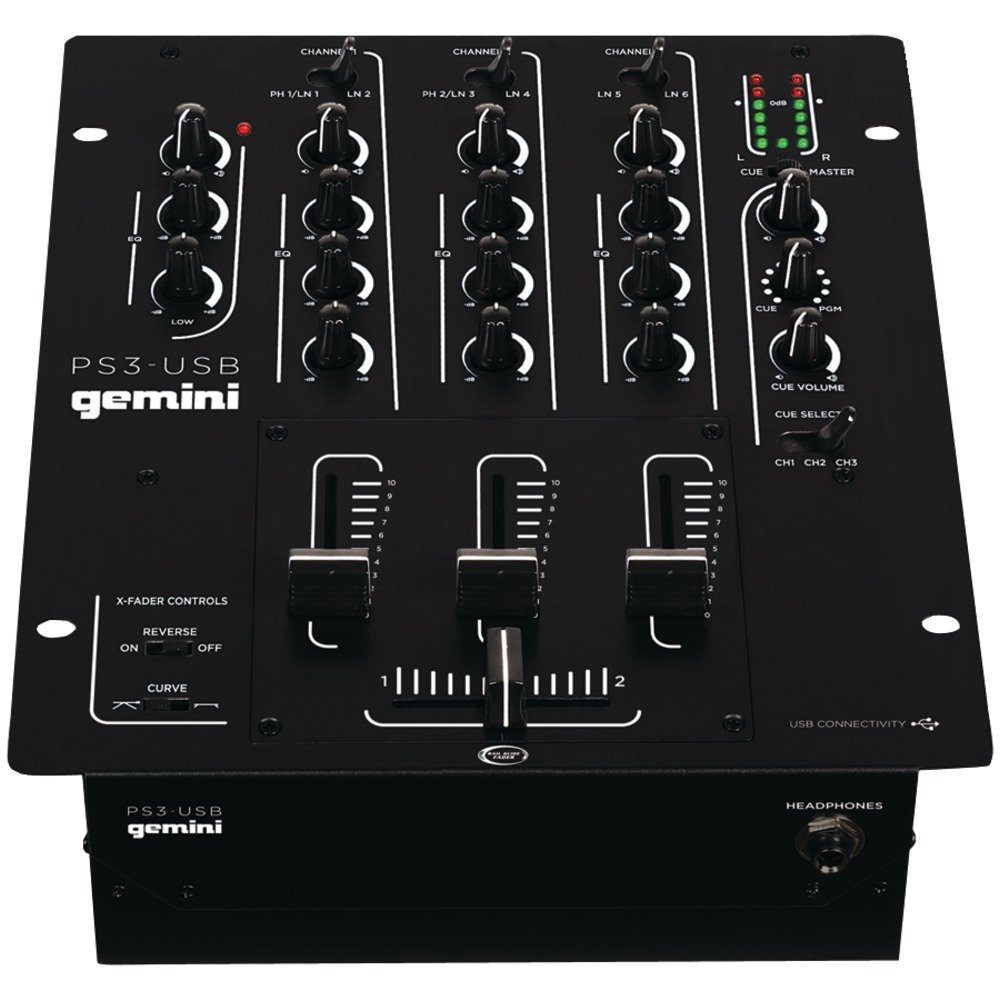
ຮູບ 1: ດ້ານຫນ້າ view of the Gemini PS3-USB Mixer, showing controls and inputs.
2. ຄໍາແນະນໍາຄວາມປອດໄພ
- ແຫຼ່ງພະລັງງານ: ເຊື່ອມຕໍ່ຫນ່ວຍບໍລິການພຽງແຕ່ກັບການສະຫນອງພະລັງງານທີ່ກໍານົດໄວ້.
- ການລະບາຍອາກາດ: ຮັບປະກັນການລະບາຍອາກາດທີ່ເຫມາະສົມ. ຫ້າມປິດຊ່ອງລະບາຍອາກາດ.
- ນ້ໍາແລະຄວາມຊຸ່ມ: ຫ້າມບໍ່ໃຫ້ອຸປະກອນຖືກຝົນ ຫຼື ຄວາມຊຸ່ມຊື່ນ. ຢ່າວາງວັດຖຸທີ່ເຕັມໄປດ້ວຍຂອງແຫຼວໃສ່ເຄື່ອງ.
- ຄວາມຮ້ອນ: ຮັກສາເຄື່ອງໃຫ້ຫ່າງຈາກແຫຼ່ງຄວາມຮ້ອນເຊັ່ນ: radiators, ເຄື່ອງບັນທຶກຄວາມຮ້ອນ, ເຕົາ, ຫຼືອຸປະກອນອື່ນໆ (ລວມທັງ. amplifiers) ທີ່ຜະລິດຄວາມຮ້ອນ.
- ທໍາຄວາມສະອາດ: ເຮັດຄວາມສະອາດດ້ວຍຜ້າແຫ້ງເທົ່ານັ້ນ.
- ການບໍລິການ: ອ້າງອີງການບໍລິການທັງໝົດໃຫ້ກັບພະນັກງານບໍລິການທີ່ມີຄຸນວຸດທິ. ຢ່າພະຍາຍາມໃຫ້ບໍລິການຜະລິດຕະພັນນີ້ຕົວທ່ານເອງ.
3. ຕັ້ງຄ່າ
3.1 ການຫຸ້ມຫໍ່
Carefully unpack the mixer and check for any signs of damage. Retain the packaging materials for future transport or storage.
3.2 ການເຊື່ອມຕໍ່ພະລັງງານ
Connect the provided power adapter to the mixer's power input and then to a suitable electrical outlet.
3.3 ການເຊື່ອມຕໍ່ສຽງ
The PS3-USB features 5-line, 3-channel inputs with 2 convertible Phono/Line RCA inputs.
- ຂາເຂົ້າໂທໂນ/ສາຍ: Connect turntables or line-level devices (CD players, media players) to the RCA inputs. Use the Phono/Line switch to select the appropriate input type for each channel.
- ຜົນຜະລິດຕົ້ນສະບັບ: Connect the Master RCA outputs to your amplifier ຫຼືລໍາໂພງພະລັງງານ.
- ບັນທຶກຜົນຜະລິດ: Connect the Record RCA outputs to a recording device if you wish to record your mix.
- ຫູຟັງ: Plug your 1/4" (6.3mm) headphones into the front panel headphone connector.
3.4 ການເຊື່ອມຕໍ່ USB
Connect the mixer to your Mac or PC using a standard USB cable. This allows for simultaneous playback and recording through your computer's media player software.
4. ຄໍາແນະນໍາການດໍາເນີນງານ
4.1 ການຄວບຄຸມ ແລະ ໜ້າທີ່ຕ່າງໆview
Familiarize yourself with the mixer's layout:
- Channel Gain Control: ປັບລະດັບອິນພຸດສຳລັບແຕ່ລະຊ່ອງ.
- 3-Band Rotary EQ: Provides control over High, Mid, and Low frequencies for each channel.
- Channel Faders: Control the volume of each individual channel.
- Crossfader: A user-replaceable Rail Glide crossfader with curve and reverse controls for blending between channels.
- ປະລິມານໂທ: ຄວບຄຸມລະດັບຜົນຜະລິດໂດຍລວມຂອງເຄື່ອງປະສົມ.
- VU ແມັດ: Visual indicators for master or cue levels.
- ພາກສຽງ: Includes rotary cue volume, CUE/PGM controls, and a split cue switch for headphone monitoring.
- ພາກສ່ວນໄມໂຄຣໂຟນ: Features a rotary microphone volume control and a 2-band EQ for microphone input.
4.2 ການປະສົມພື້ນຖານ
- Connect your audio sources to the appropriate Phono/Line inputs.
- Set the Phono/Line switch for each channel to match your source.
- Adjust the Gain control for each active channel to achieve a healthy input level without clipping (distortion).
- Use the channel faders to bring up the volume of your desired audio sources.
- Utilize the 3-band EQ to shape the sound of each channel.
- Use the crossfader to smoothly transition between channels.
- Monitor your mix using headphones via the Cue section and adjust the Master Volume for the main output.
4.3 ການຫຼິ້ນ ແລະການບັນທຶກ USB
Once connected via USB, your computer should recognize the PS3-USB as an audio device.
- ຫຼິ້ນຄືນ: Select the PS3-USB as the output device in your computer's sound settings or media player software to route audio through the mixer.
- ການບັນທຶກ: Select the PS3-USB as the input device in your recording software. The mixer's master output will be sent to your computer for recording.
5. ບໍາລຸງຮັກສາ
- ທໍາຄວາມສະອາດ: ໃຊ້ຜ້າອ່ອນໆແຫ້ງເພື່ອທຳຄວາມສະອາດດ້ານນອກຂອງເຄື່ອງປະສົມ. ຢ່າໃຊ້ນ້ຳຢາທຳຄວາມສະອາດ ຫຼື ຕົວລະລາຍ.
- Crossfader Replacement: The Rail Glide crossfader is user-replaceable. Refer to the Gemini website or authorized service centers for replacement parts and instructions if needed.
- ການເກັບຮັກສາ: When not in use for extended periods, store the mixer in a cool, dry place, preferably in its original packaging.
6. ການແກ້ໄຂບັນຫາ
| ບັນຫາ | ສາເຫດທີ່ເປັນໄປໄດ້ | ການແກ້ໄຂ |
|---|---|---|
| No sound output from master. | Master volume too low; incorrect input selection; ampບັນຫາເຄື່ອງຂະຫຍາຍສຽງ/ລຳໂພງ. | Increase Master Volume. Check Phono/Line switches. Verify ampການເຊື່ອມຕໍ່ ແລະ ພະລັງງານຂອງເຄື່ອງສົ່ງ/ລຳໂພງ. |
| ບໍ່ມີສຽງຈາກຊ່ອງສະເພາະ. | Channel fader down; Gain too low; incorrect Phono/Line selection; source device off/muted. | Raise channel fader. Adjust Gain. Correct Phono/Line switch. Check source device. |
| ສຽງບິດເບືອນ. | Input Gain too high; Master Volume too high; faulty cable. | Reduce channel Gain. Reduce Master Volume. Replace cables. |
| USB recording/playback not working. | Incorrect USB connection; computer audio settings incorrect; driver issues. | Ensure USB cable is securely connected. Select PS3-USB as audio device in computer settings. Restart computer. |
7. ຂໍ້ມູນຈໍາເພາະ
- ຕົວແບບ: PS3USB
- ຊ່ອງ: 3
- ວັດສະດຸປ້ອນ: 5-Line, 2 Convertible Phono/Line RCA, USB
- ຜົນໄດ້ຮັບ: Master RCA, Record RCA, 1/4" (6.3mm) Headphone
- EQ: 3-Band Rotary EQ per channel, 2-Band EQ for Microphone
- Crossfader: User-replaceable Rail Glide with Curve and Reverse controls
- ການເຊື່ອມຕໍ່: USB for Mac/PC Playback & Recording
- Dimensions (Approximate Shipping): 12.00in x 10.00in x 3.25in
- Weight (Approximate Shipping): 6.2 lbs (2.8 ກິໂລ)
- UPC: 747705208149
8. ການຮັບປະກັນແລະການສະຫນັບສະຫນູນ
This Gemini product is covered by a ຮັບປະກັນ 90 ວັນ from the date of purchase. This warranty covers manufacturing defects and workmanship under normal use. It does not cover damage caused by misuse, accident, modification, or unauthorized repair.
For technical support, service inquiries, or warranty claims, please contact your authorized Gemini dealer or visit the official Gemini webເວັບໄຊສໍາລັບຂໍ້ມູນຕິດຕໍ່.
ກະລຸນາເກັບຫຼັກຖານການຊື້ຂອງທ່ານໄວ້ເພື່ອກວດສອບການຮັບປະກັນ.