
ແນະນຳ
This manual provides essential information for the proper setup, operation, and maintenance of your Samson Auro D208 8-Inch Active Loudspeaker. Please read these instructions thoroughly before using the product to ensure optimal performance and safety.
ຂໍ້ມູນຄວາມປອດໄພ
Always follow basic safety precautions when using this product to reduce the risk of fire, electric shock, or injury. Keep the loudspeaker away from water and moisture. Do not block ventilation openings. Refer all servicing to qualified personnel.
ເນື້ອໃນຊຸດ
ກວດສອບວ່າຊຸດຂອງທ່ານມີລາຍການດັ່ງຕໍ່ໄປນີ້:
- Samson Auro D208 8-Inch Active Loudspeaker
- ສາຍໄຟ
- ຄູ່ມືຜູ້ໃຊ້
ຕັ້ງຄ່າ
ການຈັດວາງ
The Auro D208 is designed for versatile placement. It can be used as a main PA speaker, a floor monitor, or mounted on a standard 1 3/8-inch (35mm) pole. Ensure the speaker is placed on a stable, level surface or securely mounted to prevent tipping.
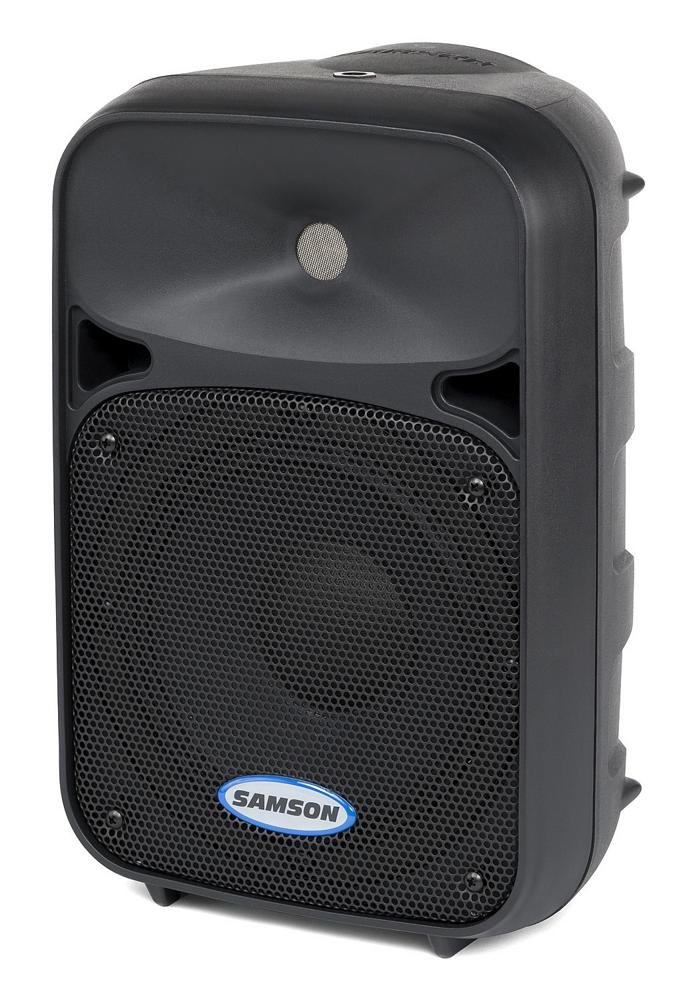
ດ້ານໜ້າ view of the Samson Auro D208 Active Loudspeaker, showcasing ການອອກແບບກະທັດຮັດຂອງຕົນແລະການປົກປັກຮັກສາ grille.
ການເຊື່ອມຕໍ່
The Auro D208 features a Mic/Line input and an additional Line output for linking multiple speakers.
- ການເຊື່ອມຕໍ່ພະລັງງານ: ເຊື່ອມຕໍ່ສາຍໄຟທີ່ສະໜອງໃຫ້ເຂົ້າກັບຮູຮັບໄຟຟ້າ AC ຢູ່ແຜງດ້ານຫຼັງ ແລະ ຈາກນັ້ນເຂົ້າກັບປລັກໄຟທີ່ເໝາະສົມ.
- ການເຊື່ອມຕໍ່ຂາເຂົ້າ: Use an XLR or 1/4-inch cable to connect your microphone or line-level audio source (e.g., mixer, instrument) to the Mic/Line input.
- Linking Speakers: To connect additional Auro D208 speakers, use an XLR cable from the Line output of the first speaker to the input of the next speaker.

Rear panel of the Samson Auro D208, illustrating the Mic/Line input, Line output, volume control, and Clip LED.
ຄໍາແນະນໍາການດໍາເນີນງານ
ເປີດ/ປິດ
After all connections are made, turn on the power switch located on the rear panel. It is recommended to turn on the Auro D208 last in your audio chain and turn it off first.
ການຄວບຄຸມປະລິມານ
Adjust the main Volume control knob on the rear panel to set the overall output level of the loudspeaker. Start with the volume at its minimum setting and gradually increase it to the desired level.
Clip LED Indicator
The Clip LED illuminates when the input signal is too strong, indicating potential distortion. If the Clip LED lights up frequently, reduce the input level from your source or the volume on the Auro D208 to prevent signal clipping.
ບໍາລຸງຮັກສາ
ທໍາຄວາມສະອາດ
Clean the exterior of the loudspeaker with a soft, dry cloth. Do not use abrasive cleaners, solvents, or waxes. Ensure the speaker is unplugged before cleaning.
ການເກັບຮັກສາ
When not in use, store the loudspeaker in a dry, cool environment, away from direct sunlight and extreme temperatures. If storing for extended periods, consider covering it to protect against dust.
ການແກ້ໄຂບັນຫາ
| ບັນຫາ | ສາເຫດທີ່ເປັນໄປໄດ້ | ການແກ້ໄຂ |
|---|---|---|
| ບໍ່ມີສຽງ | No power; input cable disconnected; volume too low. | Check power connection and switch; ensure input cables are secure; increase volume. |
| ສຽງບິດເບືອນ | Input signal too high (clipping); faulty cable. | Reduce input level from source or speaker volume; replace cable. |
| Hum ຫຼື Buzz | ວົງແຫວນດິນ; ສາຍໄຟທີ່ມີບັນຫາ; ການລົບກວນ. | Ensure all equipment is on the same electrical circuit; try different cables; move away from power sources. |
ຂໍ້ມູນຈໍາເພາະ
| ຄຸນສົມບັດ | ລາຍລະອຽດ |
|---|---|
| ຍີ່ຫໍ້ | ແຊມຊັນ |
| ຊື່ຕົວແບບ | Auro D208 |
| ໝາຍເລກຕົວແບບ | SAROD208A |
| ປະເພດລຳໂພງ | 2-Way Active Loudspeaker |
| ຂະຫນາດລໍາໂພງ | 8 ນິ້ວ |
| Woofer ເສັ້ນຜ່າສູນກາງ | 8 ນິ້ວ |
| Tweeter ເສັ້ນຜ່າສູນກາງ | 1 ນິ້ວ |
| ພະລັງງານຜົນຜະລິດສູງສຸດ | 200 ວັດ |
| ເຕັກໂນໂລຊີການເຊື່ອມຕໍ່ | USB (for control, not audio streaming) |
| ຮູບແບບການອອກສຽງ | ສະເຕຣິໂອ |
| ປະເພດການຕິດຕັ້ງ | Clip On, Floor Mount, 1 3/8-inch (35mm) Pole Mount Receptacle |
| ຄຸນສົມບັດເພີ່ມເຕີມ | Mic/Line input with Volume control and Clip LED, Additional Line output for linking multiple speakers |
| ຂະໜາດລາຍການ (D x W x H) | 17"D x 12.25"W x 10.25"H |
| ນ້ໍາຫນັກລາຍການ | 7.75 ກຣາມ |
| ແຫຼ່ງພະລັງງານ | ໄຟຟ້າສາຍ |
ການຮັບປະກັນແລະການສະຫນັບສະຫນູນ
ຂໍ້ມູນການຮັບປະກັນ
This product is covered by a 1-year parts and labor limited warranty. Please retain your proof of purchase for warranty claims.
ການຊ່ວຍເຫຼືອລູກຄ້າ
For technical assistance, service, or warranty inquiries, please visit the official Samson webສະຖານທີ່ຫຼືຕິດຕໍ່ພະແນກສະຫນັບສະຫນູນລູກຄ້າຂອງພວກເຂົາ. ຂໍ້ມູນການຕິດຕໍ່ໂດຍປົກກະຕິສາມາດພົບເຫັນຢູ່ໃນຜູ້ຜະລິດຂອງ webສະຖານທີ່ຫຼືຢູ່ໃນການຫຸ້ມຫໍ່ຜະລິດຕະພັນ.