
1. ບົດແນະນຳ
Thank you for choosing the Ground Zero GZIA 4115HPX 4-Channel Car Audio Amplifier. ນີ້ amplifier is designed to deliver high-quality audio performance for your vehicle's sound system. This manual provides essential information for the proper installation, operation, and maintenance of your ampເຄື່ອງຂະຫຍາຍສຽງ. ກະລຸນາອ່ານຄູ່ມືນີ້ຢ່າງລະອຽດກ່ອນທີ່ຈະພະຍາຍາມຕິດຕັ້ງ ຫຼື ໃຊ້ງານເພື່ອຮັບປະກັນປະສິດທິພາບ ແລະ ຄວາມປອດໄພທີ່ດີທີ່ສຸດ.
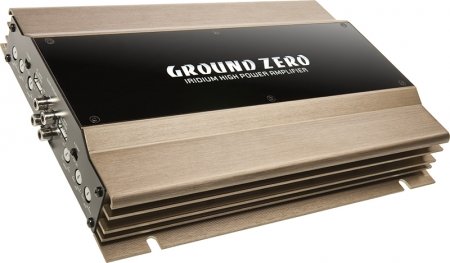
Figure 1: Ground Zero GZIA 4115HPX 4-Channel Car Audio Amplifier. This image displays the external casing ຂອງ amplifier, highlighting its compact design and heat sink fins.
2. ຄໍາແນະນໍາຄວາມປອດໄພ
ຂໍ້ມູນຄວາມປອດໄພທີ່ສໍາຄັນ: Improper installation or use can lead to serious injury, damage to the ampຄວາມເສຍຫາຍຕໍ່ຍານພາຫະນະຂອງທ່ານ, ຫຼື ຄວາມເສຍຫາຍຕໍ່ຍານພາຫະນະຂອງທ່ານ.
- ຖອດແບັດເຕີລີ່ຂອງລົດທຸກຄັ້ງກ່ອນທີ່ຈະເລີ່ມເຮັດວຽກໄຟຟ້າ.
- Ensure all wiring is properly routed and secured to prevent pinching, chafing, or short circuits.
- Use appropriate gauge wiring for power, ground, and speaker connections as recommended by the manufacturer.
- Install a fuse or circuit breaker on the main power wire as close to the battery as possible.
- ຫຼີກເວັ້ນການຕິດຕັ້ງ amplifier ໃນສະຖານທີ່ສໍາຜັດກັບແສງແດດໂດຍກົງ, ຄວາມຮ້ອນຫຼາຍເກີນໄປ, ຄວາມຊຸ່ມຊື່ນ, ຫຼືຂີ້ຝຸ່ນ.
- ຢ່າປະຕິບັດການ ampໃຫ້ໃຊ້ເຄື່ອງປັບອາກາດຖ້າມັນເສຍຫາຍ ຫຼື ເຮັດວຽກຜິດປົກກະຕິ. ໃຫ້ຊອກຫາຄວາມຊ່ວຍເຫຼືອຈາກຜູ້ຊ່ຽວຊານ.
- ຮັກສາ amplifier's ventilation areas clear to prevent overheating.
3. ການຕິດຕັ້ງແລະການຕິດຕັ້ງ
ການຕິດຕັ້ງທີ່ເຫມາະສົມແມ່ນສໍາຄັນສໍາລັບການປະຕິບັດແລະອາຍຸຍືນຂອງເຈົ້າ ampເຄື່ອງຊ່ວຍ. ຖ້າທ່ານບໍ່ແນ່ໃຈກ່ຽວກັບສ່ວນໃດສ່ວນໜຶ່ງຂອງຂະບວນການຕິດຕັ້ງ, ໃຫ້ປຶກສາຜູ້ຕິດຕັ້ງເຄື່ອງສຽງລົດມືອາຊີບ.
3.1 ການຫຸ້ມຫໍ່
ລະມັດລະວັງເອົາ amplifier from its packaging. Inspect the unit for any signs of damage that may have occurred during shipping. Retain the packaging for future transport or service needs.
3.2 ການຕິດຕັ້ງ
The GZIA 4115HPX amplifier is designed for surface mount installation. Choose a mounting location that is:
- Secure and stable, preventing vibration.
- ມີລະບາຍອາກາດໄດ້ດີ ເພື່ອໃຫ້ລະບາຍຄວາມຮ້ອນໄດ້ຢ່າງເໝາະສົມ.
- Protected from moisture and direct sunlight.
- ເຂົ້າເຖິງສໍາລັບສາຍໄຟແລະການປັບຕົວ.
ໃຊ້ສະກູຕິດຕັ້ງທີ່ໃຫ້ມາເພື່ອຍຶດ amplifier to a solid surface in your vehicle. Ensure no existing wiring, fuel lines, or brake lines are damaged during drilling.
3.3 ການເຊື່ອມຕໍ່ສາຍໄຟ
Refer to the connection diagrams below for proper wiring. All connections should be tight and secure to prevent signal loss or electrical issues.
3.3.1 ສາຍໄຟ ແລະ ສາຍດິນ
- ພະລັງງານ (B+): Connect a suitable gauge power cable directly from the positive terminal of the vehicle's battery to the amplifier's B+ terminal. Install an inline fuse (not included) within 18 inches (45 cm) of the battery.
- ດິນ (GND): ເຊື່ອມຕໍ່ສາຍດິນແບບວັດທີ່ເໝາະສົມຈາກ amplifier's GND terminal to a clean, unpainted metal surface of the vehicle's chassis. Ensure a good electrical connection. The ground cable should be as short as possible.
- ໄລຍະໄກ (REM): ເຊື່ອມຕໍ່ສາຍເປີດເຄື່ອງຈາກຣີໂມດອອກຂອງໜ່ວຍຫົວຂອງທ່ານເຂົ້າກັບ ampterminal REM ຂອງ lifier. ສາຍນີ້ປ່ຽນເປັນ amplifier ເປີດແລະປິດກັບຫົວຫນ່ວຍຂອງທ່ານ.
3.3.2 ສາຍລຳໂພງ
The GZIA 4115HPX is a 4-channel amplifier. Connect your speakers to the corresponding speaker output terminals (CH1, CH2, CH3, CH4). Ensure correct polarity (+ to + and - to -) for each speaker.
- For stereo operation, connect one speaker per channel.
- For bridged operation (e.g., for a subwoofer), refer to the specific bridging instructions on the amplifier or in a detailed wiring diagram.
3.3.3 ການເຊື່ອມຕໍ່ອິນພຸດ RCA
ເຊື່ອມຕໍ່ສາຍ RCA ຈາກຫົວຫນ່ວຍຂອງທ່ານກ່ອນ.amp ຜົນໄດ້ຮັບກັບ amplifier's RCA input jacks (INPUT CH1/2, INPUT CH3/4).

ຮູບທີ 2: ພາຍໃນ view of the Ground Zero GZIA 4115HPX amplifier's circuit board. This image shows the internal components, including capacitors, resistors, and the transformer, which are responsible for audio processing and power delivery.

ຮູບທີ 3: ລາຍລະອຽດພາຍໃນ view of the Ground Zero GZIA 4115HPX amplifier. This image provides a closer look at the power supply section and output stage components, indicating the amplifier's robust construction.
3.4 ການປັບຕົວເບື້ອງຕົ້ນ
Before powering on, ensure all connections are correct and secure.
- ຮັບການຄວບຄຸມ: Set the gain controls (LEVEL) on the amplifier to their minimum position.
- ການຕັ້ງຄ່າ Crossover: ຖ້າເຈົ້າ amplifier has built-in crossovers (HPF/LPF), set them according to your speaker type. For full-range speakers, you might use the HPF (High Pass Filter) to protect them from low frequencies. For subwoofers, use the LPF (Low Pass Filter).
4. ປະຕິບັດການ Ampມີຊີວິດຊີວາ
ເມື່ອຕິດຕັ້ງ, ໄດ້ amplifier will turn on automatically with your head unit via the remote wire.
4.1 Setting Gain Levels
The gain control is not a volume knob; it matches the output voltage ຂອງຫົວຫນ່ວຍຂອງທ່ານກັບຄວາມອ່ອນໄຫວຂອງການປ້ອນຂໍ້ມູນຂອງ ampມີຊີວິດຊີວາ.
- Turn your head unit volume to about 75-80% of its maximum.
- ຄ່ອຍໆເພີ່ມຂຶ້ນ ampການຄວບຄຸມການເພີ່ມສຽງຂອງຕົວຂະຫຍາຍສຽງຈົນກວ່າທ່ານຈະໄດ້ຍິນສຽງບິດເບືອນເລັກນ້ອຍ, ຈາກນັ້ນປິດມັນລົງເລັກນ້ອຍຈົນກວ່າສຽງຈະຊັດເຈນ.
- Repeat for all channels if independent gain controls are present.
4.2 Adjusting Crossovers and Bass Boost
- ການກັ່ນຕອງຜ່ານສູງ (HPF): Used for full-range speakers to block low frequencies that they cannot reproduce effectively. Adjust to protect speakers and improve clarity.
- Low Pass Filter (LPF): Used for subwoofers to allow only low frequencies to pass through. Adjust to blend with your main speakers.
- Boass Boost: Use sparingly. Excessive bass boost can lead to distortion and potential damage to speakers or the amplifier. Adjust to enhance low-frequency response as desired, but avoid overdriving the system.
5. ບໍາລຸງຮັກສາ
The Ground Zero GZIA 4115HPX amplifier ຕ້ອງການການບໍາລຸງຮັກສາຫນ້ອຍ.
- ທໍາຄວາມສະອາດ: ເຊັດພື້ນນອກຂອງເຄື່ອງເປັນໄລຍະ ampເຊັດຝຸ່ນອອກດ້ວຍຜ້າອ່ອນໆແຫ້ງເພື່ອເອົາຝຸ່ນອອກ. ຢ່າໃຊ້ສານເຄມີທີ່ຮຸນແຮງ ຫຼື ນໍ້າຢາເຮັດຄວາມສະອາດທີ່ມີສີຂັດ.
- ການລະບາຍອາກາດ: ຮັບປະກັນວ່າ amplifier's heat sink fins and surrounding area remain free of obstructions to allow for proper airflow and cooling.
- ກວດສອບການເຊື່ອມຕໍ່: Occasionally check all power, ground, remote, and speaker connections to ensure they remain tight and free of corrosion.
6. ການແກ້ໄຂບັນຫາ
ຖ້າເຈົ້າປະສົບບັນຫາກັບເຈົ້າ ampສຳລັບຂໍ້ມູນເພີ່ມເຕີມກ່ຽວກັບຕົວຊ່ວຍ, ໃຫ້ປຶກສາຄູ່ມືການແກ້ໄຂບັນຫາຕໍ່ໄປນີ້ກ່ອນທີ່ຈະຕິດຕໍ່ຝ່າຍຊ່ວຍເຫຼືອ.
| ບັນຫາ | ສາເຫດທີ່ເປັນໄປໄດ້ | ການແກ້ໄຂ |
|---|---|---|
| Amplifier does not turn on (no power indicator). |
|
|
| ບໍ່ມີສຽງຈາກລຳໂພງ. |
|
|
| ຄຸນນະພາບສຽງບິດເບືອນ ຫຼື ບໍ່ດີ. |
|
|
| Amplifier overheats (protection light on). |
|
|
7. ຂໍ້ມູນຈໍາເພາະ
The following are the technical specifications for the Ground Zero GZIA 4115HPX 4-Channel Car Audio Ampມີຊີວິດຊີວາ:
| ຄຸນສົມບັດ | ລາຍລະອຽດ |
|---|---|
| ໝາຍເລກຕົວແບບ | GZIA 4115HPX |
| ຈໍານວນຊ່ອງ | 4 |
| ປະລິມານຊ່ອງທາງອອກ | 4 |
| ສະບັບtage | 14.4 ໂວນ |
| ວັດtage (ສູງສຸດ) | 500 ວັດ |
| ປະເພດການຕິດຕັ້ງ | Surface Mount |
| ນ້ໍາຫນັກລາຍການ | 2 ກິໂລ 900 g |
| ຂະໜາດແພັກເກັດ | 43.4 x 25 x 7.9 cm |
| ASIN | B006VTSQ8C |
8. ຂໍ້ມູນການຮັບປະກັນ
Ground Zero products are designed and manufactured to the highest quality standards. For detailed warranty terms and conditions, please refer to the warranty card included with your product or visit the official Ground Zero webເວັບໄຊ. ຮັກສາຫຼັກຖານການຊື້ຂອງທ່ານສໍາລັບການຮຽກຮ້ອງການຮັບປະກັນໃດໆ.
9. ການຊ່ວຍເຫຼືອລູກຄ້າ
If you require further assistance or have questions not covered in this manual, please contact Ground Zero customer support or your authorized dealer. Contact information can typically be found on the official Ground Zero webເວັບໄຊ.