
1. ຜະລິດຕະພັນເກີນview
The Mitel MiVoice 5304 IP Phone is a compact and cost-effective entry-level display phone designed for various environments such as hotel rooms, university dorms, classrooms, and retail spaces. It provides essential communication features and integrates seamlessly with Mitel IP-based communication platforms.
This phone supports both MiNet and SIP protocols, offering flexibility in deployment. It features a backlit display, two lines with LED indication, and programmable keys for enhanced functionality.
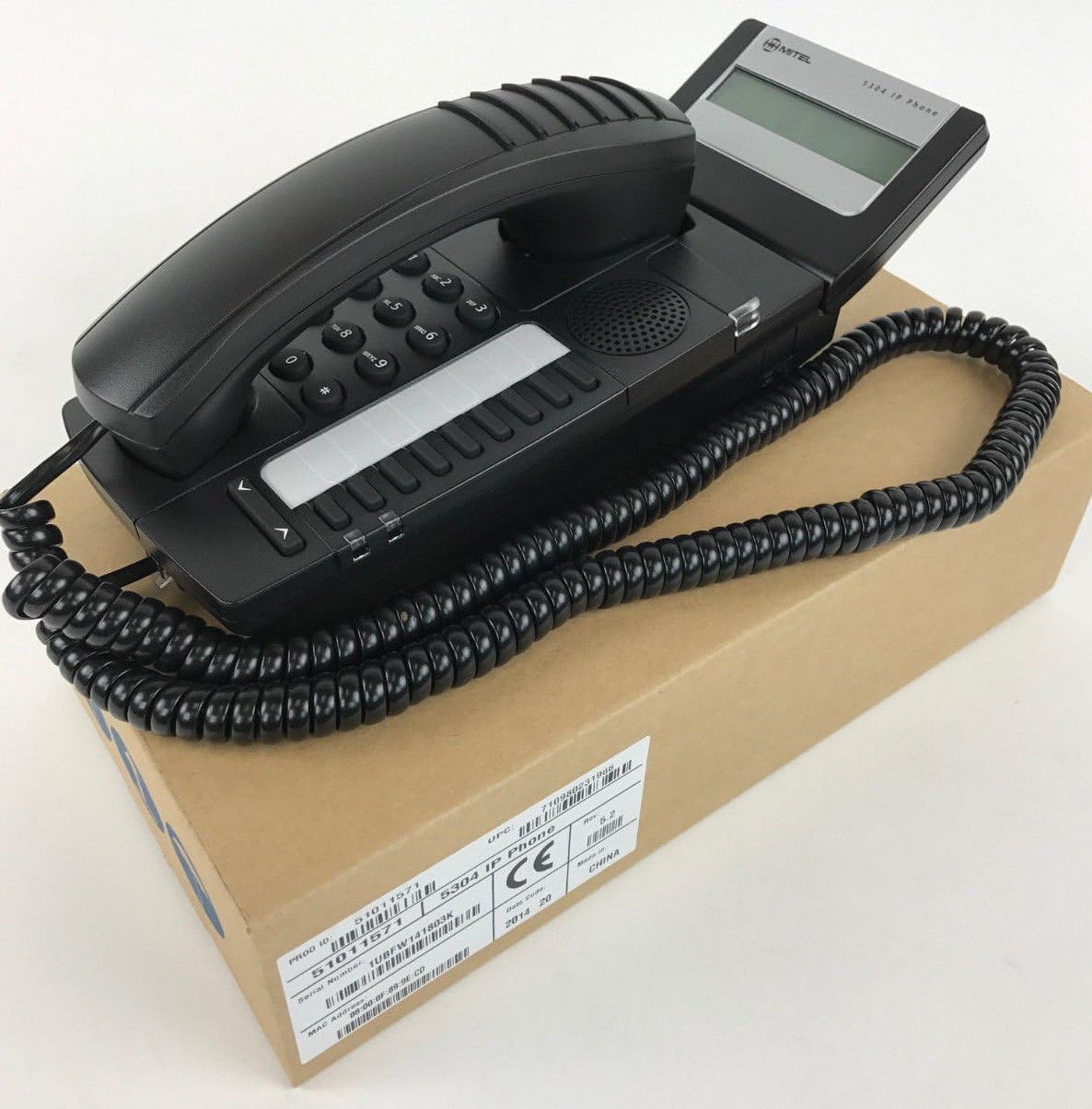
Figure 1: Mitel MiVoice 5304 IP Phone. This image shows the black IP phone with its coiled handset cord, resting on a brown cardboard box. The phone features a numeric keypad, several function buttons, and a small display screen.
2. ຄຸນນະສົມບັດທີ່ສໍາຄັນ
- ຈໍສະແດງຜົນ: Two x 20 character backlit display with auto-dimming.
- ສາຍ: Two lines with LED indication (one prime line, one programmable key).
- ກະແຈທີ່ຕັ້ງໂປຣແກຣມໄດ້: Eight programmable keys for speed dials, feature access codes, paging, conferencing, voicemail access, etc.
- ການຈັດໜ້າ: Paging and page receive capability, including direct page and group page support.
- ຮອງຮັບ Dual-Mode: Compatible with both MiNet and SIP protocols.
- ຕົວຊີ້ວັດສາຍຕາ: Incoming call visual indication and message waiting indication.
- ການຄວບຄຸມສຽງ: Adjustable volume and ringing controls.
- ການຕິດຕັ້ງ: Wall-mountable (optional accessory may be required).
- ພະລັງງານ: Multiple powering options, including 802.3af compliant Power over Ethernet (PoE).
- ການເຂົ້າເຖິງ: ADA-compliant (HAC handset).
- ການອອກແບບກະທັດຮັດ: Small footprint (approximately 26.5 cm x 10 cm or 10.5 x 4 inches).
- ປະສິດທິພາບພະລັງງານ: Designed for power conservation to reduce overall energy consumption.
3. ການຕິດຕັ້ງແລະການຕິດຕັ້ງ
3.1 ເນື້ອໃນຊຸດ
ກ່ອນທີ່ທ່ານຈະເລີ່ມຕົ້ນ, ໃຫ້ແນ່ໃຈວ່າອົງປະກອບທັງຫມົດມີຢູ່:
- Mitel MiVoice 5304 IP Phone unit
- ມືຖື
- ສາຍຫມູນວຽນຂອງມືຖື
- ສາຍອີເທີເນັດ
- (Optional) Power adapter if PoE is not used
3.2 ການເຊື່ອມຕໍ່ໂທລະສັບ
- ເຊື່ອມຕໍ່ໂທລະສັບມືຖື: ສຽບສົ້ນໜຶ່ງຂອງສາຍເຄເບີ້ນມືຖືທີ່ລ້ຽວເຂົ້າໃສ່ມືຖື ແລະອີກສົ້ນໜຶ່ງເຂົ້າໄປໃນພອດມືຖືຢູ່ຖານໂທລະສັບ.
- ເຊື່ອມຕໍ່ກັບເຄືອຂ່າຍ: Connect one end of the Ethernet cable to the LAN port on the back of the phone and the other end to an active network port (e.g., a wall jack or network switch). If using Power over Ethernet (PoE), the phone will power on automatically.
- ເຊື່ອມຕໍ່ພະລັງງານ (ຖ້າບໍ່ໃຊ້ PoE): If your network does not provide PoE, connect an optional Mitel-approved power adapter to the power port on the phone and then to a standard electrical outlet.
- ເລີ່ມຕົ້ນການເລີ່ມຕົ້ນ: The phone will power on and begin its boot-up sequence. This may take a few moments as it obtains an IP address and registers with your communication system.
3.3 ການຕິດຝາ (ທາງເລືອກ)
The Mitel 5304 IP Phone can be wall-mounted. An optional wall-mount kit (sold separately) may be required. Follow the instructions provided with the wall-mount kit for proper installation.
4. ຄໍາແນະນໍາການດໍາເນີນງານ
4.1 ການໂທແລະຕອບໂທລະສັບ
- ໂທອອກ:
- ຍົກມືຖືຂຶ້ນ ຫຼືກົດປຸ່ມ ລໍາໂພງ ປຸ່ມ.
- ກົດໝາຍເລກທີ່ຕ້ອງການໂດຍໃຊ້ປຸ່ມກົດ.
- ກົດ ໂທ or ສົ່ງ button (if available) or wait for the call to connect automatically.
- ເພື່ອຮັບສາຍ:
- Lift the handset or press the flashing line button or the ລໍາໂພງ ປຸ່ມ.
- ເພື່ອວາງສາຍ:
- ປ່ຽນເຄື່ອງມືຫຼືກົດປຸ່ມ ສິ້ນສຸດການໂທ or ລໍາໂພງ ປຸ່ມ.
4.2 Using Programmable Keys
The Mitel 5304 features eight programmable keys. Their functions are typically configured by your system administrator and can include:
- Speed Dial numbers
- Access to specific features (e.g., Call Forward, Do Not Disturb)
- Paging functions
- Voicemail access
- ກອງປະຊຸມ
To use a programmable key, simply press the button corresponding to the desired function.
4.3 ການປັບລະດັບສຽງ
Use the volume control buttons (usually located below the keypad or on the side of the phone) to adjust the handset, speakerphone, or ringer volume. Press the + ປຸ່ມເພື່ອເພີ່ມປະລິມານແລະ - ປຸ່ມເພື່ອຫຼຸດລະດັບສຽງລົງ.
4.4 Message Waiting Indication
A flashing LED indicator on the phone signifies that you have new voicemail messages. To retrieve messages, press the dedicated ຂໍ້ຄວາມ button (if configured) or dial your voicemail access code.
5. ການບໍາລຸງຮັກສາແລະການດູແລ
- ທໍາຄວາມສະອາດ: ໃຊ້ອ່ອນ, ເລັກນ້ອຍ damp cloth to clean the phone's surface. Do not use abrasive cleaners, solvents, or strong chemicals, as these can damage the finish.
- ຂີ້ຝຸ່ນ: Regularly dust the phone, especially around the keypad and display, to prevent accumulation that could affect performance.
- ສະພາບແວດລ້ອມ: Keep the phone away from excessive heat, direct sunlight, and moisture. Ensure proper ventilation if placed in an enclosed space.
- ສາຍໄຟ: ຮັບປະກັນວ່າສາຍທັງໝົດຖືກເຊື່ອມຕໍ່ຢ່າງປອດໄພ ແລະ ບໍ່ຖືກປັກ ຫຼື ເສຍຫາຍ.
6. ການແກ້ໄຂບັນຫາ
| ບັນຫາ | ສາເຫດທີ່ເປັນໄປໄດ້ | ການແກ້ໄຂ |
|---|---|---|
| ໂທລະສັບບໍ່ເປີດ. | No power from Ethernet (PoE) or power adapter not connected/faulty. |
|
| ບໍ່ມີສຽງໂທອອກ ຫຼື ບໍ່ສາມາດໂທອອກໄດ້. | Network connectivity issue, phone not registered, or system configuration problem. |
|
| ຈໍສະແດງຜົນຫວ່າງເປົ່າ ຫຼືບໍ່ສາມາດອ່ານໄດ້. | Power issue or display fault. |
|
| ບໍ່ສາມາດໄດ້ຍິນຜູ້ໂທ ຫຼືຜູ້ໂທບໍ່ສາມາດໄດ້ຍິນຂ້ອຍ. | Volume settings, handset/speaker issue, or network audio problem. |
|
7. ຂໍ້ມູນຈໍາເພາະ
| ຄຸນລັກສະນະ | ລາຍລະອຽດ |
|---|---|
| ໝາຍເລກຕົວແບບ | 51011571 |
| ຂະໜາດສິນຄ້າ (L x W x H) | 10 x 10 x 6 ນິ້ວ (25.4 x 25.4 x 15.24 cm) |
| ນ້ໍາຫນັກລາຍການ | 1.9 ປອນ (0.86 ກິໂລ) |
| ສີ | ດຳ |
| ປະເພດໂທລະສັບ | ໂທລະສັບ IP ທີ່ມີສາຍ |
| ແຫຼ່ງພະລັງງານ | Corded Electric (PoE 802.3af compliant or optional power adapter) |
| ປະເພດ Dialer | ປຸ່ມກົດດຽວ |
| ຈໍສະແດງຜົນ | Two x 20 character backlit display |
| ສາຍສະຫນັບສະຫນູນ | 2 Lines with LED indication |
| ພິທີການສະ ໜັບ ສະ ໜູນ | MiNet, SIP |
| ອຸປະກອນທີ່ເຂົ້າກັນໄດ້ | VoIP services, IP-based communication systems, Mitel 3300, Mitel SX-200 IP Communications Platforms |
| ຄວາມສາມາດໃນການເອີ້ນກອງປະຊຸມ | 2 ທາງ |
8. ການຮັບປະກັນແລະການສະຫນັບສະຫນູນ
For information regarding product warranty, please refer to the warranty card included with your purchase or visit the official Mitel website. For technical support, service, or further inquiries, please contact your Mitel authorized dealer or system administrator.
You can also find additional resources and contact information on the official Mitel webເວັບໄຊ: www.mitel.com