
1. ບົດແນະນຳ
ຂອບໃຈສໍາລັບການຊື້asing the Caliber RMD 068-2 Car Radio USB/SD Player. This manual provides detailed instructions for the installation, operation, and maintenance of your new car radio. Please read this manual thoroughly before using the product to ensure proper functionality and safety. Keep this manual for future reference.
2. ຂໍ້ມູນຄວາມປອດໄພ
- ການຕິດຕັ້ງ: Ensure the unit is installed by a qualified technician to prevent damage to the vehicle's electrical system. Incorrect wiring can cause fire or electrical shock.
- ການສະຫນອງພະລັງງານ: ເຊື່ອມຕໍ່ຫນ່ວຍບໍລິການພຽງແຕ່ກັບຫມໍ້ໄຟລົດ 12V DC ທີ່ມີດິນລົບ.
- ຟິວ: Always replace fuses with new ones of the specified rating. Using an incorrect fuse can cause damage to the unit or vehicle.
- ລະດັບສຽງ: Do not operate the unit at excessively high volume levels, as this may impair your ability to hear external traffic sounds and could be dangerous.
- ທໍາຄວາມສະອາດ: ໃຊ້ຜ້າອ່ອນໆ, ແຫ້ງເພື່ອທໍາຄວາມສະອາດ. ຢ່າໃຊ້ເຄື່ອງເຮັດຄວາມສະອາດຂັດຫຼືສານລະລາຍ.
- ຄວາມຊຸ່ມ: ຫ້າມບໍ່ໃຫ້ອຸປະກອນຖືກຄວາມຊຸ່ມ ຫຼືນໍ້າ.
3. ເນື້ອໃນຊຸດ
ກະລຸນາກວດເບິ່ງວ່າລາຍການທັງໝົດມີຢູ່:
- Caliber RMD 068-2 Car Radio Unit
- ແຜງໜ້າສາມາດຖອດອອກໄດ້
- ສາຍໄຟ ISO
- ຂອບຕິດຕັ້ງ
- Disassembly Keys (2 pcs)
- ຄູ່ມືຜູ້ໃຊ້ (ເອກະສານນີ້)
4. ຜະລິດຕະພັນເກີນview
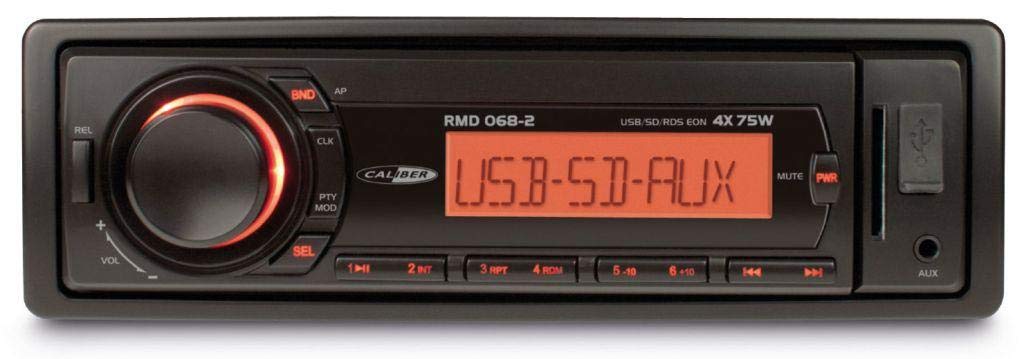
ຮູບ 1: ດ້ານຫນ້າ view of the Caliber RMD 068-2 Car Radio. This image shows the main unit with its detachable front panel, including the display, control buttons, USB port, and SD card slot.
4.1 ແຜງຄວບຄຸມດ້ານໜ້າ
- ປຸ່ມ POWER/MODE: Press to turn on/off. Short press to switch between Radio, USB, SD, AUX modes.
- ປຸ່ມລະດັບສຽງ: Rotate to adjust volume. Press to access audio settings (Bass, Treble, Balance, Fader).
- ການສະແດງ: Shows current time, radio frequency, track information, etc.
- ພອດ USB: ເຊື່ອມຕໍ່ USB flash drives ສໍາລັບການຫຼິ້ນມີເດຍ.
- ຊ່ອງໃສ່ບັດ SD: ໃສ່ SD card ເພື່ອຫຼິ້ນສື່ຕ່າງໆ.
- ຂາເຂົ້າ AUX (ແຈັກ 3.5 ມມ): ເຊື່ອມຕໍ່ອຸປະກອນສຽງພາຍນອກ.
- ປຸ່ມແຖບ/AMS: In radio mode, press to select radio band (FM1, FM2, FM3). Long press for Automatic Memory Store.
- PRESET Buttons (1-6): Store and recall radio stations. In USB/SD mode, use for direct track selection.
- ປຸ່ມ PLAY/PAUSE: ຫຼິ້ນ ຫຼື ຢຸດການຫຼິ້ນສື່ຊົ່ວຄາວ.
- FORWARD/BACKWARD Buttons: Skip tracks or tune radio frequency.
- ປຸ່ມຖອດອອກ: Release the detachable front panel.
4.2 ການເຊື່ອມຕໍ່ດ້ານຫຼັງ
The rear of the unit features standard ISO connectors for power and speakers, along with an antenna input.
- ISO Power Connector: For connecting to the vehicle's power supply (constant 12V, ignition 12V, ground).
- ISO Speaker Connector: For connecting to the vehicle's speakers (Front Left, Front Right, Rear Left, Rear Right).
- ການປ້ອນຂໍ້ມູນເສົາອາກາດ: ສຳລັບເຊື່ອມຕໍ່ເສົາອາກາດວິທະຍຸຂອງລົດ.
5. ຕັ້ງຄ່າ
5.1 ການຕິດຕັ້ງ
- ຕັດການເຊື່ອມຕໍ່ຫມໍ້ໄຟ: Before starting, disconnect the negative terminal of your car battery to prevent short circuits.
- ເອົາຫົວຫນ່ວຍເກົ່າອອກ: ເອົາວິທະຍຸລົດທີ່ມີຢູ່ຂອງທ່ານອອກຈາກແຜງໜ້າປັດຢ່າງລະມັດລະວັງ.
- ຕິດຕັ້ງກອບຕິດຕັ້ງ: Insert the supplied mounting frame into the dashboard opening and bend the tabs to secure it.
- ເຊື່ອມຕໍ່ສາຍໄຟ: Refer to the wiring diagram in section 5.2. Connect the ISO wiring harness to the car's wiring and then to the Caliber RMD 068-2 unit. Connect the antenna cable.
- Slide Unit In: Carefully slide the Caliber RMD 068-2 unit into the mounting frame until it clicks into place.
- ເຊື່ອມຕໍ່ແບັດເຕີຣີຄືນໃໝ່: ເຊື່ອມຕໍ່ສະຖານີລົບຂອງແບັດເຕີຣີລົດຂອງທ່ານຄືນໃໝ່.
- ຄັດຕິດແຜງດ້ານໜ້າ: Attach the detachable front panel to the main unit.
5.2 ແຜນວາດສາຍ
The Caliber RMD 068-2 uses standard ISO connectors. Ensure correct connections as shown below. If your vehicle does not have ISO connectors, an adapter may be required.
| Pinາຍເລກ PIN | ສີສາຍ (ທົ່ວໄປ) | ຟັງຊັນ |
|---|---|---|
| 4 | ສີເຫຼືອງ | 12V ຄົງທີ່ (ຫມໍ້ໄຟ) |
| 7 | ສີແດງ | ປ່ຽນ 12V (ໄຟ) |
| 8 | ດຳ | ດິນ |
| 5 | ສີຟ້າ | Antenna Remote Out |
| Pinາຍເລກ PIN | ສີສາຍ (ທົ່ວໄປ) | ຟັງຊັນ |
|---|---|---|
| 1 | ສີມ່ວງ | ຂວາຫຼັງ (+) |
| 2 | ສີມ່ວງ/ດຳ | ຂວາຫຼັງ (-) |
| 3 | ສີຂຽວ | ຫລັງຊ້າຍ (+) |
| 4 | ສີຂຽວ/ດຳ | ຫລັງຊ້າຍ (-) |
| 5 | ສີເທົາ | ດ້ານຂວາ (+) |
| 6 | ສີເທົາ/ດຳ | ດ້ານຂວາ (-) |
| 7 | ສີຂາວ | ໜ້າຊ້າຍ (+) |
| 8 | ຂາວ/ດຳ | ໜ້າຊ້າຍ (-) |
Note: Wire colors may vary depending on vehicle manufacturer. Always consult your vehicle's wiring diagram.
6. ຄໍາແນະນໍາການດໍາເນີນງານ
6.1 ຫນ້າທີ່ພື້ນຖານ
- ເປີດ/ປິດ: ກົດ ພະລັງງານ / ແບບ ປຸ່ມເພື່ອເປີດຫຼືປິດເຄື່ອງ.
- ການຄວບຄຸມລະດັບສຽງ: ໝຸນ ປະລິມານ ບິດຕາມເຂັມໂມງເພື່ອເພີ່ມປະລິມານ, ທວນເຂັມໂມງເພື່ອຫຼຸດລົງ.
- ການເລືອກໂໝດ: ກົດສັ້ນ ພະລັງງານ / ແບບ button to cycle through available modes: Radio (FM), USB, SD, AUX.
- ການຕັ້ງຄ່າສຽງ: ກົດ ປະລິມານ knob to enter audio settings. Rotate the knob to select settings like BASS, TREBLE, BALANCE, FADER. Press the knob again to confirm or move to the next setting.
6.2 ການດໍາເນີນງານວິທະຍຸ
- ການຄັດເລືອກແຖບ: ໃນໂຫມດວິທະຍຸ, ກົດປຸ່ມ ແຖບ/AMS button to switch between FM1, FM2, and FM3 bands.
- ຄູ່ມືການປບັຄູ່ມື: ກົດສັ້ນ ສົ່ງຕໍ່/ຖອຍຫຼັງ ປຸ່ມເພື່ອປັບຄວາມຖີ່ຂອງຄວາມຖີ່.
- ຄົ້ນຫາໂດຍອັດຕະໂນມັດ: ກົດຄ້າງໄວ້ ສົ່ງຕໍ່/ຖອຍຫຼັງ ປຸ່ມເພື່ອຄົ້ນຫາສະຖານີທີ່ແຮງຕໍ່ໄປໂດຍອັດຕະໂນມັດ.
- ການຕັ້ງໄວ້ລ່ວງໜ້າຂອງຮ້ານ: Tune to your desired station. Long press one of the ຕັ້ງໄວ້ລ່ວງໜ້າ (1-6) buttons until you hear a beep. The station is now stored.
- Recall presets: Short press one of the ຕັ້ງໄວ້ລ່ວງໜ້າ (1-6) buttons to recall a stored station.
- ການເກັບຮັກສາໜ່ວຍຄວາມຈຳອັດຕະໂນມັດ (AMS): ກົດຄ້າງໄວ້ ແຖບ/AMS button to automatically scan and store the strongest stations into the current band's presets.
6.3 ການຫຼິ້ນ USB/SD
- ແຊກສື່: Insert a USB flash drive into the USB port or an SD card into the SD card slot. The unit will automatically switch to USB/SD mode and begin playback.
- ຫຼິ້ນ/ຢຸດ: ກົດ ຫຼິ້ນ/ຢຸດຊົ່ວຄາວ ປຸ່ມເພື່ອຢຸດຊົ່ວຄາວ ຫຼືສືບຕໍ່ການຫຼິ້ນຄືນ.
- ຂ້າມເບິ່ງ: ກົດສັ້ນ ສົ່ງຕໍ່/ຖອຍຫຼັງ ປຸ່ມເພື່ອຂ້າມໄປຫາເພງຕໍ່ໄປ ຫຼືກ່ອນໜ້າ.
- Fast Forward/Rewind: ກົດຄ້າງໄວ້ ສົ່ງຕໍ່/ຖອຍຫຼັງ ປຸ່ມເພື່ອໄວໄປໜ້າ ຫຼື ຖອຍຫຼັງພາຍໃນແທຣັກ.
- ການນຳທາງໂຟນເດີ: ໃຊ້ PreSET 5 ແລະ PreSET 6 buttons to navigate between folders on your USB/SD media.
6.4 AUX Input
- ເຊື່ອມຕໍ່ອຸປະກອນ: Connect your external audio device (e.g., smartphone, MP3 player) to the 3.5mm AUX input jack on the front panel using an audio cable.
- ເລືອກໂໝດ AUX: ກົດ ພະລັງງານ / ແບບ button repeatedly until "AUX" is displayed.
- ຄວບຄຸມການຫຼິ້ນຄືນ: Control playback (play, pause, skip) directly from your connected external device. The car radio will control the volume.
7. ບໍາລຸງຮັກສາ
- ທໍາຄວາມສະອາດຫນ່ວຍບໍລິການ: Use a soft, dry cloth to wipe the front panel and display. Do not use harsh chemicals, cleaning sprays, or abrasive cloths, as these can damage the surface.
- Detachable Front Panel: When detaching the front panel, handle it carefully. Store it in a protective case (if supplied) to prevent scratches or damage.
- ພອດ USB/SD: Keep the USB port and SD card slot free from dust and debris.
8. ການແກ້ໄຂບັນຫາ
| ບັນຫາ | ສາເຫດທີ່ເປັນໄປໄດ້ | ການແກ້ໄຂ |
|---|---|---|
| ບໍ່ມີພະລັງງານ | ຟິວຂາດ; ສາຍໄຟບໍ່ຖືກຕ້ອງ; ການເຊື່ອມຕໍ່ວ່າງ | Check and replace fuse; Verify wiring connections (Yellow to constant 12V, Red to ignition 12V, Black to ground); Ensure front panel is securely attached. |
| ບໍ່ມີສຽງ | Volume too low; Mute activated; Incorrect speaker wiring; Damaged speakers | ເພີ່ມລະດັບສຽງ; ກວດສອບວ່າປິດສຽງຢູ່ຫຼືບໍ່; ກວດສອບການເຊື່ອມຕໍ່ລຳໂພງ; ທົດສອບກັບລຳໂພງທີ່ຮູ້ຈັກດີ. |
| ການຮັບວິທະຍຸບໍ່ດີ | ເສົາອາກາດບໍ່ໄດ້ເຊື່ອມຕໍ່; ເສົາອາກາດເສຍຫາຍ; ພື້ນທີ່ສັນຍານອ່ອນ | Ensure antenna is securely connected; Check antenna for damage; Try tuning to a stronger station or move to a different location. |
| USB/SD ບໍ່ຫຼິ້ນ | ບໍ່ຮອງຮັບ file format; Corrupted media; Incorrectly inserted media; Max capacity exceeded | ຮັບປະກັນ files are MP3/WMA format; Try a different USB/SD card; Reinsert media correctly; Check media capacity (max 32GB recommended). |
| Front panel cannot be detached | Eject button not fully pressed; Mechanism jammed | Press the EJECT button firmly; Do not force the panel. |
If the problem persists after trying these solutions, please contact your dealer or a qualified service center.
9. ຂໍ້ມູນຈໍາເພາະ
- ຕົວແບບ: Caliber RMD 068-2
- ພະລັງງານອອກ: 4 x 75 Watts Max
- ການສະຫນອງພະລັງງານ: 12V DC (10.8V-15.6V), Negative Ground
- ຟິວ: 10A
- ຮູບແບບສຽງທີ່ຮອງຮັບ: MP3, WMA (ຜ່ານ USB/SD)
- USB/SD Compatibility: ສູງສຸດ 32GB (ຮູບແບບ FAT32)
- ຕົວຮັບສັນຍານ FM: RDS, 18 Presets
- AUX Input: Jack Stereo 3.5 ມມ
- Detachable Front Panel: ແມ່ນແລ້ວ
- ນ້ຳໜັກ: ປະມານ 0.95 kg (2.09 lbs)
10. ການຮັບປະກັນແລະການສະຫນັບສະຫນູນ
This Caliber product is covered by a warranty in accordance with applicable European laws. For detailed warranty terms and conditions, please refer to the warranty card included with your product or visit the official Caliber website. For technical support, troubleshooting assistance, or service inquiries, please contact your authorized Caliber dealer or the customer service department in your region. Please have your product model number (RMD 068-2) and proof of purchase ready when contacting support.
Note: Specifications and design are subject to change without notice for improvement.