
1. ບົດແນະນຳ
This manual provides essential instructions for the safe and efficient operation of your Sharp CD-DH950P 240W Mini-Component System. This system features a 5-disc CD changer, a cassette deck, an iPod/iPhone docking station, a USB host for digital audio playback, and an AM/FM tuner. Please read this manual thoroughly before using the system and retain it for future reference.
2. ຂໍ້ມູນຄວາມປອດໄພ
- ແຫຼ່ງພະລັງງານ: ເຊື່ອມຕໍ່ຫນ່ວຍບໍລິການພຽງແຕ່ກັບ AC outlet ຂອງ vol ທີ່ກໍານົດໄວ້tage.
- ການລະບາຍອາກາດ: ຮັບປະກັນການລະບາຍອາກາດທີ່ພຽງພໍ. ຫ້າມປິດຊ່ອງລະບາຍອາກາດ.
- ນ້ໍາແລະຄວາມຊຸ່ມ: ຫ້າມໃຫ້ເຄື່ອງຖືກຝົນ, ຄວາມຊຸ່ມ, ຫຼື ຂອງແຫຼວທີ່ຢອດ/ກະແຈກກະຈາຍ.
- ຄວາມຮ້ອນ: ຮັກສາເຄື່ອງໃຫ້ຫ່າງຈາກແຫຼ່ງຄວາມຮ້ອນເຊັ່ນ: ລັງສີ, ເຄື່ອງບັນທຶກຄວາມຮ້ອນ, ເຕົາ ຫຼືອຸປະກອນອື່ນໆທີ່ຜະລິດຄວາມຮ້ອນ.
- ທໍາຄວາມສະອາດ: ຖອດປລັກໜ່ວຍອອກຈາກປລັກສຽບໃສ່ຝາກ່ອນທຳຄວາມສະອາດ. ໃຊ້ຜ້າອ່ອນ, ແຫ້ງ.
- ການບໍລິການ: ຢ່າພະຍາຍາມບໍລິການຜະລິດຕະພັນນີ້ດ້ວຍຕົນເອງ. ອ້າງເຖິງການບໍລິການທັງtoົດໃຫ້ກັບພະນັກງານບໍລິການທີ່ມີຄຸນວຸດທິ.
3. ເນື້ອໃນຊຸດ
ກວດສອບວ່າຊຸດຂອງທ່ານມີລາຍການດັ່ງຕໍ່ໄປນີ້:
- Main Unit (CD-DH950P)
- ລໍາໂພງຊ້າຍ
- ລໍາໂພງຂວາ
- ການຄວບຄຸມໄລຍະໄກທີ່ມີຫມໍ້ໄຟ
- AM Loop Antenna
- ເສົາອາກາດສາຍ FM
- ສາຍໄຟ
4. ຕັ້ງຄ່າ
4.1 ການເຊື່ອມຕໍ່ລໍາໂພງ
Connect the speaker wires from the main unit to the corresponding terminals on the back of each speaker. Ensure correct polarity (red to red, black to black) for optimal sound quality. The left speaker connects to the left speaker output, and the right speaker to the right speaker output.
4.2 ການເຊື່ອມຕໍ່ເສົາອາກາດ
- ເສົາອາກາດ FM: Connect the supplied FM wire antenna to the FM antenna terminal on the rear of the main unit. Extend the wire for better reception.
- ເສົາອາກາດ AM: Connect the supplied AM loop antenna to the AM antenna terminals on the rear of the main unit. Position the antenna for best reception.
4.3 ການເຊື່ອມຕໍ່ພະລັງງານ
Plug the power cord into the AC IN jack on the rear of the main unit, then plug the other end into a standard AC wall outlet.
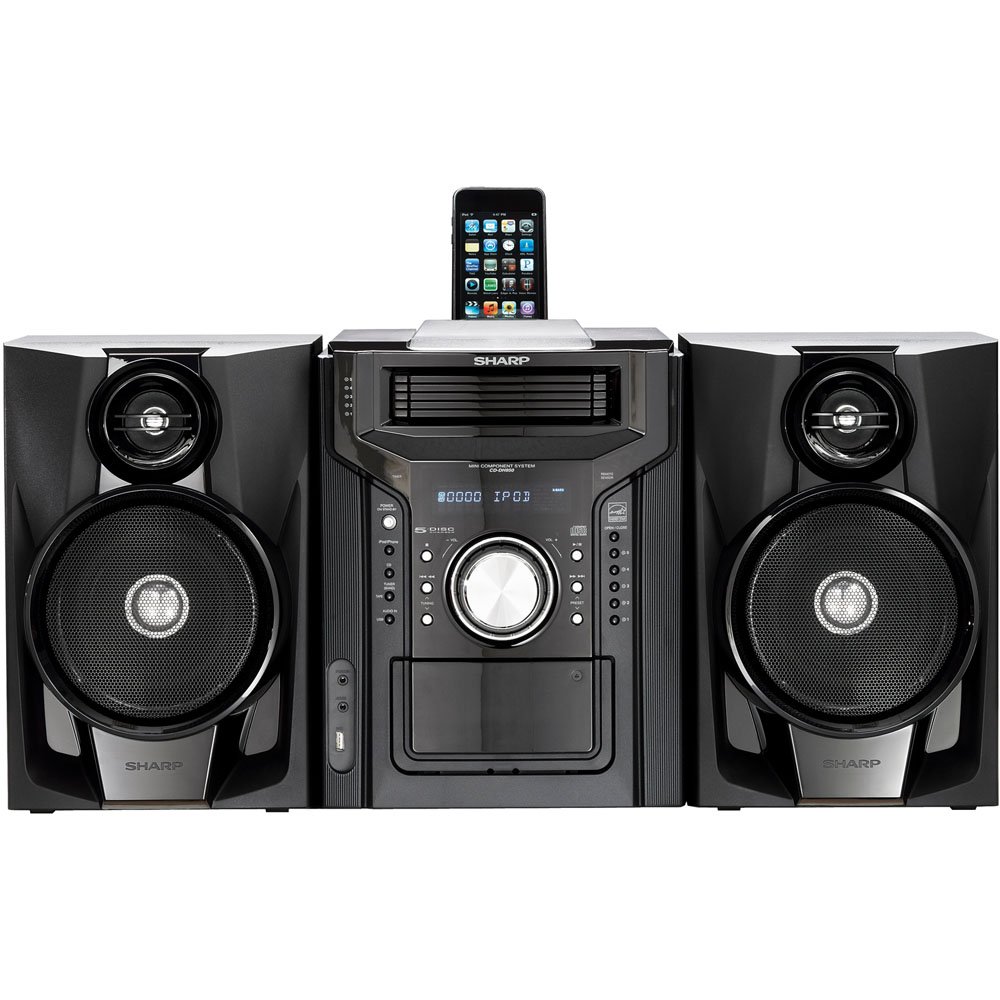
ຮູບທີ 4.3.1: ໂດຍລວມ view of the Sharp CD-DH950P Mini-Component System, showing the main unit flanked by two speakers, with an iPhone docked on top of the main unit.
5. ຄໍາແນະນໍາການດໍາເນີນງານ
5.1 ເປີດ/ປິດ ແລະຄວບຄຸມລະດັບສຽງ
- ກົດ ພະລັງງານ ປຸ່ມເທິງແຜງດ້ານໜ້າ ຫຼືການຄວບຄຸມຣີໂໝດເພື່ອເປີດ ຫຼືປິດເຄື່ອງ.
- ໝຸນ ປະລິມານ ປຸ່ມໃສ່ກະດານດ້ານຫນ້າຫຼືໃຊ້ VOL +/- ປຸ່ມໃນການຄວບຄຸມໄລຍະໄກເພື່ອປັບລະດັບສຽງ.
5.2 ການຫຼິ້ນ CD
This system features a 5-disc CD changer.
- ກົດ ເປີດ/ປິດ ປຸ່ມເພື່ອເປີດຖາດ CD.
- Place up to five CDs on the disc trays, label side up.
- ກົດ ເປີດ/ປິດ ອີກເທື່ອຫນຶ່ງເພື່ອປິດຖາດ.
- ກົດ CD ປຸ່ມເພື່ອເລືອກຟັງຊັນ CD.
- ກົດ ຫຼິ້ນ/ຢຸດຊົ່ວຄາວ ປຸ່ມເພື່ອເລີ່ມຕົ້ນການຫຼິ້ນ
- ໃຊ້ ຂ້າມ buttons to navigate between tracks or discs.
5.3 ການເຮັດວຽກຂອງແຜ່ນເທບ
- ກົດ TAPE OPEN/CLOSE button to open the cassette deck.
- ໃສ່ເທບເທບ.
- ກົດ ປາດຢາງ ປຸ່ມເພື່ອເລືອກຟັງຊັນ cassette.
- ກົດ ຫຼິ້ນ ເພື່ອເລີ່ມຕົ້ນການຫຼິ້ນ.
- To record, ensure the source is selected (e.g., CD, Tuner) and press the ບັນທຶກ ປຸ່ມຢູ່ເທິງແຜ່ນເທບຄາເຊັດ.
5.4 ດັອກ iPod/iPhone
The system includes a top-mounted docking slot for compatible iPod and iPhone devices (30-pin connector).
- Carefully place your iPod or iPhone into the docking slot.
- The system will automatically switch to iPod/iPhone mode or you may need to press the iPod / iPhone ປຸ່ມ.
- Use the system's controls or your device's controls to play music. The device will also charge while docked.
5.5 USB Host Playback
Connect a USB storage device containing MP3 or WMA audio files to the USB port on the front panel.
- ໃສ່ອຸປະກອນ USB ເຂົ້າໄປໃນພອດ USB.
- ກົດ USB button to select the USB function.
- Use the playback controls to navigate and play files.
5.6 AM/FM Tuner
- ກົດ ເຄື່ອງຈູນ ເພື່ອເລືອກວິທະຍຸ AM ຫຼື FM.
- ໃຊ້ ປັບ +/- ປຸ່ມເພື່ອປບັໄປຫາສະຖານີດ້ວຍຕົນເອງ.
- To auto-scan, press and hold the ປັບ +/- ປຸ່ມ.
- To store a preset, tune to the desired station, then press ຄວາມຈຳ followed by a preset number.
5.7 ການປ້ອນຂໍ້ມູນສຽງ
Connect an external audio device (e.g., MP3 player, smartphone) to the AUDIO IN jack on the front panel using a 3.5mm stereo cable.
- Connect your device to the AUDIO IN jack.
- ກົດ ສຽງເຂົ້າມາ ເພື່ອເລືອກແຫຼ່ງຂໍ້ມູນນີ້.
- ຄວບຄຸມການຫຼິ້ນຄືນຈາກອຸປະກອນທີ່ເຊື່ອມຕໍ່ຂອງທ່ານ.
6. ບໍາລຸງຮັກສາ
6.1 ການທໍາຄວາມສະອາດຫນ່ວຍງານ
Wipe the exterior of the unit with a soft, dry cloth. Do not use abrasive cleaners, waxes, or solvents. Ensure the unit is unplugged before cleaning.
6.2 ການດູແລຊີດີ ແລະ ເທບເຊັດ
- Handle CDs by their edges to avoid fingerprints and scratches. Clean discs with a soft, lint-free cloth from the center outwards.
- Store cassette tapes away from strong magnetic fields and direct sunlight.
7. ການແກ້ໄຂບັນຫາ
| ບັນຫາ | ສາເຫດທີ່ເປັນໄປໄດ້ | ການແກ້ໄຂ |
|---|---|---|
| ບໍ່ມີພະລັງງານ | ສາຍໄຟບໍ່ໄດ້ເຊື່ອມຕໍ່; ປລັກສຽບໄຟມີບັນຫາ | ໃຫ້ແນ່ໃຈວ່າໄດ້ສຽບສາຍໄຟຢ່າງປອດໄພ; ລອງຮ້ານອື່ນ |
| ບໍ່ມີສຽງ | ລະດັບສຽງຕໍ່າເກີນໄປ; ບໍ່ໄດ້ເຊື່ອມຕໍ່ລຳໂພງ; ເລືອກແຫຼ່ງທີ່ມາບໍ່ຖືກຕ້ອງ | ເພີ່ມລະດັບສຽງ; ກວດສອບການເຊື່ອມຕໍ່ລຳໂພງ; ເລືອກແຫຼ່ງສັນຍານເຂົ້າທີ່ຖືກຕ້ອງ |
| CD ບໍ່ໄດ້ຫຼິ້ນ | Disc inserted incorrectly; Disc is dirty or scratched | Insert disc correctly (label side up); Clean or replace disc |
| ການຮັບວິທະຍຸທີ່ບໍ່ດີ | ເສົາອາກາດບໍ່ໄດ້ຖືກວາງຢ່າງຖືກຕ້ອງ; ສັນຍານອ່ອນ | Adjust position of AM/FM antennas; Try auto-tuning or manual fine-tuning |
| iPod/iPhone not charging/playing | Device not properly docked; Device not compatible (e.g., newer connector) | Re-dock the device; Note that this system uses a 30-pin connector, newer devices may require an adapter (not included) |
8. ຂໍ້ມູນຈໍາເພາະ
- ຍີ່ຫໍ້: ແຫຼມ
- ຕົວແບບ: CD-DH950P
- ພະລັງງານຜົນຜະລິດທັງຫມົດ: 240 Watts RMS (85W/ch FTC)
- ການຕັ້ງຄ່າລຳໂພງ: 2.1 ຊ່ອງ
- ຮູບແບບສຽງທີ່ຮອງຮັບ: CD, MP3, WMA
- ອັດຕາສ່ວນສັນຍານເຖິງສິ່ງລົບກວນ: 100 dB
- ອຸປະກອນທີ່ເຂົ້າກັນໄດ້: MP3 Player, Smartphone (via 30-pin dock or USB/Audio In)
- ຂະໜາດ (L x W x H): 27.6 x 13.6 x 13.5 ນິ້ວ
- ນ້ໍາຫນັກລາຍການ: 24.4 ປອນ
- UPC: 074000369863, 074000369290
9. ຂໍ້ມູນການຮັບປະກັນ
This product is covered by a 1-year limited warranty from the date of purchase. Please refer to the warranty card included with your product for full terms and conditions, or contact Sharp customer service for details.
10. ສະຫນັບສະຫນູນ
For further assistance, technical support, or service inquiries, please contact Sharp customer service. Contact information can typically be found on the Sharp official webເວັບໄຊທ໌ຫຼືໃນເອກະສານທີ່ສະຫນອງໃຫ້ກັບຜະລິດຕະພັນຂອງທ່ານ.