
ແນະນຳ
The GIGABYTE GM-M7600 is a wireless precision optical mouse designed for comfortable and reliable use. This manual provides instructions for setting up, operating, maintaining, and troubleshooting your device.
ເນື້ອໃນຊຸດ
ກະລຸນາກວດສອບເນື້ອໃນຂອງຊຸດເພື່ອໃຫ້ແນ່ໃຈວ່າລາຍການທັງຫມົດມີຢູ່:
- GIGABYTE GM-M7600 Wireless Optical Mouse
- Portable Nano USB Receiver
- 2 x ຫມໍ້ໄຟ AAA
ຕັ້ງຄ່າ
1. ການຕິດຕັ້ງຫມໍ້ໄຟ
The GM-M7600 mouse requires two AAA batteries for operation. The batteries are included in the package.
- ຊອກຫາຝາປິດຊ່ອງໃສ່ຫມໍ້ໄຟຢູ່ດ້ານລຸ່ມຂອງຫນູ.
- ຄ່ອຍໆເລື່ອນ ຫຼືຍົກຝາປິດເພື່ອເປີດຊ່ອງໃສ່.
- Insert the two AAA batteries, ensuring the positive (+) and negative (-) terminals align correctly with the markings inside the compartment.
- ປິດຝາປິດຊ່ອງໃສ່ຫມໍ້ໄຟຢ່າງປອດໄພ.
2. ການເຊື່ອມຕໍ່ຕົວຮັບ USB
The mouse connects to your computer via a portable Nano USB receiver.
- Locate the Nano USB receiver. It may be stored inside the mouse's battery compartment or packaged separately.
- Plug the Nano USB receiver into an available USB port on your computer (Laptop or Personal Computer).
- Your operating system (e.g., Windows XP, Linux) should automatically detect and install the necessary drivers. This process may take a few moments.
- ເມື່ອໄດເວີຖືກຕິດຕັ້ງ, ຫນູແມ່ນກຽມພ້ອມສໍາລັບການນໍາໃຊ້.
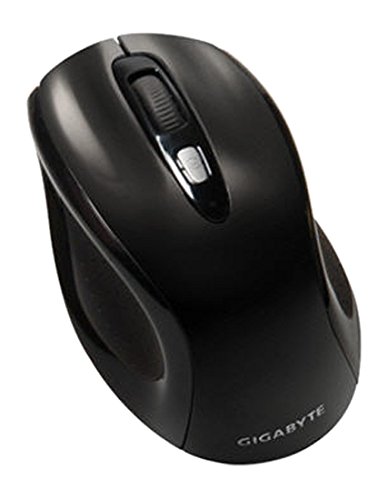
ຮູບທີ 1: GIGABYTE GM-M7600 Wireless Optical Mouse. This image displays the ergonomic design of the mouse, highlighting its form factor and the location of its buttons. The Nano USB receiver is typically stored within the mouse or connected to a computer's USB port.
ຄໍາແນະນໍາການດໍາເນີນງານ
1. ເປີດ / ປິດພະລັງງານ
The mouse typically has a power switch on its underside. Slide the switch to the 'ON' position to activate the mouse. Slide it to 'OFF' when not in use to conserve battery life.
2. ການປັບ DPI (ຄວາມອ່ອນໄຫວ)
The GM-M7600 features an adjustable DPI switch, allowing you to change the mouse sensitivity between 800 DPI and 1600 DPI. This switch is usually located near the scroll wheel. Press the DPI button to toggle between the two sensitivity settings.
3. ໜ້າທີ່ພື້ນຖານຂອງເມົ້າ
- ຄລິກຊ້າຍ: ປຸ່ມຫຼັກສຳລັບການເລືອກລາຍການ, ກຳລັງເປີດ files, ແລະ ການພົວພັນກັບຊອບແວ.
- ກົດຂວາ: ປຸ່ມສຳຮອງສຳລັບເຂົ້າເຖິງເມນູບໍລິບົດ ແລະ ຕົວເລືອກເພີ່ມເຕີມ.
- ລໍ້ເລື່ອນ: ໃຊ້ສຳລັບການເລື່ອນຜ່ານເອກະສານ ແລະ web pages. It can also function as a middle click button.
ບໍາລຸງຮັກສາ
1. ທໍາຄວາມສະອາດ
ເພື່ອຮັກສາປະສິດທິພາບແລະຮູບລັກສະນະທີ່ດີທີ່ສຸດ:
- Disconnect the mouse from your computer and turn off the power switch.
- ໃຊ້ຜ້າແພທີ່ອ່ອນໆ ທີ່ບໍ່ມີເສັ້ນດ່າງ dampຖອກໃສ່ດ້ວຍນ້ໍາຫຼືການແກ້ໄຂການເຮັດຄວາມສະອາດອ່ອນໆເພື່ອເຊັດພື້ນຜິວຂອງຫນູ.
- ຫຼີກລ່ຽງການໃຊ້ສານເຄມີທີ່ຮ້າຍແຮງ, ນ້ຳສະອາດ, ຫຼືສີດນ້ຳໃສ່ຫນູໂດຍກົງ.
- Clean the optical sensor area on the underside of the mouse with a dry cotton swab to remove any dust or debris.
2. ການທົດແທນຫມໍ້ໄຟ
When the mouse performance degrades or it stops responding, it may be time to replace the batteries.
- ປິດເມົາສ໌ໂດຍໃຊ້ສະວິດເປີດປິດ.
- Open the battery compartment as described in the 'Installing Batteries' section.
- ເອົາແບັດ AAA ເກົ່າອອກ.
- ໃສ່ແບັດເຕີຣີ AAA ໃໝ່ສອງກ້ອນ, ໂດຍສັງເກດຂົ້ວທີ່ຖືກຕ້ອງ (+/-).
- Close the battery compartment and turn the mouse back on.
ການແກ້ໄຂບັນຫາ
If you encounter issues with your GIGABYTE GM-M7600 mouse, try the following solutions:
- ເມົ້າບໍ່ຕອບສະໜອງ:
- ກວດໃຫ້ແນ່ໃຈວ່າເມົາສ໌ເປີດຢູ່.
- ກວດເບິ່ງວ່າແບດເຕີຣີຖືກຕິດຕັ້ງຢ່າງຖືກຕ້ອງແລະມີການສາກໄຟພຽງພໍ. ປ່ຽນແທນຖ້າຈໍາເປັນ.
- ໃຫ້ແນ່ໃຈວ່າຕົວຮັບສັນຍານ Nano USB ໄດ້ສຽບເຂົ້າກັບພອດ USB ທີ່ໃຊ້ງານໄດ້ໃນຄອມພິວເຕີຂອງທ່ານຢ່າງແໜ້ນໜາແລ້ວ. ລອງໃຊ້ພອດ USB ອື່ນ.
- ປິດເປີດຄອມພິວເຕີຂອງທ່ານຄືນໃໝ່.
- ການເຄື່ອນໄຫວຕົວກະພິບທີ່ຜິດພາດ:
- ເຮັດຄວາມສະອາດເຊັນເຊີ optical ຢູ່ຂ້າງລຸ່ມຂອງຫນູ.
- ໃຫ້ແນ່ໃຈວ່າທ່ານກໍາລັງໃຊ້ຫນູໃນດ້ານທີ່ເຫມາະສົມ. ຫຼີກເວັ້ນການສະທ້ອນສູງຫຼືຫນ້າໂປ່ງໃສ.
- Check for any wireless interference. Move the mouse closer to the receiver or away from other wireless devices.
- DPI switch not working:
- ໃຫ້ແນ່ໃຈວ່າເມົາສ໌ເປີດຢູ່ ແລະ ເຊື່ອມຕໍ່ແລ້ວ.
- ກົດປຸ່ມ DPI ໃຫ້ແໜ້ນ.
ຂໍ້ມູນຈໍາເພາະ
| ຊື່ຕົວແບບ | GM-M7600 |
| ຍີ່ຫໍ້ | GIGABYTE |
| ເຕັກໂນໂລຊີການເຊື່ອມຕໍ່ | 2.4GHz Radio Frequency Wireless |
| ການກວດຈັບການເຄື່ອນໄຫວ | Optical |
| ດັດປັບ DPI | 800 / 1600 DPI |
| ຈໍານວນປຸ່ມ | 3 (ຊ້າຍ, ຂວາ, ລໍ້ເລື່ອນ/ຄລິກກາງ) |
| ແຫຼ່ງພະລັງງານ | ແບດເຕີຣີ້ AAA 2 x (ລວມ) |
| ປະເພດຕົວຮັບ | Portable Nano USB Receiver |
| ອຸປະກອນທີ່ເຂົ້າກັນໄດ້ | ແລັບທັອບ, ຄອມພິວເຕີສ່ວນຕົວ |
| ສະຫນັບສະຫນູນລະບົບປະຕິບັດງານ | Linux, Windows XP |
| ວັດສະດຸຫຸ້ມຫໍ່ | Plastic with Rubberized Finish |
| ສີ | ດຳ |
ການຮັບປະກັນແລະການສະຫນັບສະຫນູນ
For warranty information and technical support, please refer to the warranty card included with your product or visit the official GIGABYTE webເວັບໄຊ. ຮັກສາໃບຮັບເງິນການຊື້ຂອງທ່ານສໍາລັບການຮ້ອງຂໍການຮັບປະກັນ.