
ແນະນຳ
The Mackie HD1221 is a 12-inch 2-way compact high-definition powered loudspeaker designed for professional audio applications. It features 1200W of Class-D Fast Recovery amplification, high-definition audio processing, and custom-designed transducers by EAW. This manual provides essential information for the safe and effective use of your HD1221 loudspeaker, including setup, operation, maintenance, and troubleshooting.
ຂໍ້ມູນຄວາມປອດໄພ
Before operating the Mackie HD1221 loudspeaker, please read and understand all safety instructions. Failure to do so may result in electric shock, fire, or other injuries. Keep these instructions for future reference.
- ແຫຼ່ງພະລັງງານ: Connect the unit only to a power supply of the type described in the operating instructions or as marked on the appliance.
- ການຕໍ່ດິນ: Ensure the loudspeaker is properly grounded to prevent electric shock.
- ການລະບາຍອາກາດ: ຫ້າມປິດຊ່ອງລະບາຍອາກາດໃດໆ. ຕິດຕັ້ງຕາມຄໍາແນະນໍາຂອງຜູ້ຜະລິດ.
- ນ້ໍາແລະຄວາມຊຸ່ມ: ຫ້າມໃຊ້ອຸປະກອນນີ້ໃກ້ກັບນໍ້າ ຫຼື ປ່ອຍໃຫ້ມັນຕົກ ຫຼື ກະແຈກກະຈາຍ.
- ທໍາຄວາມສະອາດ: ເຮັດຄວາມສະອາດດ້ວຍຜ້າແຫ້ງເທົ່ານັ້ນ.
- ການບໍລິການ: ອ້າງອີງການບໍລິການທັງໝົດໃຫ້ກັບພະນັກງານບໍລິການທີ່ມີຄຸນວຸດທິ. ການບໍລິການແມ່ນຕ້ອງການເມື່ອອຸປະກອນໄດ້ຮັບຄວາມເສຍຫາຍໃນທາງໃດກໍ່ຕາມເຊັ່ນ: ສາຍໄຟຫຼືປລັກສຽບຖືກເສຍຫາຍ, ແຫຼວຮົ່ວໄຫຼຫຼືສິ່ງຂອງຕົກເຂົ້າໄປໃນອຸປະກອນ, ອຸປະກອນຖືກຝົນຫຼືຄວາມຊຸ່ມຊື່ນ, ບໍ່ເຮັດວຽກຕາມປົກກະຕິ. , ຫຼືໄດ້ຖືກຫຼຸດລົງ.
- ການຕິດຕັ້ງ: ໃຊ້ກັບລົດເຂັນ, ຂາຕັ້ງ, ຂາຕັ້ງ, ວົງເລັບ, ຫຼືຕາຕະລາງທີ່ລະບຸໂດຍຜູ້ຜະລິດ, ຫຼືຂາຍດ້ວຍອຸປະກອນ. ເມື່ອລົດເຂັນຖືກນຳໃຊ້, ໃຫ້ໃຊ້ຄວາມລະມັດລະວັງໃນເວລາເຄື່ອນຍ້າຍເຄື່ອງພ້ອມໆກັນຂອງລົດເຂັນ/ອຸປະກອນເພື່ອຫຼີກລ່ຽງການບາດເຈັບຈາກການປີ້ນ.
ເນື້ອໃນຊຸດ
Verify that the following items are included in your Mackie HD1221 package:
- Mackie HD1221 Powered Loudspeaker
- ສາຍໄຟ
- ຄູ່ມືເລີ່ມຕົ້ນດ່ວນ (ຖ້າມີ)
- ຂໍ້ມູນການຮັບປະກັນ
ຖ້າລາຍການໃດຂາດຫາຍໄປຫຼືເສຍຫາຍ, ກະລຸນາຕິດຕໍ່ຕົວແທນຈໍາຫນ່າຍຂອງທ່ານທັນທີ.
ສິນຄ້າເກີນview
The Mackie HD1221 is a versatile loudspeaker designed for various applications, including main PA, stage monitor, and flown installations. It features a robust construction and advanced audio processing.
ດ້ານ ໜ້າ ແລະດ້ານຂ້າງ Views
ຮູບ 1: ດ້ານຫນ້າແລະດ້ານຂ້າງ view of the HD1221 loudspeaker, highlighting the durable grille and integrated handles for portability.

ຮູບທີ 2: ດ້ານຊ້າຍ view of the HD1221 loudspeaker.
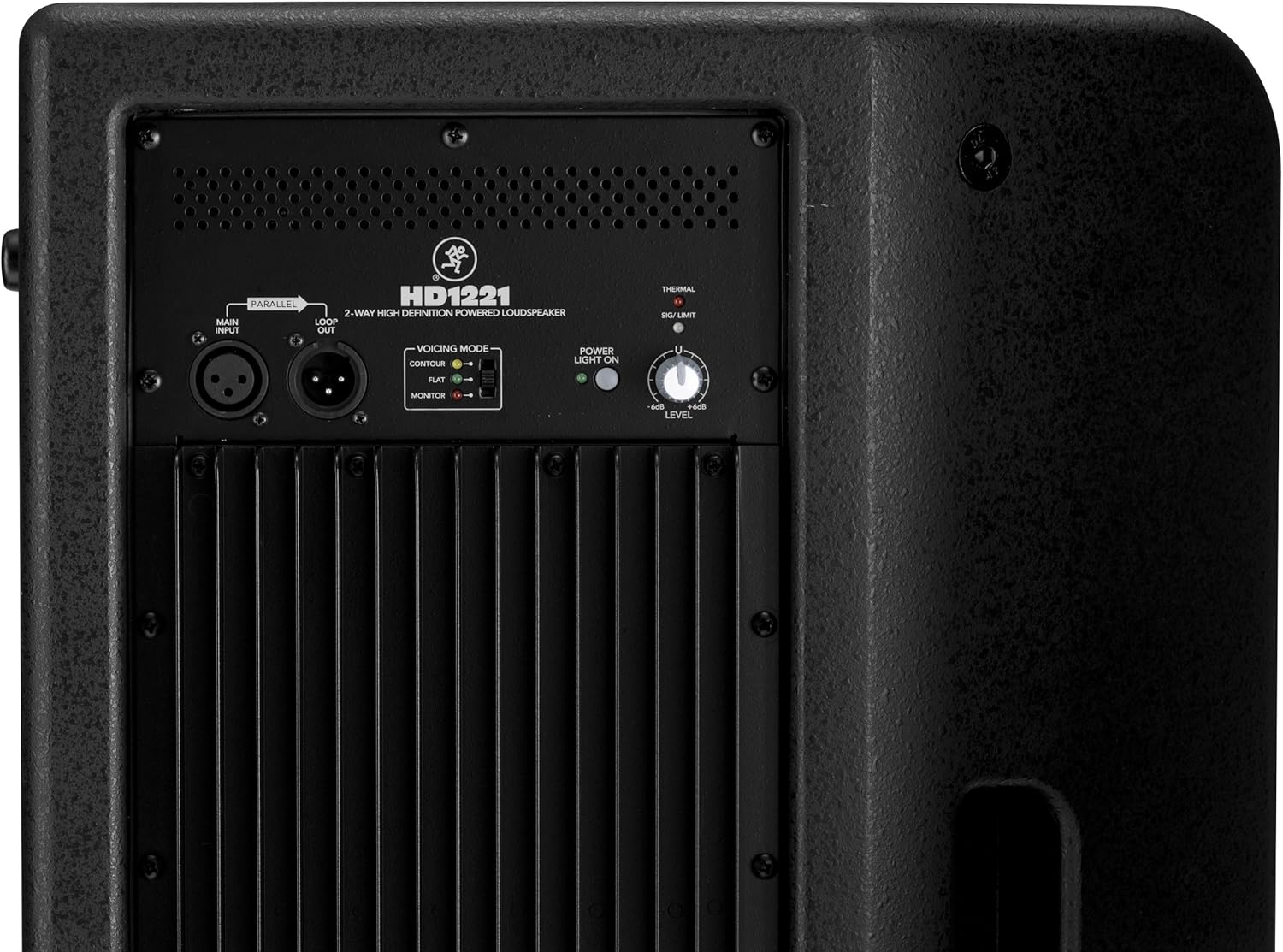
ແຜງຄວບຄຸມດ້ານຫຼັງ ແລະການເຊື່ອມຕໍ່

Figure 3: Rear panel of the HD1221, detailing the input/output section, voicing mode switch, power indicator, and level control knob.
- Main Input (XLR): Connect your audio source here.
- Loop Out (XLR): Provides a parallel output of the main input signal for connecting to additional loudspeakers or other audio equipment.
- Voicing Mode Switch: Selects between Contour, Flat, and Monitor modes to optimize the loudspeaker's frequency response for different applications.
- ເປີດໄຟ: ຊີ້ໃຫ້ເຫັນສະຖານະພະລັງງານຂອງຫນ່ວຍບໍລິການ.
- Thermal/Sig/Limit Indicators: Provide visual feedback on the loudspeaker's operational status, including thermal protection, signal presence, and limiting.
- ການຄວບຄຸມລະດັບ: Adjusts the overall output volume of the loudspeaker.
- ການປ້ອນຂໍ້ມູນພະລັງງານ AC: Connects the power cable to the mains supply.
ອົງປະກອບພາຍໃນ
ຮູບທີ 4: ພາຍໃນ view of the HD1221, showcasing the 12-inch neodymium woofer and 1.75-inch titanium compression driver, designed by EAW.
ຕັ້ງຄ່າ
Proper setup ensures optimal performance and safety. Follow these steps for initial setup:
ການເຊື່ອມຕໍ່ພະລັງງານ
- Ensure the Level control on the rear panel is set to its minimum position.
- Connect the supplied AC power cable to the AC Power Input on the rear panel of the HD1221.
- ສຽບປາຍສາຍໄຟອີກດ້ານໜຶ່ງເຂົ້າໄປໃນປລັກໄຟຟ້າທີ່ມີສາຍດິນ.
ການເຊື່ອມຕໍ່ສຽງ
- Connect your audio source (e.g., mixer, instrument) to the Main Input (XLR) on the rear panel.
- If connecting multiple loudspeakers, use the Loop Out (XLR) to send the signal to the next loudspeaker.
ຕົວເລືອກການຕິດຕັ້ງ
The HD1221 offers several mounting options for flexibility:
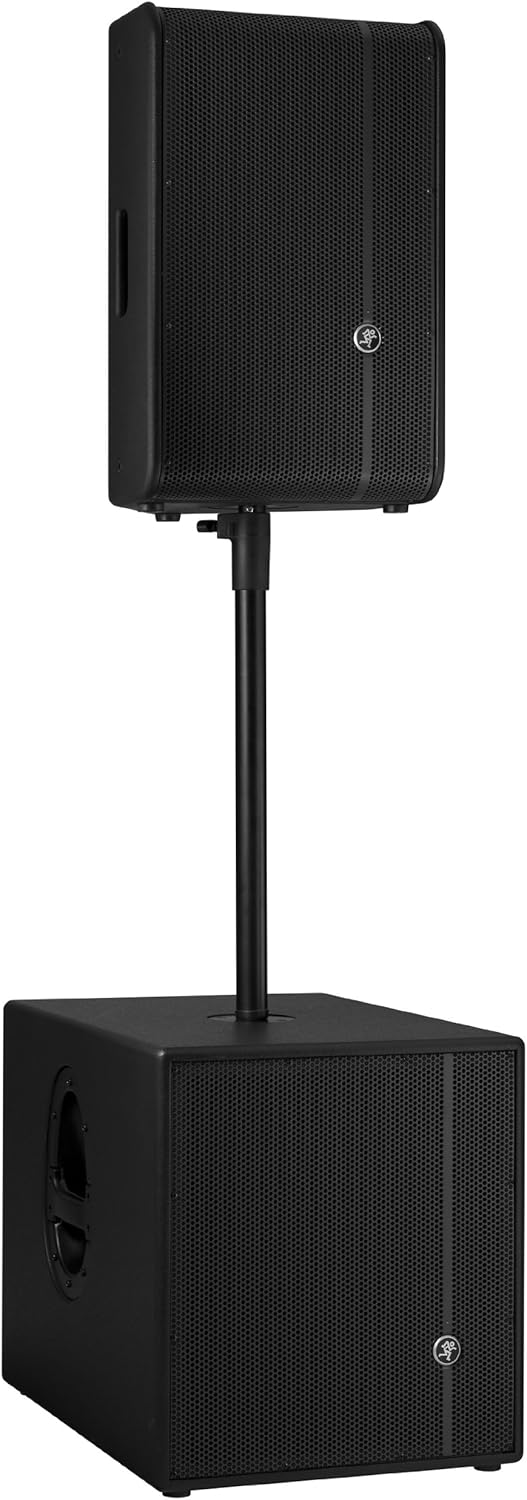
ເສົາເຂັມ

Figure 5: The HD1221 mounted on a pole, typically above a subwoofer like the HD1501 for a full-range PA system.
The HD1221 can be mounted on a standard speaker pole stand. Ensure the stand is stable and rated for the weight of the loudspeaker (approximately 58 lbs).
Stage Monitor Placement
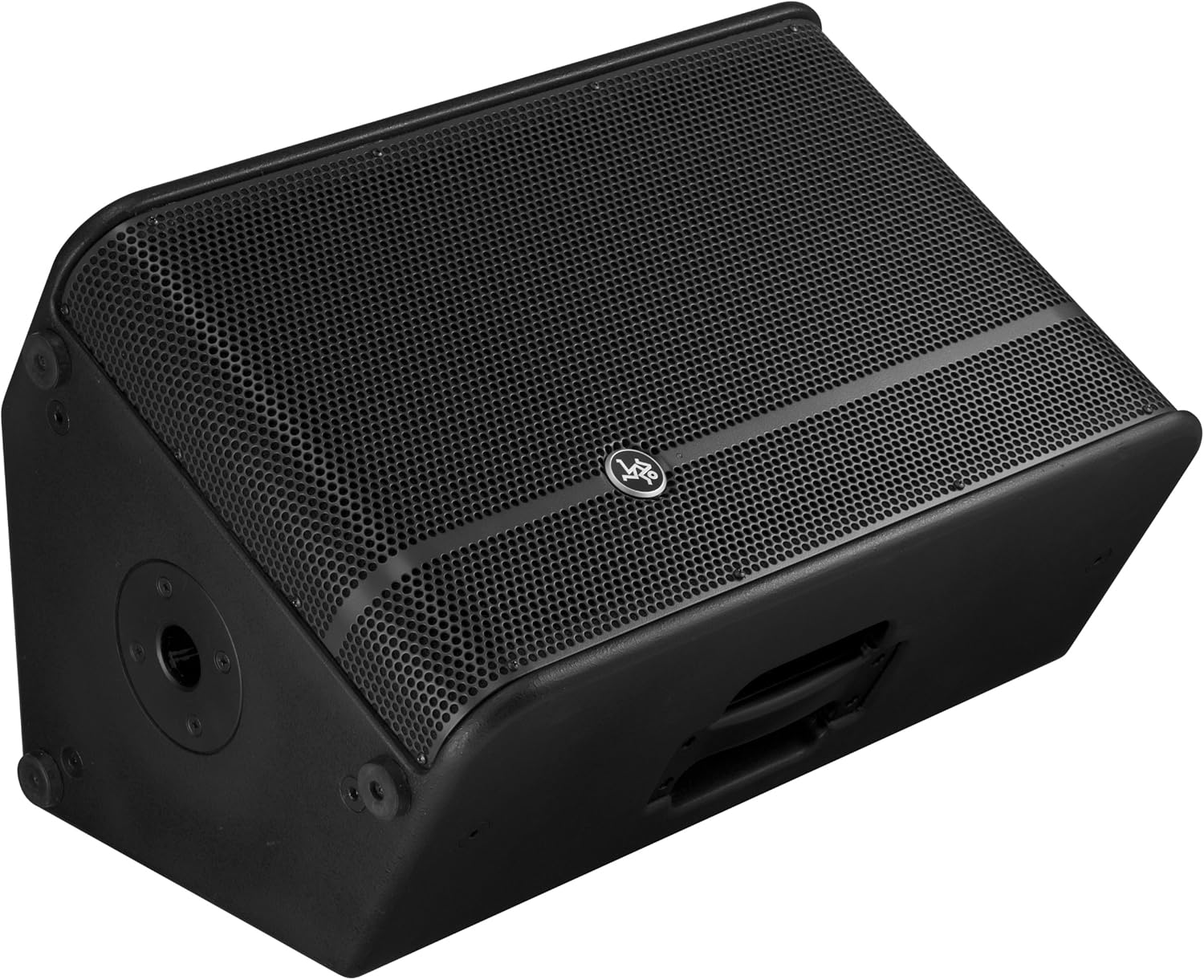
Figure 6: The HD1221 configured as a stage monitor, utilizing its 60-degree angle for optimal sound projection towards the performer.
ການອອກແບບຕູ້ອະນຸຍາດໃຫ້ໃຊ້ເປັນtage monitor with a 60-degree angle. Place the loudspeaker directly on the stage floor, angled towards the performer.
Flying/Suspension

Figure 7: The HD1221 suspended vertically using appropriate rigging hardware.

Figure 8: The HD1221 suspended horizontally using appropriate rigging hardware.
The HD1221 can be flown both vertically and horizontally. Always use certified rigging hardware and consult with a qualified professional for safe installation. The user-rotatable horn allows for precise sound placement in either orientation.
ຄໍາແນະນໍາການດໍາເນີນງານ
Once the loudspeaker is set up, follow these steps for operation:
- ເປີດ: Turn on your audio source (mixer, etc.) first, then turn on the HD1221 loudspeaker. The 'Power Light On' indicator should illuminate.
- Set Voicing Mode: Use the Voicing Mode switch on the rear panel to select the appropriate setting for your application:
- ວົງຈອນ: Provides a sculpted frequency response, often suitable for music playback.
- ແປ: Offers a neutral frequency response, ideal for critical listening or when external EQ is used.
- ຈໍພາບ: Optimizes the frequency response for use as a stage monitor, reducing low-end rumble and enhancing clarity.
- ປັບລະດັບ: Slowly increase the Level control on the rear panel to achieve the desired volume. Monitor the 'Sig/Limit' indicator; if it flashes frequently or stays lit, reduce the input level from your source or the HD1221's level to prevent distortion and potential damage.
- ປິດພະລັງງານ: When finished, turn off the HD1221 loudspeaker first, then turn off your audio source.
ວິດີໂອຜະລິດຕະພັນຢ່າງເປັນທາງການ
ວິດີໂອທີ 1: ຈົບແລ້ວview of the Mackie HD1221 12-inch 2-Way High-Definition Powered Loudspeaker, demonstrating its features and applications.
ບໍາລຸງຮັກສາ
Regular maintenance helps prolong the life and performance of your HD1221 loudspeaker.
- ທໍາຄວາມສະອາດ: Use a dry, lint-free cloth to clean the exterior of the loudspeaker. Do not use liquid cleaners or solvents.
- ປີ້ງ: Periodically check the steel grille for any damage or debris. Clean gently if necessary.
- ການເຊື່ອມຕໍ່: ຮັບປະກັນວ່າສາຍທັງໝົດຖືກເຊື່ອມຕໍ່ຢ່າງປອດໄພ ແລະບໍ່ມີຄວາມເສຍຫາຍ.
- ການເກັບຮັກສາ: When not in use, store the loudspeaker in a dry, temperate environment, protected from dust and extreme temperatures.
ການແກ້ໄຂບັນຫາ
If you encounter issues with your HD1221, refer to the following common problems and solutions:
| ບັນຫາ | ສາເຫດທີ່ເປັນໄປໄດ້ | ການແກ້ໄຂ |
|---|---|---|
| ບໍ່ມີສຽງອອກ | No power; incorrect connections; low level setting; faulty cable. | Check power cable and outlet. Verify audio cable connections. Increase Level control. Test with a different cable. |
| ສຽງບິດເບືອນ | Input level too high; faulty cable; damaged speaker component. | Reduce input level from source or HD1221. Check 'Sig/Limit' indicator. Test with a different cable. If distortion persists, contact support. |
| ບໍ່ມີໄຟສາຍ | No power; power switch off; internal fuse blown. | Ensure power cable is connected and outlet is active. Check power switch. If still no light, contact support. |
| Overheating (Thermal indicator lit) | Insufficient ventilation; prolonged high-volume operation. | Ensure adequate airflow around the unit. Reduce volume. Allow unit to cool down. |
ຂໍ້ມູນຈໍາເພາະ
Detailed technical specifications for the Mackie HD1221 powered loudspeaker:
- ພະລັງງານອອກ: ສູງສຸດ 1200W
- ປະເພດລຳໂພງ: 2-Way High-Definition Powered Loudspeaker
- Woofer: 12-inch Neodymium Woofer
- ໄດເວີການບີບອັດ: 1.75-inch Titanium Compression Driver
- ຮອນ: ໝຸນແບບຜູ້ໃຊ້ສາມາດໝຸນໄດ້ 90° x 50°
- ວັດສະດຸຕູ້: ໄມ້ອັດ 15 ມມ
- ປີ້ງ: ເຫຼັກກ້າມ້ວນເຢັນ
- ມຸມຕິດຕາມ: 60 ອົງສາ
- Voicing Modes: Contour, Flat, Monitor
- Ampການຢືນຢັນ: Class-D Fast Recovery
- impedance: 8 ໂອມ
- ນ້ໍາຫນັກລາຍການ: 58 ປອນ
- ອະນຸສັນຍາການເຊື່ອມຕໍ່: Wi-Fi (Note: This specification might refer to internal processing or future features, as direct Wi-Fi audio input is not typical for this type of speaker.)
- ໝາຍເລກຕົວແບບ: HD1221
- UPC: 663961030495
ຮັບປະກັນ
The Mackie HD1221 loudspeaker comes with a comprehensive warranty:
- ເອເລັກໂຕຣນິກ: ຮັບປະກັນ 3 ປີ
- ຄົນຂັບລົດ: ຮັບປະກັນ 2 ປີ
Please retain your proof of purchase for warranty claims. For full terms and conditions, refer to the warranty card included with your product or visit the official Mackie webເວັບໄຊ.
ສະຫນັບສະຫນູນ
For additional assistance, technical support, or service inquiries, please contact Mackie Customer Support. You can find contact information and frequently asked questions on the official Mackie webເວັບໄຊ.
ຊັບພະຍາກອນອອນໄລນ໌: ຢ້ຽມຢາມ Mackie Store on Amazon ສໍາລັບຂໍ້ມູນຜະລິດຕະພັນແລະການປັບປຸງ.