
ແນະນຳ
ຂອບໃຈສໍາລັບການຊື້asing the SENTRY CL933 Big Screen Weather Alarm Clock. This device combines a digital alarm clock with a large LCD display, providing essential information such as time, date, indoor temperature, humidity, and a weather forecast. This manual will guide you through the setup, operation, and maintenance of your new alarm clock.
ຂໍ້ມູນຄວາມປອດໄພ
- ຫ້າມວາງເຄື່ອງໄວ້ໃນອຸນຫະພູມສູງ, ແສງແດດໂດຍກົງ ຫຼື ຄວາມຊຸ່ມສູງ.
- ຫຼີກລ້ຽງການລຸດລົງຫຼືເຮັດໃຫ້ຫນ່ວຍງານໄດ້ຮັບຜົນກະທົບທີ່ເຂັ້ມແຂງ.
- ຢ່າຜະສົມແບດເຕີຣີເກົ່າແລະໃຫມ່, ຫຼືແບດເຕີລີ່ປະເພດຕ່າງໆ.
- ຖອດແບດເຕີລີ່ອອກຖ້າເຄື່ອງຈະບໍ່ຖືກໃຊ້ເປັນໄລຍະເວລາ.
- ເຮັດຄວາມສະອາດເຄື່ອງດ້ວຍຜ້າອ່ອນ, ແຫ້ງ. ຢ່າໃຊ້ເຄື່ອງເຮັດຄວາມສະອາດຂັດຫຼືສານລະລາຍ.
- ຜະລິດຕະພັນນີ້ແມ່ນສໍາລັບການນໍາໃຊ້ພາຍໃນເທົ່ານັ້ນ.
ເນື້ອໃນຊຸດ
ກະລຸນາກວດເບິ່ງວ່າລາຍການທັງໝົດມີຢູ່:
- SENTRY CL933 Big Screen Weather Alarm Clock
- ຄູ່ມືຜູ້ໃຊ້ (ເອກະສານນີ້)
ສິນຄ້າເກີນview
The SENTRY CL933 features a large, easy-to-read LCD display and intuitive controls. Familiarize yourself with the main components:
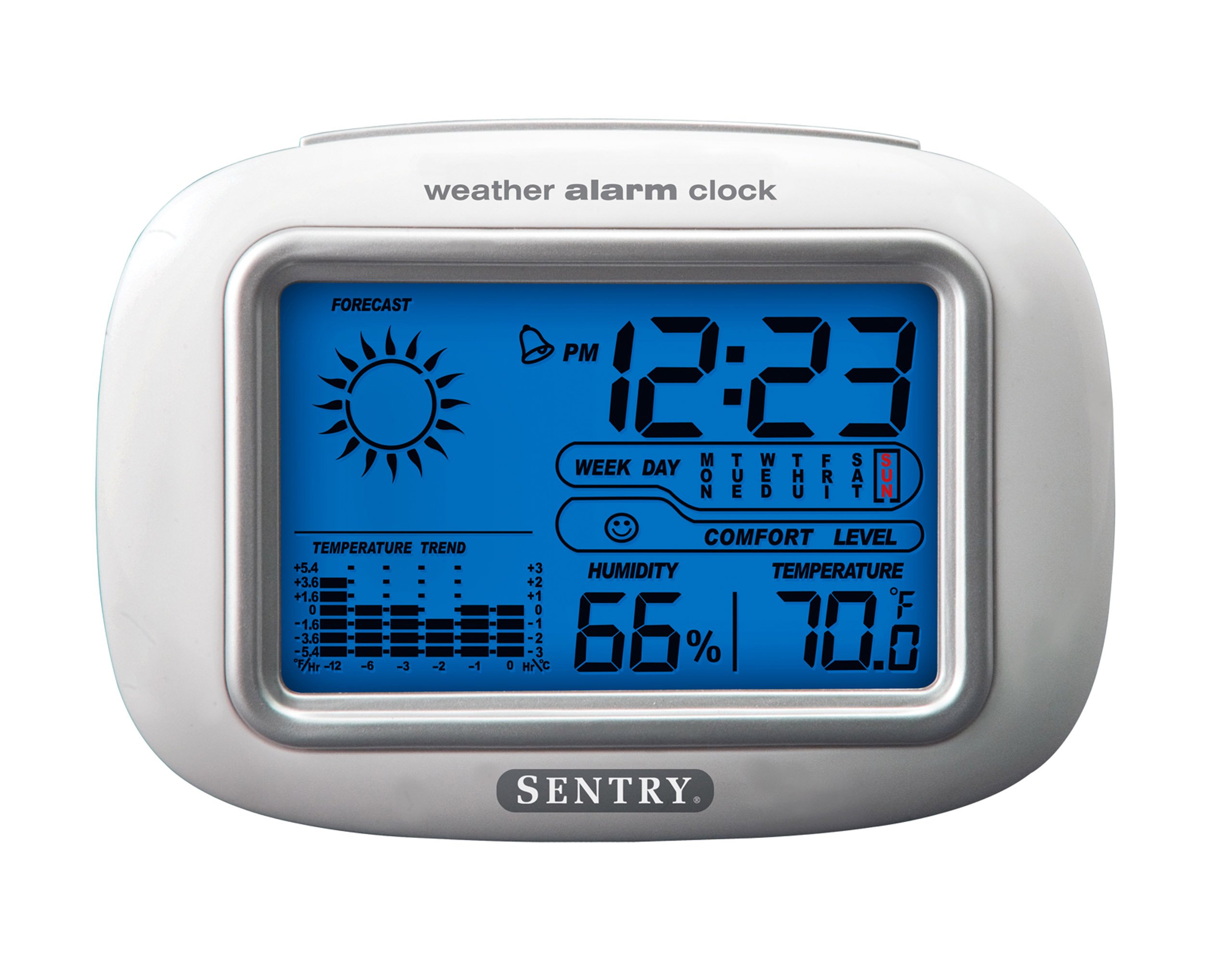
The SENTRY CL933 Big Screen Weather Alarm Clock displayed in its retail packaging, showing the clock face with time, weather forecast, humidity, and temperature readings.
ອົງປະກອບສະແດງ:
- ການສະແດງເວລາ: Shows current time (12/24 hour format).
- Date & Day of Week: Displays the current date and day.
- ໄອຄອນພະຍາກອນອາກາດ: Indicates predicted weather conditions (e.g., sunny, cloudy, rainy).
- Moon Phase Icon: Shows the current moon phase.
- ຈໍສະແດງອຸນຫະພູມ: ສະແດງອຸນຫະພູມພາຍໃນເປັນ Celsius ຫຼື Fahrenheit.
- ການສະແດງຄວາມຊຸ່ມຊື່ນ: Shows indoor humidity percentage.
- Comfort Level Icon: Indicates the comfort level based on temperature and humidity.
- ຕົວຊີ້ວັດແນວໂນ້ມອຸນຫະພູມ: Shows if the temperature is rising, falling, or stable over the last 12 hours.
- ໄອຄອນປຸກ: Indicates when the alarm is set.
Control Buttons (typically on the back or sides):
- MODE/SET Button: Used to switch between display modes and enter setting mode.
- ປຸ່ມຂຶ້ນ/ລົງ: Used to adjust values during setting and sometimes to toggle display options.
- ປຸ່ມປຸກ: Used to set or activate/deactivate the alarm.
- ປຸ່ມ SNOOZE/Light: Activates the backlight and functions as the snooze button when the alarm sounds.
- ປຸ່ມ °C/°F: ສະຫຼັບລະຫວ່າງການສະແດງອຸນຫະພູມ Celsius ແລະ Fahrenheit.
ຕັ້ງຄ່າ
1. ການຕິດຕັ້ງຫມໍ້ໄຟ
- ຊອກຫາຝາປິດຊ່ອງໃສ່ຫມໍ້ໄຟຢູ່ດ້ານຫຼັງຂອງໜ່ວຍ.
- Remove the cover by sliding or lifting it.
- ໃສ່ແບັດເຕີຣີ AAA ໃໝ່ສອງ (2) ກ້ອນ (ບໍ່ລວມ) ຕາມຕົວຊີ້ບອກຂົ້ວ (+ ແລະ -) ພາຍໃນຊ່ອງ.
- ປ່ຽນຝາປິດຊ່ອງໃສ່ຫມໍ້ໄຟໃຫ້ປອດໄພ.
- The clock will power on and the display will activate.
2. ການຈັດວາງເບື້ອງຕົ້ນ
Place the alarm clock on a stable, flat surface away from direct heat sources, strong vibrations, or areas with extreme temperature fluctuations for accurate readings.
ຄໍາແນະນໍາການດໍາເນີນງານ
1. ກໍານົດເວລາແລະວັນທີ
- ກົດຄ້າງໄວ້ MODE/SET button for approximately 3 seconds to enter time setting mode. The hour digit will start flashing.
- ໃຊ້ UP or ລົງ ປຸ່ມເພື່ອປັບຊົ່ວໂມງ.
- ກົດ MODE/SET again to confirm the hour and move to the minute setting.
- Repeat steps 2 and 3 for minutes, year, month, and day.
- ຫຼັງຈາກຕັ້ງມື້ແລ້ວ, ໃຫ້ກົດ MODE/SET ເປັນຄັ້ງສຸດທ້າຍທີ່ຈະອອກຈາກໂໝດການຕັ້ງຄ່າ.
- To switch between 12-hour and 24-hour time format, press the UP ປຸ່ມໃນຂະນະທີ່ຊົ່ວໂມງກະພິບໃນລະຫວ່າງການຕັ້ງເວລາ.
2. ຕັ້ງຄ່າປຸກ
- ກົດ ປຸກ ກົດປຸ່ມໜຶ່ງຄັ້ງເພື່ອສະແດງເວລາປຸກໃນປະຈຸບັນ.
- ກົດຄ້າງໄວ້ ປຸກ button for approximately 3 seconds. The alarm hour digit will start flashing.
- ໃຊ້ UP or ລົງ ປຸ່ມເພື່ອປັບໂມງປຸກ.
- ກົດ ປຸກ again to confirm the hour and move to the alarm minute setting.
- ໃຊ້ UP or ລົງ ປຸ່ມເພື່ອປັບນາທີປຸກ.
- ກົດ ປຸກ one last time to confirm and exit alarm setting mode.
- ເພື່ອເປີດ ຫຼື ປິດການໃຊ້ງານໂມງປຸກ, ກົດປຸ່ມ ປຸກ button briefly when the current time is displayed. An alarm icon will appear on the display when the alarm is active.
3. Snooze Function and Backlight
- ເມື່ອສຽງສັນຍານເຕືອນ, ກົດປຸ່ມ ແສງ SNOOZE / LIGHT button to activate the snooze function. The alarm will temporarily stop and sound again after a few minutes (typically 5-10 minutes).
- To turn off the alarm completely, press any other button (e.g., ປຸກ, MODE/SET) when the alarm is sounding.
- ກົດ ແສງ SNOOZE / LIGHT button at any time to activate the backlight for a few seconds, illuminating the display for easy viewing in low light conditions. The backlight is not designed to stay on continuously to conserve battery life.
4. ການເລືອກຫົວໜ່ວຍອຸນຫະພູມ (°C/°F)
ກົດ ° C / ° F button (usually located on the back or side) to toggle the temperature display between Celsius and Fahrenheit.
5. Understanding Weather and Environmental Displays
- ພະຍາກອນອາກາດ: The icon (e.g., sun, clouds, rain) represents a prediction of the weather for the next 12-24 hours based on atmospheric pressure changes detected by the internal sensor. This is an estimate and may not always match official weather reports.
- ຄວາມຊຸ່ມຊື່ນ: Displays the current indoor relative humidity percentage.
- ລະດັບຄວາມສະດວກສະບາຍ: An icon (e.g., smiley face, neutral face, frowny face) indicates the indoor comfort level based on the combination of temperature and humidity.
- Temperature Trend: The arrow indicator shows if the indoor temperature has been rising, falling, or remaining stable over the past 12 hours.
- ເດືອນໄລຍະ: The moon icon changes to reflect the current phase of the moon.
ບໍາລຸງຮັກສາ
- ທໍາຄວາມສະອາດ: ເຊັດຫນ່ວຍດ້ວຍຜ້າອ່ອນໆ, damp ຜ້າ. ຢ່າໃຊ້ສານເຄມີທີ່ຮຸນແຮງຫຼືວັດສະດຸຂັດ.
- ການປ່ຽນແບັດເຕີຣີ: When the display becomes dim or functions become erratic, replace the two AAA batteries. Ensure correct polarity.
- ການເກັບຮັກສາ: ຖ້າເກັບຮັກສາໂມງໄວ້ເປັນເວລາດົນ, ໃຫ້ຖອດແບັດເຕີຣີອອກເພື່ອປ້ອງກັນການຮົ່ວໄຫຼ.
ການແກ້ໄຂບັນຫາ
| ບັນຫາ | ສາເຫດ / ການແກ້ໄຂທີ່ເປັນໄປໄດ້ |
|---|---|
| ຈໍສະແດງຜົນຫວ່າງເປົ່າ ຫຼືມືດ. | Batteries are low or incorrectly installed. Replace with new AAA batteries, ensuring correct polarity. |
| Time/Date cannot be set. | ໃຫ້ແນ່ໃຈວ່າທ່ານກຳລັງກົດປຸ່ມຄ້າງໄວ້ MODE/SET ກົດປຸ່ມເປັນເວລາ 3 ວິນາທີເພື່ອເຂົ້າສູ່ໂໝດການຕັ້ງຄ່າ. |
| ໂມງປຸກບໍ່ມີສຽງ. | The alarm may not be activated. Press the ປຸກ button briefly to ensure the alarm icon is displayed. Check alarm time setting. |
| ອຸນຫະພູມ/ຄວາມຊຸ່ມຊື່ນບໍ່ຖືກຕ້ອງ. | The unit may be placed near a heat source, vent, or in direct sunlight. Move the clock to a more stable environment. Readings are for indoor conditions only. |
| ການພະຍາກອນອາກາດເບິ່ງຄືວ່າບໍ່ຖືກຕ້ອງ. | The weather forecast is an estimate based on internal barometric pressure changes and may not always align with local weather reports. It is a general trend indicator. |
ຂໍ້ມູນຈໍາເພາະ
- ຕົວແບບ: CL933
- ຍີ່ຫໍ້: SENTRY
- ປະເພດການສະແດງ: LCD ດິຈິຕອນທີ່ມີ Backlight
- ແຫຼ່ງພະລັງງານ: ພະລັງງານຫມໍ້ໄຟ
- ແບັດເຕີຣີທີ່ຕ້ອງການ: 2 x AAA (ບໍ່ລວມ)
- ຂະໜາດ: 6.5 x 2.25 x 4.25 ນິ້ວ (16.5 x 5.7 x 10.8 cm)
- ນ້ຳໜັກ: 6.2 ອອນສ໌ (176 ກຣາມ)
- ຄຸນສົມບັດ: Time, Date, Day of Week, Alarm, Snooze, Indoor Temperature (°C/°F), Indoor Humidity, Weather Forecast Icons, Moon Phase, Comfort Level Indicator, 12-hour Temperature Trend.
- ປະເພດການຕິດຕັ້ງ: ໂຕະ
ການຮັບປະກັນແລະການສະຫນັບສະຫນູນ
SENTRY products are designed for reliability and performance. For any questions, technical support, or warranty inquiries, please refer to the contact information provided with your purchase or visit the official SENTRY webເວັບໄຊ. ກະລຸນາຮັກສາຫຼັກຖານການຊື້ຂອງທ່ານສໍາລັບການຮຽກຮ້ອງການຮັບປະກັນ.