
1. ບົດແນະນຳ
The BUFFALO Giga Switching Hub LSW3-GT-24NSR is a 24-port Gigabit Ethernet switch designed for high-speed network environments. It is ideal for small to medium-sized offices and workplaces requiring robust and reliable network connectivity. This device supports full Gigabit speeds across all ports, ensuring efficient data transfer.
Key features include a fanless design for silent operation and enhanced reliability, as well as a loop detection function to prevent network disruptions caused by accidental network loops.
2. ຂໍ້ມູນຄວາມປອດໄພ
Please read and understand the following safety precautions before using the device to prevent injury or damage.
- ການສະຫນອງພະລັງງານ: Use only the provided power adapter. Ensure the power outlet meets the specified voltage ຂໍ້ກໍານົດ.
- ການລະບາຍອາກາດ: ຫ້າມປິດຊ່ອງລະບາຍອາກາດ. ຮັບປະກັນການໄຫຼວຽນຂອງອາກາດທີ່ພຽງພໍຮອບອຸປະກອນເພື່ອປ້ອງກັນຄວາມຮ້ອນເກີນ.
- ສະພາບແວດລ້ອມ: Avoid exposing the device to water, high humidity, extreme temperatures, or direct sunlight.
- ການຈັດການ: Do not drop or subject the device to strong impacts. Do not attempt to open or repair the device yourself. Refer all servicing to qualified personnel.
- ສາຍໄຟ: Ensure all network cables are properly connected and secured.
3. ເນື້ອໃນຊຸດ
ກວດສອບວ່າລາຍການທັງຫມົດແມ່ນມີຢູ່ໃນຊຸດ:
- BUFFALO Giga Switching Hub LSW3-GT-24NSR Unit
- ສາຍໄຟ
- Rack Mount Brackets (if included with your model)
- ຕີນຢາງ (ສຳລັບວາງໂຕະ)
4. ຕັ້ງຄ່າ
4.1 ການຕິດຕັ້ງທາງດ້ານຮ່າງກາຍ
The LSW3-GT-24NSR can be installed on a desktop or mounted in a 19-inch equipment rack.
ການຈັດວາງ Desktop:
- Attach the included rubber feet to the bottom of the unit to prevent slipping and provide stability.
- ວາງເຄື່ອງໄວ້ເທິງພື້ນຜິວທີ່ຮາບພຽງ, ໝັ້ນຄົງ ແລະ ມີລະບາຍອາກາດພຽງພໍ.
ການຕິດຕັ້ງ Rack:
- Attach the rack mount brackets to the sides of the unit using the provided screws.
- Secure the unit into a standard 19-inch equipment rack using appropriate rack screws (not included).
4.2 ການເຊື່ອມຕໍ່ສາຍເຄືອຂ່າຍ
Connect your network devices (computers, servers, other switches) to any of the 24 RJ-45 ports on the front panel using standard Ethernet cables (Category 5e or higher recommended for Gigabit speeds).

ຮູບທີ 1: ແຜງດ້ານໜ້າເກີນview with 24 Ethernet Ports and Status LEDs.
4.3 ການເຊື່ອມຕໍ່ພະລັງງານ
- Connect the power cable to the AC IN port on the rear of the device.
- ສຽບປາຍອື່ນໆຂອງສາຍໄຟເຂົ້າໄປໃນປລັກສຽບໄຟທີ່ເຫມາະສົມ.
- The device will power on automatically. The POWER LED on the front panel should illuminate.

ຮູບ 2: ແຜງດ້ານຫຼັງເກີນview with AC IN Power Port.
5. ຄໍາແນະນໍາການດໍາເນີນງານ
5.1 ຕົວຊີ້ວັດ LED
The front panel features several LED indicators to monitor the status of the switch and its ports.
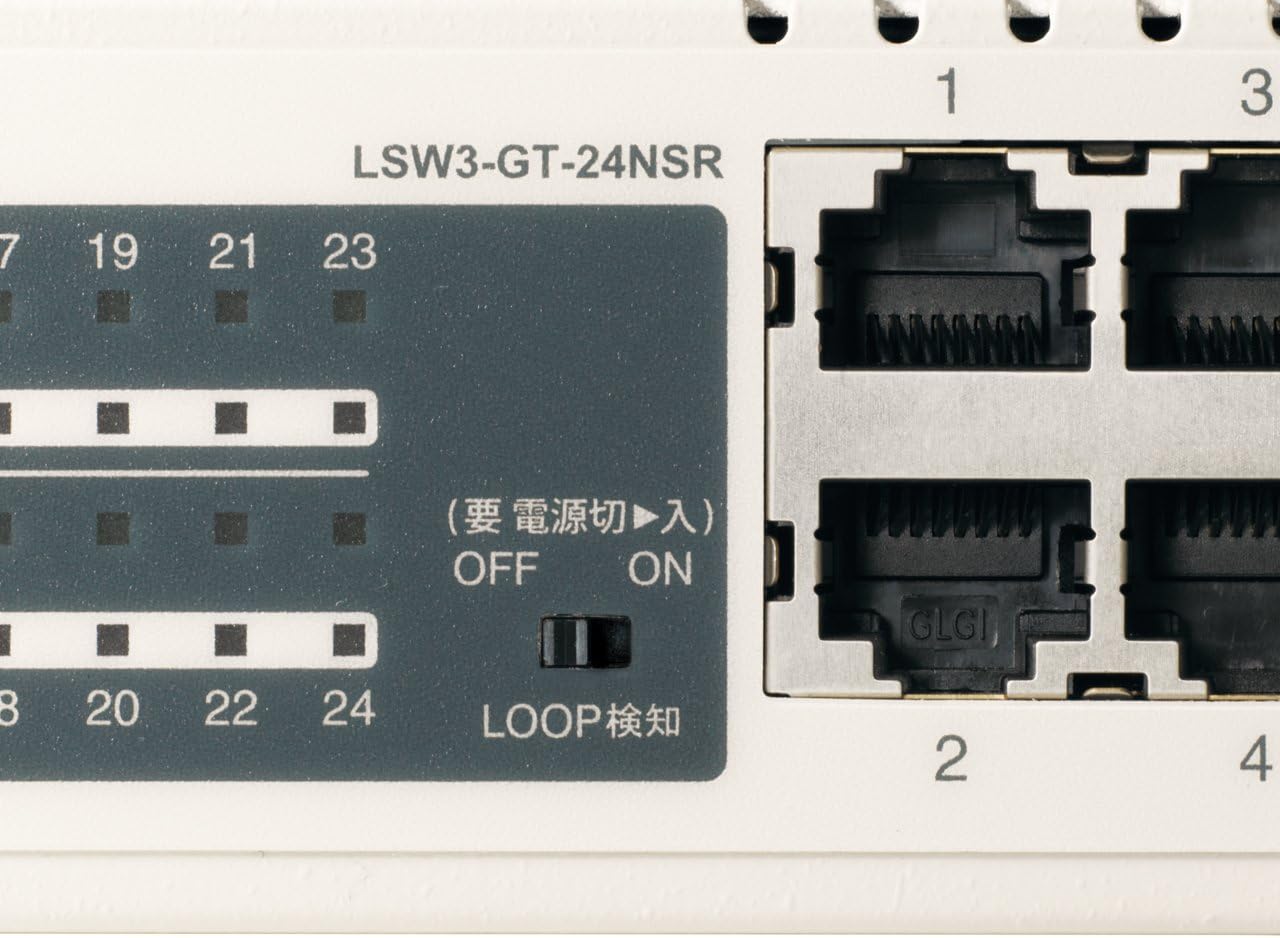
ຮູບທີ 3: ລາຍລະອຽດ view of LED Indicators and Loop Detection Switch.
| ຊື່ LED | ສະຖານະ | ລາຍລະອຽດ |
|---|---|---|
| ພະລັງງານ | On | ອຸປະກອນເປີດຢູ່. |
| ລິ້ງ / ACT (ຕໍ່ພອດ) | On | A network device is connected and a link is established. |
| ກະພິບ | ຂໍ້ມູນກຳລັງຖືກສົ່ງຕໍ່ ຫຼື ຮັບຜ່ານພອດ. | |
| 1000/100/10M (ຕໍ່ພອດ) | ສີຂຽວ | Port is operating at 1000 Mbps (Gigabit Ethernet). |
| ສີສົ້ມ | Port is operating at 100 Mbps (Fast Ethernet). | |
| ປິດ | Port is operating at 10 Mbps (Ethernet). | |
| LOOP DETECT | On | A network loop has been detected. |
5.2 Loop Detection Function
The LSW3-GT-24NSR features a hardware switch for enabling or disabling the loop detection function. This function helps prevent network instability caused by accidental network loops.
Figure 4: Loop Detection Switch (ON/OFF).
- ເປີດ: Loop detection is active. If a loop is detected, the corresponding port will be automatically shut down to prevent network broadcast storms, and the LOOP DETECT LED will illuminate.
- ປິດ: Loop detection is disabled.
It is recommended to keep the loop detection function ON for network stability.
6. ບໍາລຸງຮັກສາ
6.1 ການທໍາຄວາມສະອາດອຸປະກອນ
To maintain optimal performance, periodically clean the exterior of the switch.
- ຖອດສາຍໄຟອອກກ່ອນທຳຄວາມສະອາດ.
- ໃຊ້ຜ້າປຽກອ່ອນໆເຊັດພື້ນຜິວ.
- Do not use liquid cleaners, aerosols, or solvents, as these may damage the casing ຫຼືອົງປະກອບພາຍໃນ.
6.2 ການພິຈາລະນາດ້ານສິ່ງແວດລ້ອມ
Ensure the device is operated within its specified environmental conditions:
- ອຸນຫະພູມ: 0°C ຫາ 40°C (32°F ຫາ 104°F)
- ຄວາມຊຸ່ມຊື່ນ: 10% ຫາ 85% (ບໍ່ condensing)
7. ການແກ້ໄຂບັນຫາ
If you encounter issues with your BUFFALO Giga Switching Hub, refer to the following common problems and solutions.
7.1 ບໍ່ມີພະລັງງານ
- ອາການ: ໄຟ LED ປິດ.
- ການແກ້ໄຂ: Check if the power cable is securely connected to both the device and the power outlet. Ensure the power outlet is functional.
7.2 No Link or Slow Speed on a Port
- ອາການ: The LINK/ACT LED for a connected port is off, or the 1000/100/10M LED indicates a lower speed than expected (e.g., 100M instead of 1000M).
- ການແກ້ໄຂ:
- ກວດສອບວ່າສາຍ Ethernet ໄດ້ເຊື່ອມຕໍ່ກັນຢ່າງແໜ້ນໜາຢູ່ທັງສອງສົ້ນ.
- Try a different Ethernet cable. Ensure it is a Category 5e or higher cable for Gigabit speeds.
- ເຊື່ອມຕໍ່ອຸປະກອນກັບພອດອື່ນໃນສະວິດ.
- Check the network adapter settings on the connected device (computer, server) to ensure it is configured for auto-negotiation or the correct speed.
7.3 Network Instability / LOOP DETECT LED is On
- ອາການ: The LOOP DETECT LED is illuminated, and network performance is degraded or unstable.
- ການແກ້ໄຂ:
- A network loop has been detected. This typically occurs when two ports on the same switch (or different switches) are connected to each other, creating an infinite data path.
- Carefully inspect your network cabling to identify and remove any redundant connections that form a loop.
- If the loop detection switch is ON, the affected port will be automatically shut down. Once the loop is resolved, the port should resume normal operation.
8. ຂໍ້ມູນຈໍາເພາະ
| ຄຸນສົມບັດ | ລາຍລະອຽດ |
|---|---|
| ຍີ່ຫໍ້ | ບັກຟາໂລ |
| ໝາຍເລກຕົວແບບ | LSW3-GT-24NSR |
| ຈຳນວນພອດ | ພອດ 24 x 10/100/1000BASE-T RJ-45 |
| ຄວາມອາດສາມາດສະຫຼັບ | 48 Gbps (ບໍ່ບລັອກ) |
| ອັດຕາການສົ່ງຕໍ່ | 35.7 Mpps |
| ຂະ ໜາດ ຕາຕະລາງທີ່ຢູ່ MAC | ລາຍການ 8K |
| ສະຫນັບສະຫນູນກອບ Jumbo | ເຖິງ 9KB |
| ຄຸນສົມບັດ | Auto-MDI/MDIX, Auto-Negotiation, Loop Detection Function, Fanless Design |
| ການສະຫນອງພະລັງງານ | ການສະຫນອງພະລັງງານ AC ພາຍໃນ |
| ຂະໜາດ (ກວ້າງ x ສູງ) | (Specific dimensions not provided in source, typical for 1U rackmount) |
| ນ້ຳໜັກ | (Specific weight not provided in source) |
| ອຸນຫະພູມປະຕິບັດການ | 0°C ຫາ 40°C |
| ຄວາມຊຸ່ມຊື່ນປະຕິບັດການ | 10% ຫາ 85% (ບໍ່ condensing) |
9. ການຮັບປະກັນແລະການສະຫນັບສະຫນູນ
This BUFFALO product is covered by a manufacturer's warranty. Please refer to the warranty card included with your product or visit the official BUFFALO webເວັບໄຊສໍາລັບເງື່ອນໄຂການຮັບປະກັນລາຍລະອຽດ.
For technical support, product registration, or further assistance, please visit the official BUFFALO support webເວັບໄຊ ຫຼືຕິດຕໍ່ພະແນກບໍລິການລູກຄ້າຂອງເຂົາເຈົ້າ. ຂໍ້ມູນການຕິດຕໍ່ໂດຍປົກກະຕິສາມາດພົບເຫັນຢູ່ໃນຜູ້ຜະລິດຂອງ webສະຖານທີ່ຫຼືຢູ່ໃນການຫຸ້ມຫໍ່ຜະລິດຕະພັນ.