
1. ບົດແນະນຳ
This manual provides essential information for the safe and efficient installation, operation, and maintenance of the Eltako FSM61-UC Wireless Transmitter Module. Please read this manual thoroughly before using the device.
2. ຂໍ້ມູນຄວາມປອດໄພ
ຄຳເຕືອນ: Electrical work must be performed exclusively by qualified electricians or under their direct supervision and guidance. Failure to comply may result in electric shock, fire, or serious injury.
Observe all local and national electrical codes and regulations during installation.
3. ຜະລິດຕະພັນເກີນview
The Eltako FSM61-UC is a dual-channel wireless transmitter module designed for panel mounting. It features an internal antenna and operates without standby power loss. This module sends radio telegrams within the Eltako radio system.
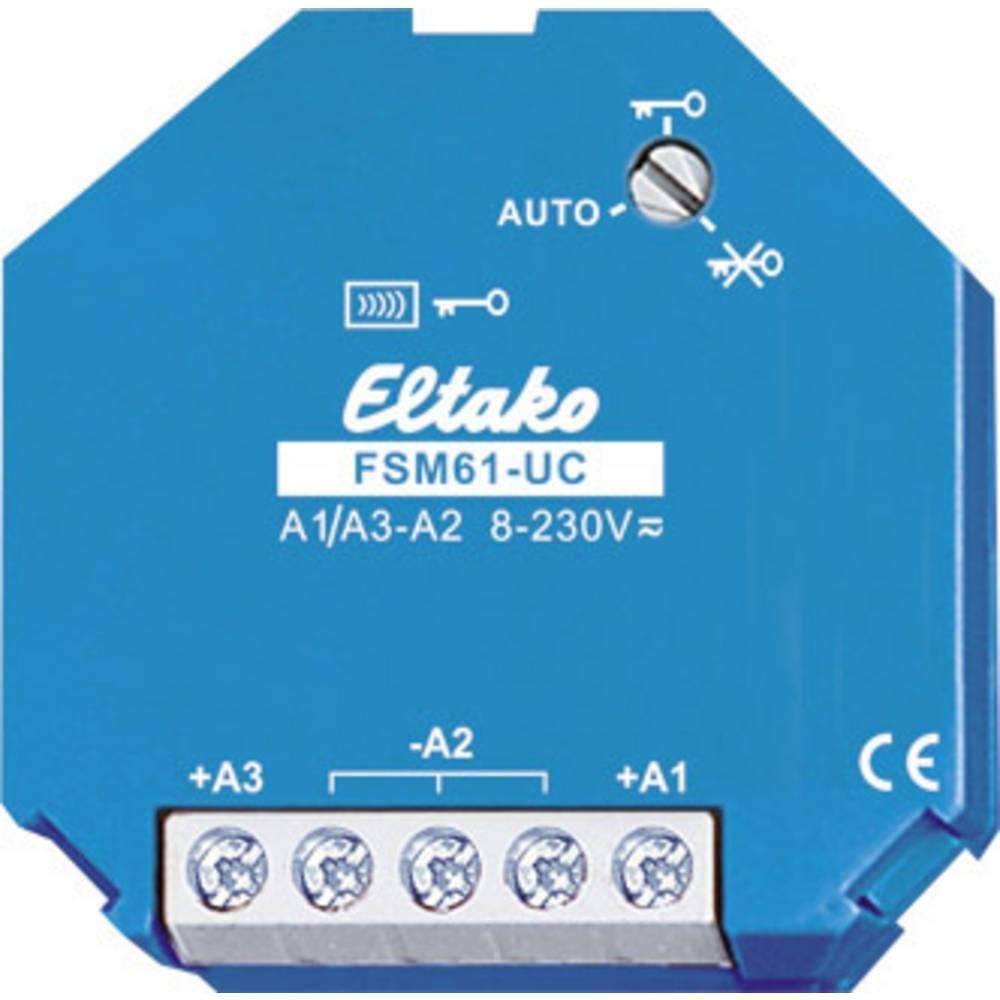
Image 1: Eltako FSM61-UC Wireless Transmitter Module. This image shows the compact design of the module, suitable for integration into electrical panels.
- ປະເພດ: Dual radio emission module
- ເສົາອາກາດ: ພາຍໃນ
- ການບໍລິໂພກພະລັງງານ: No standby loss
- ການຕິດຕັ້ງ: ການຕິດຕັ້ງແຜງ
- ຂະໜາດ (L x W x D): ປະມານ 45mm x 45mm x 18mm
4. ການຕິດຕັ້ງແລະການຕິດຕັ້ງ
Follow these instructions for proper installation and wiring of the FSM61-UC module:
- ຄວບຄຸມວັດສະດຸປ້ອນ:
- Terminal A1 sends a toggle-like radio telegram.
- Terminal A3 sends a toggle-like radio telegram.
- Opening both control contacts simultaneously sends a radio key telegram.
- ການຄວບຄຸມພ້ອມໆກັນ: It is prohibited to control multiple wireless emission modules simultaneously from a single source.
- Universal Control Voltage: The +an/-A2 input processes control commands from 8 to 253 V AC or 10 to 230 V DC. The minimum duration for a control command is 0.2 seconds.
- Cable Capacitance: The maximum parallel capacitance for control cables at 230 V is 5 nF. This corresponds to an approximate cable length of 20 meters.
- Bridged Terminals (A1 and A3): If terminals A1 and A3 are bridged, an A3 radio telegram is sent once per minute as long as the control voltage is present. This feature is useful for central commands with priority.
5. ຄໍາແນະນໍາການດໍາເນີນງານ
The FSM61-UC module does not require continuous power, thus ensuring no standby power loss.
ການຈັດການການເຂົ້າລະຫັດ
The rotary switch on the module is used to activate or deactivate encryption. The switch operates in AUTO mode.
- To Activate Encryption: Turn the rotary switch to the right stop (indicated by a key symbol) and then press the associated keys once.
- To Deactivate Encryption: Turn the rotary switch to the left stop (indicated by a crossed-out key symbol) and then press the associated keys once.
6. ບໍາລຸງຮັກສາ
The Eltako FSM61-UC module is designed for maintenance-free operation under normal conditions. Ensure the module is kept free from dust and moisture. No user-serviceable parts are inside.
7. ການແກ້ໄຂບັນຫາ
If the module does not function as expected, verify the following:
- Ensure all wiring connections are secure and correct according to the installation instructions.
- ຢືນຢັນວ່າການຄວບຄຸມ voltage is within the specified range (8-253 V AC or 10-230 V DC) and applied for at least 0.2 seconds.
- Check the encryption settings using the rotary switch as described in the Operating Instructions.
- Ensure no other wireless emission modules are being controlled simultaneously from the same source.
- ຖ້າບັນຫາຍັງຄົງຢູ່, ໃຫ້ປຶກສາຊ່າງໄຟຟ້າທີ່ມີຄຸນວຸດທິ.
8. ຂໍ້ມູນຈໍາເພາະ
| ຄຸນສົມບັດ | ຂໍ້ມູນຈໍາເພາະ |
|---|---|
| ໝາຍເລກຕົວແບບ | FSM61-UC |
| ຜູ້ຜະລິດ | Eltako |
| ຂະໜາດ (L x W x D) | 9 x 6.5 x 2.2 cm (approx. 45 x 45 x 18 mm for module body) |
| ນ້ຳໜັກ | 40 ກຣາມ |
| ການຄວບຄຸມ Voltage ການປ້ອນຂໍ້ມູນ | 8-253 V AC or 10-230 V DC |
| Minimum Control Pulse Duration | 0.2 ວິນາທີ |
| Max. Parallel Cable Capacitance (230V) | 5 nF (approx. 20 meters) |
| ການນໍາໃຊ້ | Professional and domestic |
9. ການຮັບປະກັນແລະການສະຫນັບສະຫນູນ
Information regarding specific warranty terms and customer support for the Eltako FSM61-UC module is not available in the provided product details. Please refer to the manufacturer's official website or contact your point of purchase for warranty details and technical support.