
1. ຂໍ້ມູນຄວາມປອດໄພທີ່ສໍາຄັນ
ກະລຸນາອ່ານຄໍາແນະນໍາທັງໝົດຢ່າງລະອຽດກ່ອນທີ່ຈະໃຊ້ເຄື່ອງເຮັດຄວາມຮ້ອນນີ້. ການບໍ່ປະຕິບັດຕາມຄໍາແນະນໍາເຫຼົ່ານີ້ອາດຈະເຮັດໃຫ້ເກີດໄຟໄໝ້, ໄຟຟ້າຊັອດ, ການບາດເຈັບຕໍ່ບຸກຄົນ ຫຼື ຄວາມເສຍຫາຍຕໍ່ຊັບສິນ.
- ຄຳເຕືອນ: ຄວາມສ່ຽງໄຟໄໝ້. ເກັບຮັກສາວັດສະດຸທີ່ຕິດໄຟໄດ້ເຊັ່ນ: ເຟີນີເຈີ, ໝອນ, ຜ້າປູທີ່ນອນ, ເຈ້ຍ, ເຄື່ອງນຸ່ງຫົ່ມ ແລະ ຜ້າມ່ານໃຫ້ຢູ່ຫ່າງຈາກດ້ານໜ້າຂອງເຄື່ອງເຮັດຄວາມຮ້ອນຢ່າງໜ້ອຍ 3 ຟຸດ (0.9 ແມັດ) ແລະ ຫ່າງຈາກດ້ານຂ້າງ ແລະ ດ້ານຫຼັງ.
- ເຄື່ອງເຮັດຄວາມຮ້ອນນີ້ຮ້ອນເມື່ອໃຊ້. ເພື່ອຫຼີກເວັ້ນການບາດແຜ, ບໍ່ໃຫ້ຜິວຫນັງເປົ່າແຕະພື້ນຜິວຮ້ອນ.
- ຄວາມລະມັດລະວັງທີ່ສຸດແມ່ນມີຄວາມຈໍາເປັນໃນເວລາທີ່ເຄື່ອງເຮັດຄວາມຮ້ອນໃດໆຖືກນໍາໃຊ້ໂດຍຫຼືຢູ່ໃກ້ກັບເດັກນ້ອຍຫຼືເດັກນ້ອຍທີ່ບໍ່ຖືກຕ້ອງແລະທຸກຄັ້ງທີ່ເຄື່ອງເຮັດຄວາມຮ້ອນຖືກປະໄວ້ແລະບໍ່ມີການເບິ່ງແຍງ.
- ຖອດເຄື່ອງເຮັດຄວາມຮ້ອນທຸກຄັ້ງເມື່ອບໍ່ໄດ້ໃຊ້.
- ຫ້າມໃຊ້ເຄື່ອງເຮັດຄວາມຮ້ອນທີ່ມີສາຍໄຟຫຼືປັdamagedກເສຍຫາຍຫຼືຫຼັງຈາກເຄື່ອງທໍາງານຜິດປົກກະຕິ, ໄດ້ຫຼຸດຫຼືເສຍຫາຍໃນລັກສະນະໃດ ໜຶ່ງ.
- ຢ່າໃຊ້ນອກ.
- ເພື່ອຕັດການເຊື່ອມຕໍ່ເຄື່ອງເຮັດຄວາມຮ້ອນ, ໃຫ້ປິດການຄວບຄຸມ, ຈາກນັ້ນຖອດປລັກອອກຈາກປລັກສຽບໄຟ.
- ຫ້າມສຽບ ຫຼື ອະນຸຍາດໃຫ້ສິ່ງຂອງຕ່າງປະເທດເຂົ້າໄປໃນທໍ່ລະບາຍອາກາດ ຫຼື ທໍ່ລະບາຍອາກາດ ເພາະອາດເຮັດໃຫ້ເກີດໄຟຊັອດ ຫຼື ໄຟໄໝ້ ຫຼື ເຮັດໃຫ້ເຄື່ອງເຮັດຄວາມຮ້ອນເສຍຫາຍໄດ້.
- ເພື່ອປ້ອງກັນໄຟທີ່ອາດຈະເກີດຂຶ້ນ, ຢ່າປິດກັ້ນການຮັບອາກາດຫຼືລະບາຍອາກາດໃນທາງໃດກໍ່ຕາມ. ຢ່າໃຊ້ພື້ນຜິວທີ່ອ່ອນນຸ້ມ, ຄືກັບຕຽງນອນ, ບ່ອນທີ່ຊ່ອງເປີດອາດຈະຖືກປິດກັ້ນ.
- ເຄື່ອງເຮັດຄວາມຮ້ອນນີ້ປະກອບມີ Tip-Over Safety Switch that automatically turns the unit off if it is accidentally tipped over.
- Features an internal heat-limiting thermostat and thermal cut-off safety device to prevent overheating.

ຮູບພາບ: The Optimus H-1382 heater features a tip-over safety switch, which automatically cuts power if the unit is accidentally knocked over, enhancing user safety.
2. ຜະລິດຕະພັນເກີນview
The Optimus H-1382 is a portable oscillating fan heater designed to provide efficient and convenient heating for personal spaces. It offers versatile functionality, serving as a heater in colder months and a cooling fan during warmer periods. Its compact design and safety features make it suitable for various indoor environments.
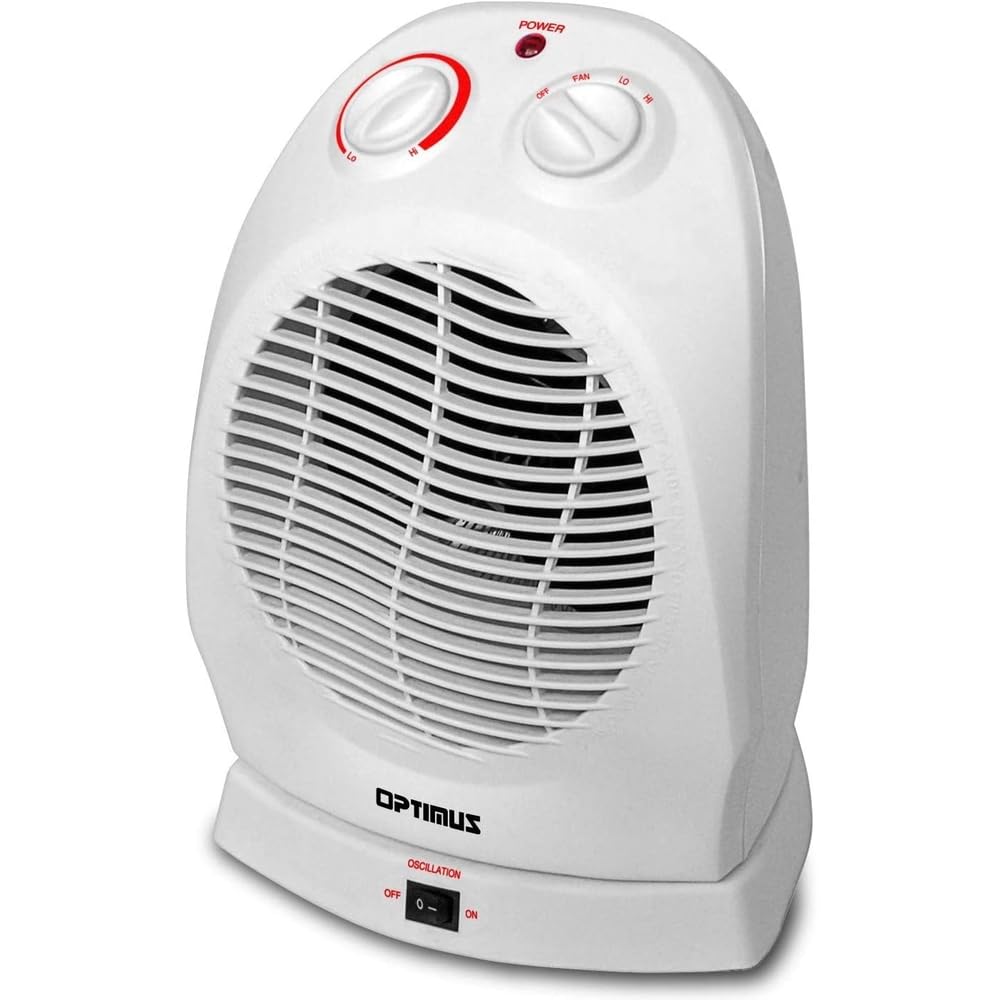
ຮູບພາບ: The Optimus H-1382 Portable Oscillating Fan Heater is shown in a living room, highlighting its compact size and suitability for personal heating.
ຄຸນນະສົມບັດທີ່ສໍາຄັນ:
- Two Heat Settings: 750W and 1500W
- Four-position Function Switch: OFF, FAN, LO (Low Heat), HI (High Heat)
- ການຄວບຄຸມເຄື່ອງຄວບຄຸມອຸນຫະພູມອັດຕະໂນມັດ
- Motorized Oscillating Base (rotates approximately 70-90 degrees)
- Internal Heat-Limiting Thermostat
- Thermal Cut-Off Safety Device
- Overheat Protection Circuit
- Tip-Over Safety Switch
- ແສງຕົວຊີ້ວັດພະລັງງານ
- Integrated carry handle for portability
3. ຕັ້ງຄ່າ
Before initial use, ensure the heater is placed on a firm, level surface. Avoid placing it on soft surfaces like rugs or carpets that could block the air intake. Ensure there is at least 3 feet (0.9 meters) of clear space around the heater from any combustible materials. Plug the heater directly into a 120V AC, 60Hz wall outlet. Do not use with extension cords or power strips.
4. ຄໍາແນະນໍາການດໍາເນີນງານ
The Optimus H-1382 features two control knobs and an oscillation switch for easy operation.

ຮູບພາບ: ລາຍລະອຽດ view of the control panel on the Optimus H-1382, showing the thermostat knob, function switch, and oscillation switch.
Function Switch (Right Knob):
- ປິດ: Turns the heater completely off.
- ແຟນAN: Activates the fan-only mode for air circulation without heat.
- LO (Low Heat): Provides 750 watts of heating power.
- HI (High Heat): Provides 1500 watts of heating power.
Thermostat Control (Left Knob):
This knob allows you to set your desired room temperature. Once the room reaches the set temperature, the heater will cycle on and off automatically to maintain it. The power indicator light will illuminate when the heater is actively heating.
- Turn the thermostat knob to the 'HI' position.
- Select your desired heat setting (LO or HI) using the function switch.
- Once the room reaches a comfortable temperature, slowly turn the thermostat knob counter-clockwise until the heater turns off.
- The heater will now automatically maintain this temperature.
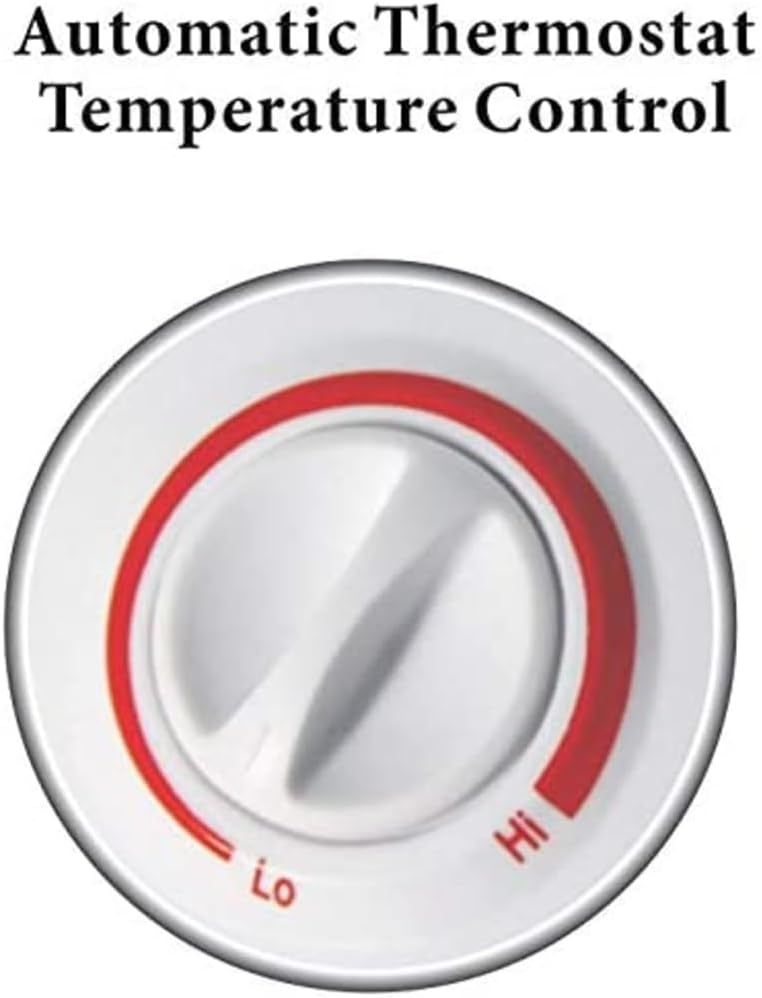
ຮູບພາບ: The automatic thermostat control knob on the Optimus H-1382, indicating 'Lo' and 'Hi' settings for temperature regulation.
ຄຸນນະສົມບັດ Oscillation:
The oscillation switch, located at the base of the unit, controls the motorized oscillating base. When turned ON, the heater will rotate approximately 70-90 degrees, distributing heat over a wider area. Turn it OFF to direct heat in a stationary position.
ວິດີໂອ: This video provides a general product description of the Optimus H-1382 Portable Oscillating Fan Heater, showcasing ລັກສະນະ ແລະ ການດຳເນີນງານຂອງມັນ.
5. ບໍາລຸງຮັກສາ
ການບໍາລຸງຮັກສາເປັນປົກກະຕິຮັບປະກັນປະສິດທິພາບທີ່ດີທີ່ສຸດແລະອາຍຸຍືນຂອງເຄື່ອງເຮັດຄວາມຮ້ອນຂອງທ່ານ.
ທໍາຄວາມສະອາດ:
- ຖອດເຄື່ອງເຮັດຄວາມຮ້ອນອອກສະເໝີກ່ອນທຳຄວາມສະອາດ.
- ໃຊ້ອ່ອນ, ງamp ຜ້າເຊັດພື້ນຜິວພາຍນອກຂອງເຄື່ອງເຮັດຄວາມຮ້ອນ.
- ຫ້າມໃຊ້ເຄື່ອງຊັກຜ້າ ຫຼືສານລະລາຍທີ່ຂັດຜິວ ເພາະອາດເຮັດໃຫ້ພື້ນຜິວເສຍຫາຍໄດ້.
- ຄ່ອຍໆດູດຝຸ່ນຊ່ອງອາກາດເຂົ້າ ແລະ ຊ່ອງລະບາຍອາກາດເພື່ອກຳຈັດຝຸ່ນ ແລະ ຂີ້ເທົ່າທີ່ຕົກຄ້າງຢູ່.
- Ensure the heater is completely dry before plugging it back in.
ການເກັບຮັກສາ:
ເມື່ອເກັບຮັກສາເຄື່ອງເຮັດຄວາມຮ້ອນ, ໃຫ້ເກັບຮັກສາໄວ້ໃນບ່ອນທີ່ເຢັນ, ແຫ້ງ. ມັນແນະນໍາໃຫ້ເກັບຮັກສາມັນໄວ້ໃນການຫຸ້ມຫໍ່ຕົ້ນສະບັບຂອງມັນເພື່ອປົກປ້ອງມັນຈາກຝຸ່ນແລະຄວາມເສຍຫາຍ.
6. ການແກ້ໄຂບັນຫາ
If your heater is not operating correctly, please check the following common issues before contacting support.
- ເຄື່ອງເຮັດຄວາມຮ້ອນບໍ່ເປີດ:
- ກວດໃຫ້ແນ່ໃຈວ່າໄດ້ສຽບສາຍໄຟເຂົ້າກັບປລັກໄຟຟ້າທີ່ເຮັດວຽກຢ່າງປອດໄພ.
- Check if the function switch is set to 'LO' or 'HI'.
- ກວດສອບວ່າປຸ່ມຄວບຄຸມອຸນຫະພູມຖືກຕັ້ງໄວ້ທີ່ອຸນຫະພູມສູງກວ່າອຸນຫະພູມຫ້ອງໃນປະຈຸບັນ.
- Check if the tip-over safety switch has been activated (ensure the heater is on a flat, stable surface).
- Confirm that the circuit breaker has not tripped.
- Heater produces no heat in heat mode:
- Ensure the function switch is not set to 'FAN' only.
- ປັບເຄື່ອງຄວບຄຸມອຸນຫະພູມໃຫ້ເປັນການຕັ້ງຄ່າທີ່ສູງຂຶ້ນ.
- Heater cycles on and off too frequently:
- The thermostat may be set too close to the ambient room temperature. Adjust it slightly.
- Ensure the heater is not placed near a draft or an open window, which can cause rapid temperature fluctuations.
- ກະແສລົມຫຼຸດລົງ ຫຼື ສຽງລົບກວນຜິດປົກກະຕິ:
- Check for dust or obstructions in the air intake and exhaust grilles. Clean as per maintenance instructions.
7. ຂໍ້ມູນຈໍາເພາະ
| ຄຸນສົມບັດ | ຂໍ້ມູນຈໍາເພາະ |
|---|---|
| ຍີ່ຫໍ້ | Optimus |
| ໝາຍເລກຕົວແບບ | H-1382 |
| ການຕັ້ງຄ່າພະລັງງານ | 750W (ຕໍ່າ), 1500W (ສູງ) |
| Function ປ່ຽນ | OFF, FAN, LO, HI |
| ເຄື່ອງຄວບຄຸມອຸນຫະພູມ | ການຄວບຄຸມອັດຕະໂນມັດ |
| ການສັ່ນສະເທືອນ | Motorized, approx. 70-90 degrees |
| ຄຸນນະສົມບັດຄວາມປອດໄພ | Tip-Over Safety Switch, Internal Heat-Limiting Thermostat, Thermal Cut-Off, Overheat Protection Circuit |
| ຂະໜາດສິນຄ້າ | 12.5 x 9 x 9 ນິ້ວ |
| ນ້ໍາຫນັກລາຍການ | 3.7 ປອນ |
| ສີ | ສີຂາວ |
| ການນຳໃຊ້ພາຍໃນ/ນອກ | ພາຍໃນ |
| ແຫຼ່ງພະລັງງານ | ໄຟຟ້າ |
8. ການຮັບປະກັນແລະການສະຫນັບສະຫນູນ
This Optimus H-1382 Portable Oscillating Fan Heater comes with a ຮັບປະກັນ 3 ປີຈໍາກັດ from the manufacturer, Optimus Enterprise Inc. For warranty claims, technical support, or any inquiries regarding your product, please refer to the contact information provided in your product packaging or visit the official Optimus webເວັບໄຊ.
ກະລຸນາເກັບຫຼັກຖານການຊື້ຂອງທ່ານໄວ້ເພື່ອກວດສອບການຮັບປະກັນ.


