
ແນະນຳ
This manual provides essential instructions for the safe and effective operation of your Microlife WS100 Digital Body Fat Analyzer Weight Scale. Please read this manual thoroughly before using the device and retain it for future reference. The Microlife WS100 is designed to measure body weight, body fat percentage, ແລະມະຫາຊົນກ້າມເນື້ອ.
ຂໍ້ມູນຄວາມປອດໄພ
- Do not use this device if you have a pacemaker or other electronic medical implant.
- Pregnant women should consult their doctor before using this device.
- Ensure the scale is placed on a hard, flat surface for accurate measurements. Avoid carpets or uneven floors.
- Do not use the scale on wet or slippery surfaces to prevent falls.
- ຮັກສາອຸປະກອນໃຫ້ໄກຈາກເດັກນ້ອຍ.
- Do not disassemble or attempt to repair the device yourself. Contact customer support if issues arise.
ຕັ້ງຄ່າ
1. ການຫຸ້ມຫໍ່ແລະການກວດກາເບື້ອງຕົ້ນ
Carefully remove the Microlife WS100 scale from its packaging. Inspect the device for any signs of damage. If any damage is observed, do not use the scale and contact your retailer.
2. ການຕິດຕັ້ງຫມໍ້ໄຟ
The Microlife WS100 scale comes with batteries included. Locate the battery compartment on the underside of the scale. Open the compartment cover and ensure the batteries are correctly inserted according to the polarity indicators (+/-). Close the battery compartment securely.
3. Calibration ເບື້ອງຕົ້ນ
Before first use or after moving the scale, it is recommended to perform an initial calibration. Place the scale on a hard, flat surface. Briefly step onto the scale, then step off. The display will show "0.0" or a similar indication, confirming calibration.
4. User Profile Setup (for Body Fat Analysis)
To utilize the body fat and muscle mass analysis features, you must set up a user profile. Refer to the detailed instructions in the "Operating Instructions" section for setting up user profiles, including age, gender, and height.
ຄໍາແນະນໍາການດໍາເນີນງານ
1. ການວັດແທກນ້ໍາຫນັກພື້ນຖານ
- ວາງເຄື່ອງຊັ່ງໄວ້ເທິງໜ້າດິນທີ່ແຂງ ແລະ ຮາບພຽງ.
- ກ້າວໃສ່ຂະໜາດດ້ວຍຕີນເປົ່າ ແລະຢືນຢູ່.
- Your weight will be displayed on the screen. The scale will automatically turn off after a few seconds.
2. Body Fat and Muscle Mass Measurement
For body composition analysis, ensure your user profile ຖືກສ້າງຕັ້ງຂຶ້ນ.
- Press the "SET" button to enter user selection mode.
- Use the arrow buttons to select your user number (P1, P2, etc.).
- Step onto the scale barefoot, ensuring your feet are positioned on the metal electrodes.
- Stand still until the measurements (weight, body fat percentage, ມະຫາຊົນກ້າມເນື້ອ percentage) are displayed sequentially.
- The scale will automatically store the data and turn off.
3. Switching Measurement Units
The unit switch button (usually located on the underside of the scale) allows you to toggle between kilograms (kg) and pounds (lb). Press this button to select your preferred unit before taking a measurement.
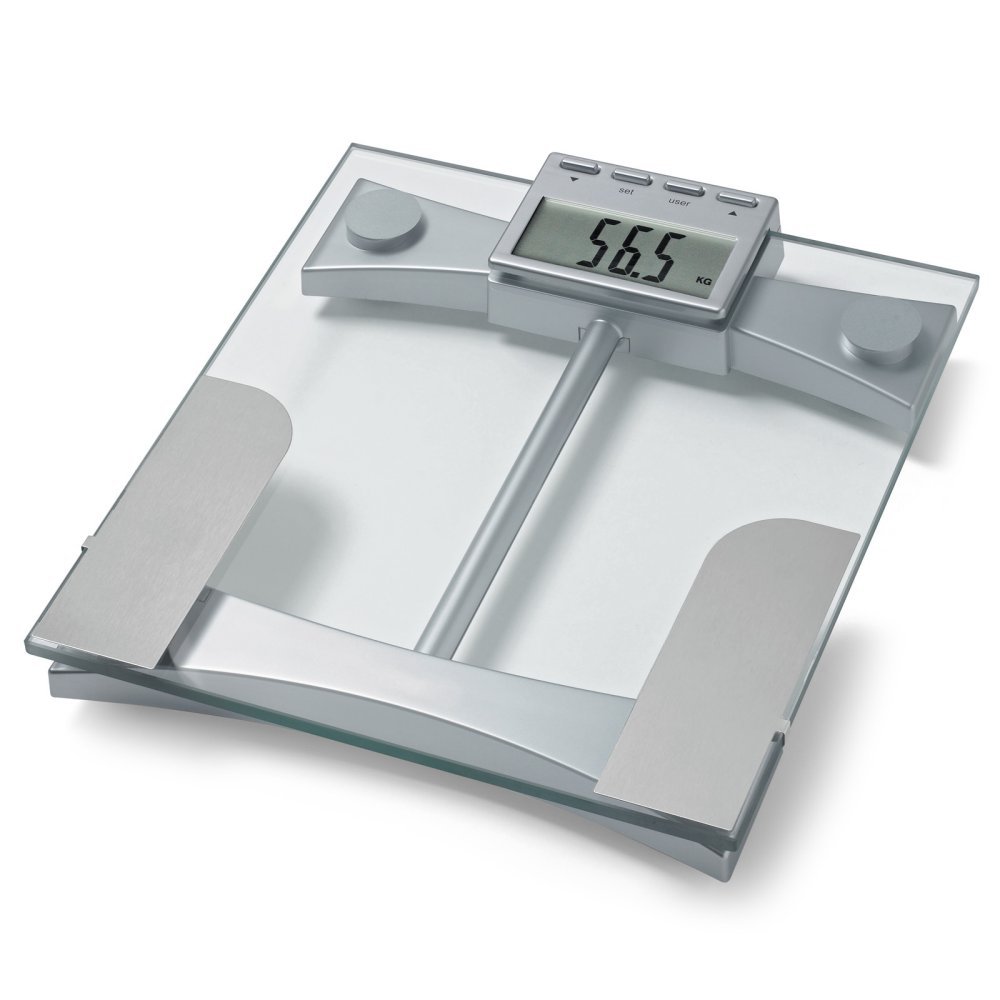
ຮູບທີ 1: ເທິງ view of the Microlife WS100 scale. Note the display area and the metallic electrodes for body composition analysis. Ensure feet are placed correctly on these electrodes for accurate readings.
ບໍາລຸງຮັກສາ
1. Cleaning the Scale
ເຊັດພື້ນຜິວທີ່ມີຂະຫນາດອ່ອນໆ, ງamp cloth. Do not use abrasive cleaners or immerse the scale in water. Avoid harsh chemicals that may damage the surface or electronic components.
2. ການເກັບຮັກສາ
ເກັບຮັກສາຂະຫນາດໄວ້ໃນບ່ອນທີ່ເຢັນ, ແຫ້ງ, ຫ່າງຈາກແສງແດດໂດຍກົງແລະອຸນຫະພູມທີ່ຮ້າຍກາດ. ຫຼີກລ່ຽງການວາງວັດຖຸໜັກໃສ່ຂະໜາດເມື່ອບໍ່ໃຊ້ງານ.
3. ການທົດແທນຫມໍ້ໄຟ
When the display shows a "Lo" indicator, it is time to replace the batteries. Open the battery compartment on the underside of the scale, remove the old batteries, and insert new ones of the same type, observing correct polarity. Dispose of old batteries responsibly.
ການແກ້ໄຂບັນຫາ
| ບັນຫາ | ສາເຫດທີ່ເປັນໄປໄດ້ | ການແກ້ໄຂ |
|---|---|---|
| "Lo" ສະແດງ | ພະລັງງານຫມໍ້ໄຟຕ່ໍາ. | ປ່ຽນແບັດໃໝ່. |
| "Err" ສະແດງ | ໂຫຼດເກີນ ຫຼື ການວັດແທກຜິດພາດ. | Ensure the scale is not overloaded. Step off and then back on the scale. Ensure stable footing. |
| ການອ່ານບໍ່ຖືກຕ້ອງ | Scale on uneven surface, not calibrated, or user profile ບໍ່ຖືກຕ້ອງ. | Place scale on a hard, flat surface. Perform initial calibration. Verify user profile settings (age, height, gender). |
| ບໍ່ມີການສະແດງຜົນ | Batteries incorrectly installed or completely drained. | ກວດສອບຂົ້ວແບັດເຕີຣີ. ປ່ຽນແບັດເຕີຣີຖ້າຈຳເປັນ. |
ຂໍ້ມູນຈໍາເພາະ
- ຕົວແບບ: WS100
- ຍີ່ຫໍ້: Microlife
- ປະເພດການສະແດງ: ດິຈິຕອລ
- ຄຸນນະສົມບັດພິເສດ: Body Fat, Bodyweight, Muscle Mass
- ວັດສະດຸ: ພາດສະຕິກ
- ສີ: ດຳ
- ແຫຼ່ງພະລັງງານ: ແບັດເຕີຣີ (ລວມ)
- ຂະໜາດຜະລິດຕະພັນ: 31.75 x 7.62 x 37.47 ຊມ (12.5 x 3 x 14.75 ນິ້ວ)
- ນ້ໍາຫນັກລາຍການ: 2.99 ກິໂລ (6.59 ປອນ)
- GTIN/UPC: 642632841233
ການຮັບປະກັນແລະການສະຫນັບສະຫນູນ
For warranty information or technical support, please refer to the warranty card included with your product or visit the official Microlife webສະຖານທີ່. ຢ່າພະຍາຍາມສ້ອມແປງອຸປະກອນດ້ວຍຕົນເອງ, ເພາະວ່າການເຮັດແບບນີ້ອາດເຮັດໃຫ້ການຮັບປະກັນເປັນໂມຄະ.