
1. ບົດແນະນຳ
The Definitive Technology Subamp 600 is a high-powered amplifier designed specifically for use with Definitive Technology IWSub in-wall subwoofers. This amplifier features two discrete high-power amplifier channels within a single housing, making it suitable for driving one or two IWSubs in various audio setups, including whole-house distributed audio or dedicated home theater systems. It is engineered to provide optimal power and simplify the integration of in-wall subwoofers into your audio environment.
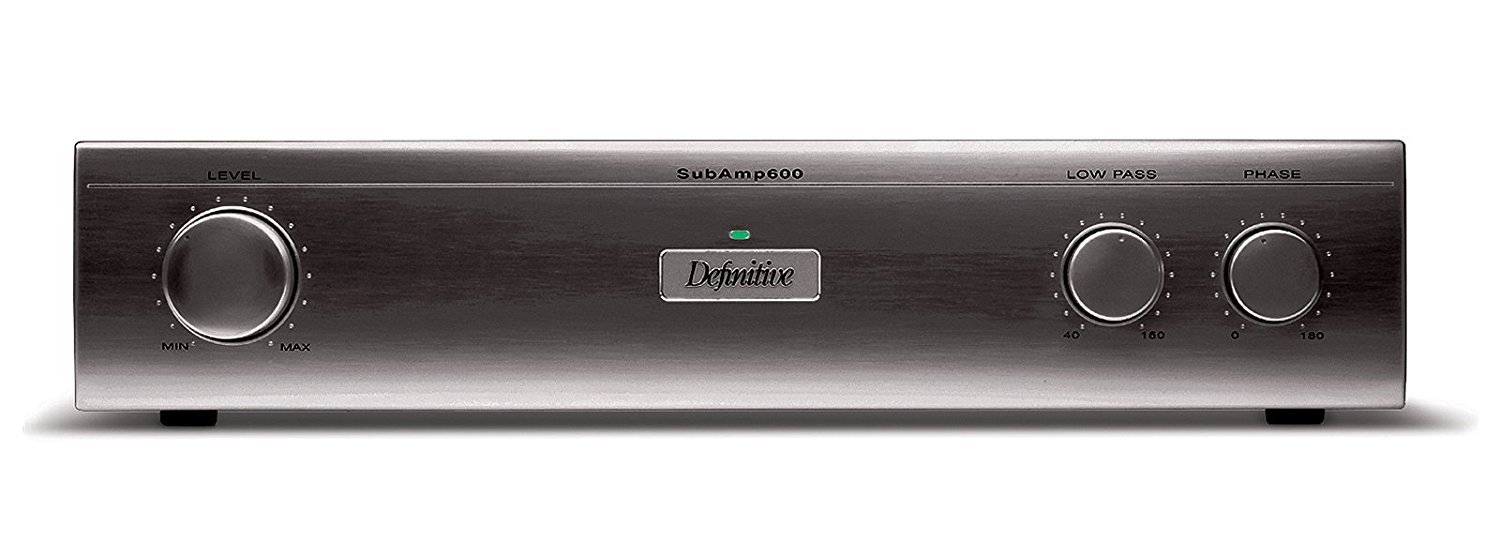
ຮູບ 1: ດ້ານຫນ້າ view of the Definitive Technology Subamp 600 120V Ampຮູບພາບນີ້ສະແດງໃຫ້ເຫັນ amplifier's front panel, typically black, with various controls and indicators for operation.
2. ຂໍ້ມູນຄວາມປອດໄພ
Please read all safety and operating instructions before using this product. Retain these instructions for future reference.
- ແຫຼ່ງພະລັງງານ: ເຊື່ອມຕໍ່ amplifier only to a 120V AC power source as indicated on the unit.
- ການລະບາຍອາກາດ: ຮັບປະກັນການລະບາຍອາກາດທີ່ເຫມາະສົມ. ຫ້າມປິດຊ່ອງລະບາຍອາກາດໃດໆ. ຕິດຕັ້ງຕາມຄໍາແນະນໍາຂອງຜູ້ຜະລິດ.
- ນ້ໍາແລະຄວາມຊຸ່ມ: ຢ່າເຮັດໃຫ້ເຄື່ອງໃຊ້ນີ້ຖືກຝົນ ຫຼືຄວາມຊຸ່ມຊື່ນ. ຫ້າມວາງສິ່ງຂອງທີ່ເຕັມໄປດ້ວຍນ້ຳເຊັ່ນ: ໂຖປັດສະວະ, ໃສ່ເຄື່ອງ.
- ຄວາມຮ້ອນ: ຫ້າມຕິດຕັ້ງໃກ້ກັບແຫຼ່ງຄວາມຮ້ອນເຊັ່ນລັງສີ, ເຄື່ອງບັນທຶກຄວາມຮ້ອນ, ເຕົາຫຼືອຸປະກອນອື່ນໆ (ລວມທັງ. amplifiers) ທີ່ຜະລິດຄວາມຮ້ອນ.
- ການບໍລິການ: ຢ່າພະຍາຍາມບໍລິການຜະລິດຕະພັນນີ້ດ້ວຍຕົນເອງ. ອ້າງເຖິງການບໍລິການທັງtoົດໃຫ້ກັບພະນັກງານບໍລິການທີ່ມີຄຸນວຸດທິ.
- ທໍາຄວາມສະອາດ: Unplug this product from the wall outlet before cleaning. Use a dry cloth for cleaning.
- ສາຍໄຟ: ປົກປ້ອງສາຍໄຟຈາກການຖືກສຽບ ຫຼື ສຽບ, ໂດຍສະເພາະຢູ່ປລັກສຽບ, ກ່ອງຮັບສະດວກ, ແລະຈຸດທີ່ພວກມັນອອກຈາກອຸປະກອນ.
3. ເນື້ອໃນຊຸດ
Carefully unpack your Definitive Technology Subamp 600. Ensure all items listed below are present and in good condition. If any items are missing or damaged, contact your dealer immediately.
- Definitive Technology IW Sub Amp 600 Ampມີຊີວິດຊີວາ
- ສາຍໄຟ
- ຄູ່ມືແນະ ນຳ (ເອກະສານນີ້)
4. ການຕິດຕັ້ງແລະການຕິດຕັ້ງ
4.1 ການຈັດວາງ
The Subamp 600 is designed to fit conveniently in standard audio equipment racks. Ensure adequate space around the unit for proper ventilation, especially at the rear where connections are made and heat may dissipate.
4.2 Connecting to IWSub In-Wall Subwoofers
The Subamp 600 features two discrete high-power amplifier channels, allowing it to drive one or two Definitive Technology IWSub in-wall subwoofers. The speaker posts are conveniently located on the rear panel for easy access and secure connections.
- ປິດພະລັງງານ: Ensure the Subamp 600 and all connected audio components are powered off before making any connections.
- Speaker Wire Preparation: Strip approximately 1/2 inch (12mm) of insulation from the ends of your high-quality speaker wires. Twist the bare strands tightly.
- Connect to IWSub: Connect the positive (+) terminal of the Subamp 600's speaker output to the positive (+) terminal of your IWSub. Connect the negative (-) terminal of the Subamp 600's speaker output to the negative (-) terminal of your IWSub. Repeat for a second IWSub if applicable, using the second ampຊ່ອງ lifier.
- ການເຊື່ອມຕໍ່ຂາເຂົ້າ: Connect the audio input from your receiver or pre-amplifier to the appropriate input jacks on the Subamp 600. Use high-quality RCA cables for optimal signal transfer.
4.3 ການເຊື່ອມຕໍ່ພະລັງງານ
Once all audio connections are made, connect the supplied power cord to the AC inlet on the rear of the Subamp 600, and then plug the other end into a grounded 120V AC wall outlet.
5. ຄໍາແນະນໍາການດໍາເນີນງານ
5.1 ການເປີດ/ປິດ
The Subamp 600 features an automatic signal sensing power-on function. When an audio signal is detected from your source component, the amplifier will automatically power on. When no signal is detected for a period, it will enter a standby mode.
- ການດໍາເນີນງານອັດຕະໂນມັດ: Simply ensure the amplifier is plugged in and your source component is playing audio.
- ພະລັງງານຄູ່ມື: A power switch may be present on the front or rear panel for manual control. Refer to the specific unit for its location.
5.2 ການປັບການຕັ້ງຄ່າ
The Subamp 600 typically includes controls for adjusting volume (gain), crossover frequency, and phase. These controls allow you to integrate the subwoofer seamlessly with your main speakers and room acoustics.
- Volume/Gain: ປັບລະດັບສຽງໃຫ້ກົງກັບລະດັບສຽງອອກຂອງລຳໂພງຫຼັກຂອງທ່ານ. ເລີ່ມຈາກລະດັບຕ່ຳ ແລະ ຄ່ອຍໆເພີ່ມຂຶ້ນ.
- ປະເພດ: This control determines the highest frequency the subwoofer will reproduce. Set it to blend smoothly with your main speakers' low-frequency cutoff.
- ໄລຍະ: Adjust the phase (0° or 180°) to ensure the subwoofer's output is in phase with your main speakers, preventing cancellation at the crossover point.
6. ບໍາລຸງຮັກສາ
Proper care and maintenance will ensure the longevity and optimal performance of your Subamp 600.
- ທໍາຄວາມສະອາດ: Use a soft, dry cloth to clean the exterior surfaces of the amplifier. Do not use liquid cleaners, aerosols, or abrasive cloths, as these may damage the finish.
- ການລະບາຍອາກາດ: Periodically check that the ventilation openings are clear of dust and debris. Blocked vents can lead to overheating.
- ການເຊື່ອມຕໍ່: Occasionally check all cable connections to ensure they are secure. Loose connections can degrade audio quality.
7. ການແກ້ໄຂບັນຫາ
If you experience issues with your Subamp 600, ໃຫ້ອ້າງອີງເຖິງບັນຫາ ແລະ ວິທີແກ້ໄຂທົ່ວໄປຕໍ່ໄປນີ້:
| ບັນຫາ | ສາເຫດທີ່ເປັນໄປໄດ້ | ການແກ້ໄຂ |
|---|---|---|
| ບໍ່ມີສຽງຈາກ subwoofer |
|
|
| ຄຸນນະພາບສຽງບິດເບືອນ ຫຼື ບໍ່ດີ |
|
|
| Amplifier overheats |
|
|
8. ຂໍ້ມູນຈໍາເພາະ
| ຄຸນສົມບັດ | ລາຍລະອຽດ |
|---|---|
| ຊື່ຕົວແບບ | ຍ່ອຍamp 600 |
| ຕົວລະບຸຕົວແບບ | UCYC |
| ຍີ່ຫໍ້ | ເທັກໂນໂລຍີທີ່ຊັດເຈນ |
| Output Power (1 Channel) | 275 ວັດ |
| Output Power (2 Channels) | 230 ວັດຕໍ່ຊ່ອງ |
| ຈໍານວນຊ່ອງ | 2 |
| ສະບັບtage | 120 ໂວນ |
| ຂະໜາດລາຍການ (L x W x H) | 9.63 x 17.06 x 3.69 ນິ້ວ |
| ນ້ໍາຫນັກລາຍການ | 25 ປອນ |
| ປະເພດການຕິດຕັ້ງ | Designed for equipment rack placement (Note: "Wall Mount" is listed in some specifications, but product description indicates rack placement.) |
| UPC | 093207018589 |
9. ຂໍ້ມູນການຮັບປະກັນ
This Definitive Technology Subamp 600 amplifier is covered by a manufacturer's warranty. For specific details regarding the warranty period, coverage, and terms, please refer to the warranty card included with your product or visit the official Definitive Technology webເວັບໄຊ. ຮັກສາຫຼັກຖານການຊື້ຂອງທ່ານສໍາລັບການຮ້ອງຂໍການຮັບປະກັນ.
10. ການຊ່ວຍເຫຼືອລູກຄ້າ
If you have any questions, require technical assistance, or need to report a problem that cannot be resolved using the troubleshooting guide, please contact Definitive Technology customer support.
For the most up-to-date contact information, please visit the official Definitive Technology webເວັບໄຊ: