
ແນະນຳ
The Audio-Technica AT9900 is a high-quality, high-sensitivity compact stereo microphone designed for digital recording equipment. It features a newly developed pivot floating structure to reduce extraneous vibration noise and a free-angle mechanism for flexible cable output. The microphone includes an indoor/outdoor mode switch to reduce noise, such as wind, ensuring clear recordings in various environments. Its excellent acoustic characteristics are enhanced by a full-surface metal mesh, which helps reduce external noise interference.
ເນື້ອໃນຊຸດ
Before use, please ensure all items are present:
- Audio-Technica AT9900 Stereo Lavalier Microphone
- ແບັດເຕີຣີ LR44
ຕັ້ງຄ່າ
- ໃສ່ແບັດເຕີລີ: Open the battery compartment and insert the supplied LR44 battery, ensuring correct polarity. The microphone requires battery power for operation.
- ເຊື່ອມຕໍ່ຫາອຸປະກອນ: Plug the 3.5 mm L-type gold-plated stereo mini jack into the microphone input port of your digital recording equipment (e.g., camera, portable recorder, computer).
- ໄມໂຄຣໂຟນຕຳແໜ່ງ: Use the integrated clip to attach the microphone to clothing, such as a lapel or collar, ensuring it is positioned optimally for sound capture.
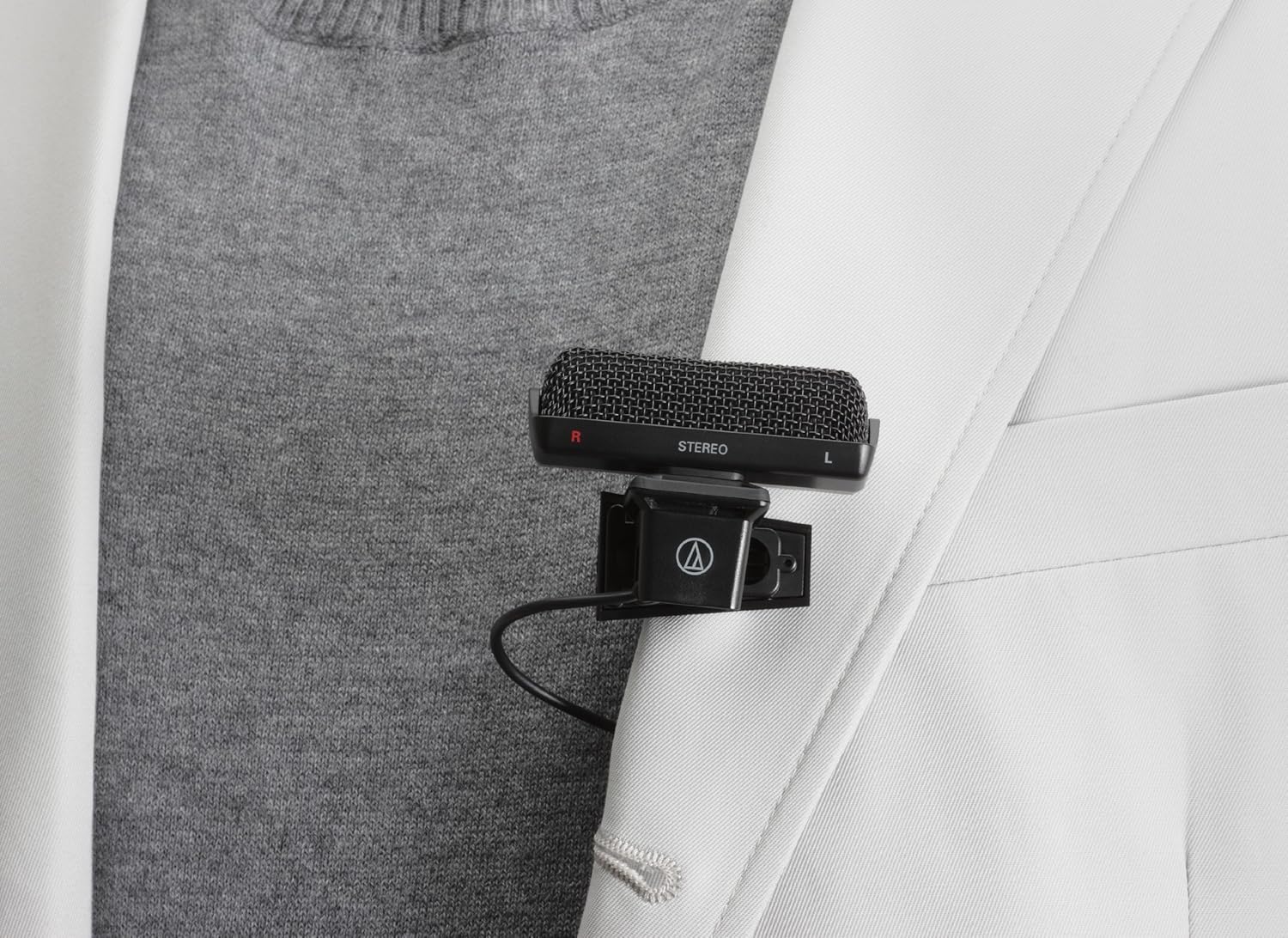
Image: The AT9900 microphone shown clipped to a jacket lapel, demonstrating its typical lavalier placement for recording.
ຄໍາແນະນໍາການດໍາເນີນງານ
- ເປີດ/ປິດ: Locate the ON/OFF switch on the microphone body. Slide the switch to the "ON" position to power on the microphone. Slide it to "OFF" when not in use to conserve battery life.
- ເລືອກຮູບແບບການບັນທຶກ: The microphone features an L-CUT/FLAT switch.
- ແປ: Use this setting for standard recording environments, typically indoors, where a full frequency response is desired.
- L-CUT (Low-Cut Filter): Use this setting in outdoor environments or situations where low-frequency noise (e.g., wind noise, rumble) needs to be reduced. This filter helps to improve clarity of speech or desired sounds by attenuating unwanted low-end frequencies.
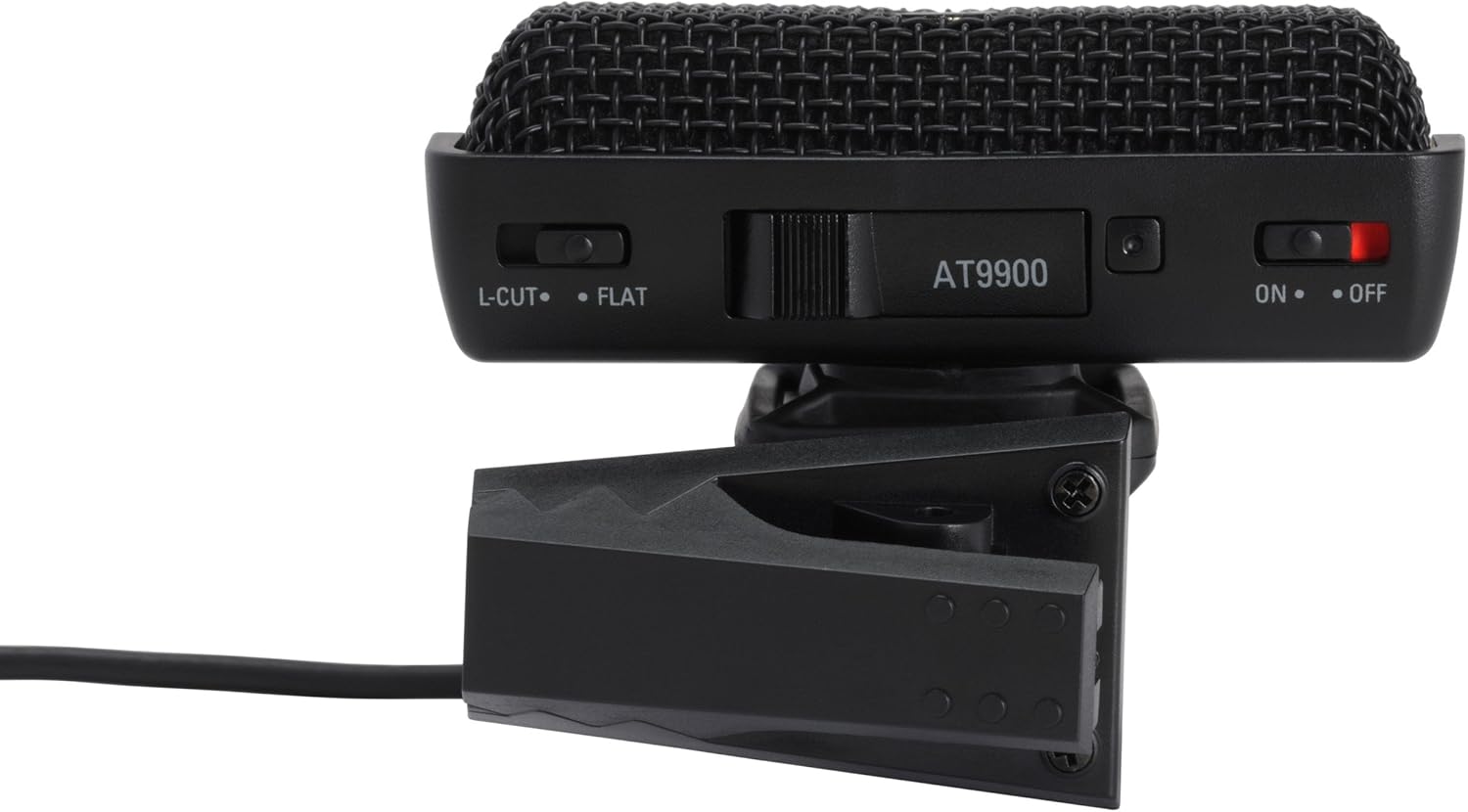
ຮູບພາບ: A close-up view of the AT9900 microphone's top panel, highlighting the L-CUT/FLAT switch, the AT9900 model indicator, and the ON/OFF power switch.
- ເລີ່ມການບັນທຶກ: Start recording on your connected digital recording equipment. Monitor audio levels to ensure optimal sound capture without distortion.
ບໍາລຸງຮັກສາ
- ທໍາຄວາມສະອາດ: Wipe the microphone body with a soft, dry cloth. Do not use liquid cleaners or solvents.
- ການເກັບຮັກສາ: Store the microphone in a dry, cool place away from direct sunlight and extreme temperatures.
- ການປ່ຽນແບັດເຕີຣີ: Replace the LR44 battery when sound quality degrades or the microphone fails to power on. Dispose of used batteries responsibly.
- ການດູແລສາຍໄຟ: ຫຼີກເວັ້ນການງໍແຫຼມຫຼືດຶງຫຼາຍເກີນໄປກ່ຽວກັບສາຍເຄເບີນເພື່ອປ້ອງກັນຄວາມເສຍຫາຍ.
ການແກ້ໄຂບັນຫາ
- ບໍ່ມີສຽງ/ສຽງຕ່ຳ:
- Ensure the microphone is switched "ON".
- Check if the LR44 battery is correctly inserted and has sufficient charge. Replace if necessary.
- Verify the 3.5mm jack is fully inserted into your recording device's microphone input.
- Check the input settings and volume levels on your recording equipment.
- ສຽງບິດເບືອນ:
- ຫຼຸດການຮັບສັນຍານເຂົ້າໃນອຸປະກອນບັນທຶກສຽງຂອງທ່ານ.
- ໃຫ້ແນ່ໃຈວ່າໄມໂຄຣໂຟນບໍ່ຢູ່ໃກ້ກັບແຫຼ່ງສຽງເກີນໄປ.
- ສຽງລົມດັງເກີນໄປ:
- Switch the microphone to the "L-CUT" mode.
- Consider using an external windscreen (not included) for very windy conditions.
ຂໍ້ມູນຈໍາເພາະ
| ອົງປະກອບ | Stereo Electret Condenser |
| ຮູບແບບຂົ້ວໂລກ | Unidirectional |
| ການຕອບສະໜອງຄວາມຖີ່ | 70-16,000 Hz |
| ຄວາມອ່ອນໄຫວ | -42 dB (7.9 mV) re 1V ທີ່ 1 Pa |
| impedance | 2,000 ໂອມ |
| ການສະຫນອງພະລັງງານ | Battery/Plug-in Power |
| ປະເພດຫມໍ້ໄຟ | LR44 |
| ຊີວິດຫມໍ້ໄຟ | ປະມານ 300 ຊົ່ວໂມງ |
| ຂະໜາດ (H x W x D) | 41 x 58 x 20 ມມ |
| ນ້ຳໜັກ | 23 g (microphone only) / 37 g (item weight from specs) |
| ຄວາມຍາວສາຍ | 1.6 ມ |
| ຕົວເຊື່ອມຕໍ່ | 3.5 mm L-type gold-plated stereo mini jack |
| ອັດຕາສ່ວນສັນຍານເຖິງສຽງດັງ | 80 dB |
| ວັດສະດຸ | ໂລຫະ |
ຫມາຍເຫດ: ຂໍ້ມູນຈໍາເພາະແມ່ນຂຶ້ນກັບການປ່ຽນແປງໂດຍບໍ່ມີການແຈ້ງການສໍາລັບການປັບປຸງຜະລິດຕະພັນ.
ການຮັບປະກັນແລະການສະຫນັບສະຫນູນ
Audio-Technica products are manufactured to high quality standards. For warranty information, please refer to the warranty card included with your product or visit the official Audio-Technica webເວັບໄຊສໍາລັບລາຍລະອຽດສະເພາະກັບພາກພື້ນຂອງທ່ານ.
For technical support, troubleshooting assistance, or service inquiries, please contact Audio-Technica customer support through their official webເວັບໄຊ: Audio-Technica Official Store.