
1. ຜະລິດຕະພັນເກີນview
The Oregon Scientific THGR122NX is a water-resistant remote sensor designed to measure both temperature and humidity. It transmits this data wirelessly to a compatible main unit (sold separately) on one of three user-selectable channels. The sensor also features an integrated LCD screen that displays the current temperature and humidity readings directly. This unit is suitable for both indoor and outdoor use, providing versatile environmental monitoring.

Figure 1: Oregon Scientific THGR122NX Water Resistant Remote Sensor with LCD Display.
2. ຕັ້ງຄ່າ
2.1 ການຕິດຕັ້ງຫມໍ້ໄຟ
- Open the battery compartment cover located on the back of the THGR122NX sensor.
- ໃສ່ແບັດເຕີຣີ AAA ສອງ (2) ກ້ອນ, ໂດຍສັງເກດເບິ່ງຂົ້ວທີ່ຖືກຕ້ອງ (+/-) ຕາມທີ່ລະບຸໄວ້ພາຍໃນຊ່ອງ.
- ປິດຝາປິດຊ່ອງໃສ່ຫມໍ້ໄຟຢ່າງປອດໄພ.
- For optimal performance in very cold conditions, it is suggested to use Lithium AAA batteries.
2.2 ການວາງເຊັນເຊີ
For accurate readings, mount the sensor vertically on a north-facing wall or in a well-shaded location to avoid direct sunlight and rain. Direct sunlight can cause the temperature readings to be higher than actual. It is recommended to place the sensor at least 6 inches below eaves or under a deck. The maximum transmission range to the base station is approximately 100 feet (30 meters) in an open area, not including walls or floors.
2.3 Pairing with Main Unit
- Ensure batteries are installed in both the remote sensor and the main display unit.
- On the remote sensor, select one of the three available channels (CH1, CH2, or CH3) using the channel switch inside the battery compartment.
- On the main unit, initiate the sensor search function (refer to your main unit's manual for specific instructions). The main unit should automatically detect and display readings from the remote sensor.
- If connection is not established, remove batteries from both units, wait a few seconds, and re-insert them, ensuring the remote sensor is powered on first, then the main unit. Repeat the pairing process.
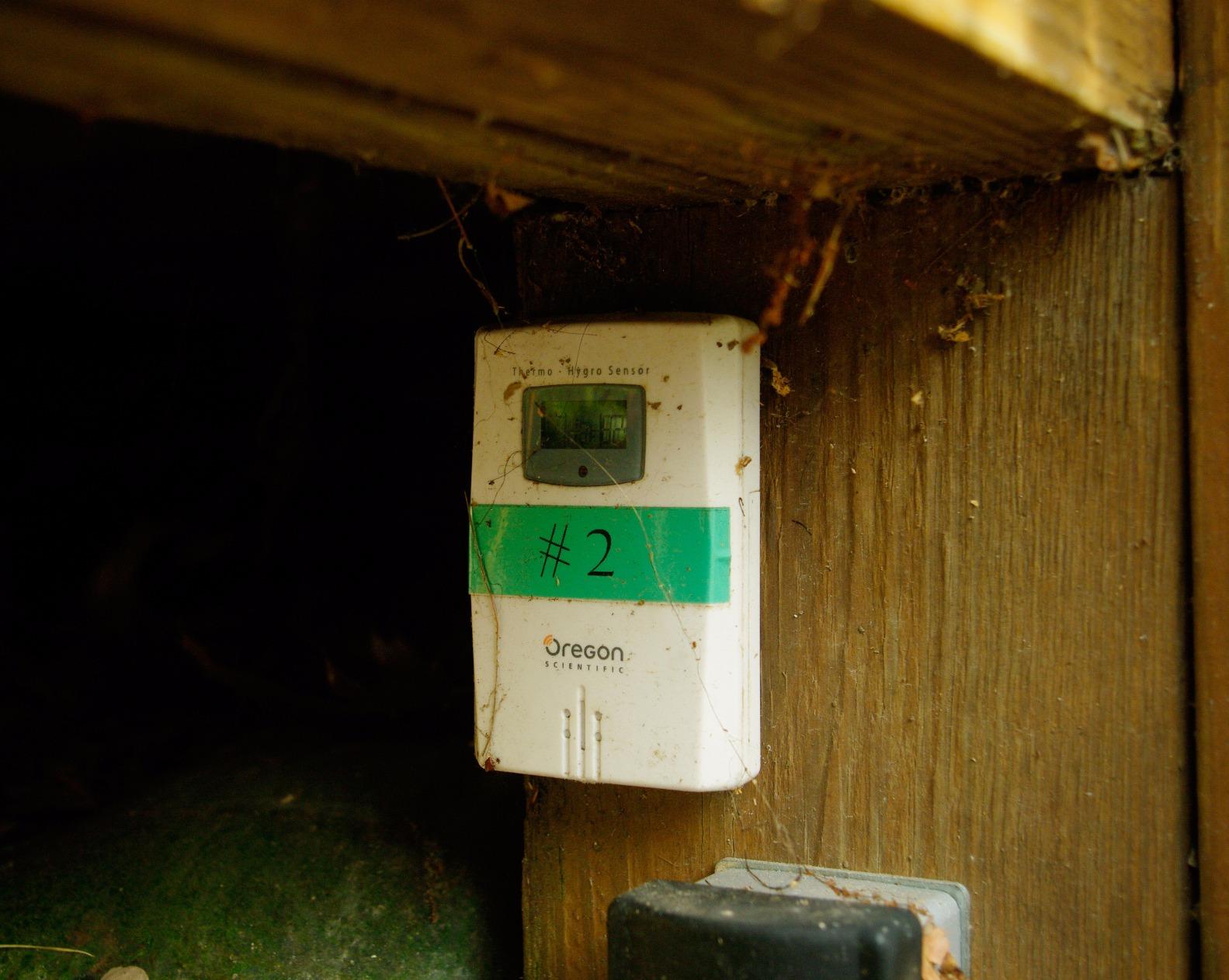
Figure 2: Remote sensor mounted outdoors, demonstrating proper placement for optimal readings.
3. ຄໍາແນະນໍາການດໍາເນີນງານ
3.1 ຈໍ LCD
The THGR122NX sensor features a small LCD display that shows the current temperature and humidity readings directly on the unit. This allows for quick local checks without needing to consult the main unit.
3.2 ການອ່ານອຸນຫະພູມ ແລະ ຄວາມຊຸ່ມຊື່ນ
- The sensor measures temperature within a range of -22°F to 140°F (-30°C to 60°C).
- Humidity is measured from 25% to 95% relative humidity.
- Readings are updated and transmitted to the main unit approximately every 40 seconds.
3.3 ການເລືອກຊ່ອງ
A switch inside the battery compartment allows you to select one of three channels (CH1, CH2, CH3). This is crucial for avoiding interference if multiple sensors are used or if other wireless devices are nearby. Ensure the selected channel matches the setting on your main unit.
4. ບໍາລຸງຮັກສາ
4.1 ການທໍາຄວາມສະອາດ
ເຊັດເຊັນເຊີໃຫ້ສະອາດດ້ວຍຜ້າອ່ອນໆ, ຜ້າເຊັດໂຕamp ຜ້າ. ຢ່າໃຊ້ເຄື່ອງເຮັດຄວາມສະອາດຂັດຫຼືສານລະລາຍ, ເພາະວ່າສິ່ງເຫຼົ່ານີ້ອາດຈະທໍາລາຍຫນ່ວຍງານ.
4.2 ການທົດແທນຫມໍ້ໄຟ
When the low battery indicator appears on the main unit or the sensor's LCD, replace the batteries promptly. Always replace both batteries at the same time with new ones of the same type. Dispose of used batteries responsibly according to local regulations.
4.3 ການປົກປ້ອງສິ່ງແວດລ້ອມ
Although water-resistant, avoid submerging the sensor in water. Protect it from extreme physical shock or vibration.
5. ການແກ້ໄຂບັນຫາ
| ບັນຫາ | ສາເຫດທີ່ເປັນໄປໄດ້ | ການແກ້ໄຂ |
|---|---|---|
| No readings on main unit. | Incorrect channel selected, out of range, or low batteries. | Verify channel selection, move sensor closer to main unit, replace batteries in both units. |
| ອຸນຫະພູມ/ຄວາມຊຸ່ມຊື່ນບໍ່ຖືກຕ້ອງ. | Direct sunlight/rain exposure, or sensor placed near heat sources. | Relocate sensor to a shaded, protected area away from direct heat sources. |
| Intermittent signal loss. | Interference from other wireless devices, or obstacles. | Move sensor and main unit away from other electronics, reduce obstacles between units. |
| LCD display on sensor is blank or dim. | ຫມໍ້ໄຟຕ່ໍາຫຼືຕາຍ. | ປ່ຽນແບັດເຕີລີ AAA ໃໝ່. |
6. ຂໍ້ມູນຈໍາເພາະ
- ຕົວແບບ: THGR122NX
- ຍີ່ຫໍ້: ວິທະຍາສາດ Oregon
- ຊ່ວງວັດແທກອຸນຫະພູມ: -22°F ຫາ 140°F (-30°C ຫາ 60°C)
- ຊ່ວງການວັດແທກຄວາມຊຸ່ມຊື່ນ: 25% ຫາ 95% RH
- ໄລຍະສາຍສົ່ງ: ສູງເຖິງ 100 ຟຸດ (30 ແມັດ) ໃນພື້ນທີ່ເປີດ
- ຊ່ອງ: 3 ຊ່ອງທີ່ຜູ້ໃຊ້ເລືອກໄດ້
- ແຫຼ່ງພະລັງງານ: 2 x ຫມໍ້ໄຟ AAA (ລວມ)
- ຄຸນນະສົມບັດພິເສດ: Water-resistant, LCD Display
- ຂະໜາດຜະລິດຕະພັນ: 3.6 x 1 x 2.4 ນິ້ວ
- ນ້ໍາຫນັກລາຍການ: 4 ອອນ
- ວັດສະດຸ: ພາດສະຕິກ
- ສີ: ສີຂາວ
7. ການຮັບປະກັນແລະການສະ ໜັບ ສະ ໜູນ
7.1 ຂໍ້ມູນການຮັບປະກັນ
This Oregon Scientific product comes with a 1-year limited warranty from the date of purchase, covering manufacturing defects in materials and workmanship.
7.2 ສະຫນັບສະຫນູນລູກຄ້າ
For further assistance, product registration, or to check compatibility with your existing Oregon Scientific weather station, please visit the official Oregon Scientific webເວັບໄຊ: oregonscientificstore.com/sensors.
Ask a question about this manual
Ask about setup, troubleshooting, compatibility, parts, safety, or missing instructions. Manuals+ will review the question and use this page’s manual context to help answer it.