
ແນະນຳ
This manual provides detailed instructions for the proper use and maintenance of your Casio WV-59E-1AVEF digital watch. This timepiece features radio-controlled timekeeping, ensuring accurate time display by receiving time calibration signals. Please read this manual thoroughly to ensure optimal performance and longevity of your watch.
Key features include display illumination, world time function, 5-bar water resistance, and an automatic calendar.
ສິນຄ້າເກີນview
The Casio WV-59E-1AVEF is a robust digital watch designed for daily wear. It features a square case, digital display, and a comfortable resin strap. The watch is equipped with multiple buttons for navigating its various functions.
ຮູບທີ 1: ດ້ານໜ້າ view of the Casio WV-59E-1AVEF digital watch, displaying the time, date, and various mode indicators.
ການຄວບຄຸມແລະການສະແດງ
- ຈໍສະແດງຜົນ: Shows time, date, and function indicators.
- ປຸ່ມ: Typically located on the sides of the watch for mode selection, adjustment, and illumination.

ຮູບທີ 2: ຂ້າງ view of the Casio WV-59E-1AVEF watch, highlighting the control buttons on the left and right sides of the case.

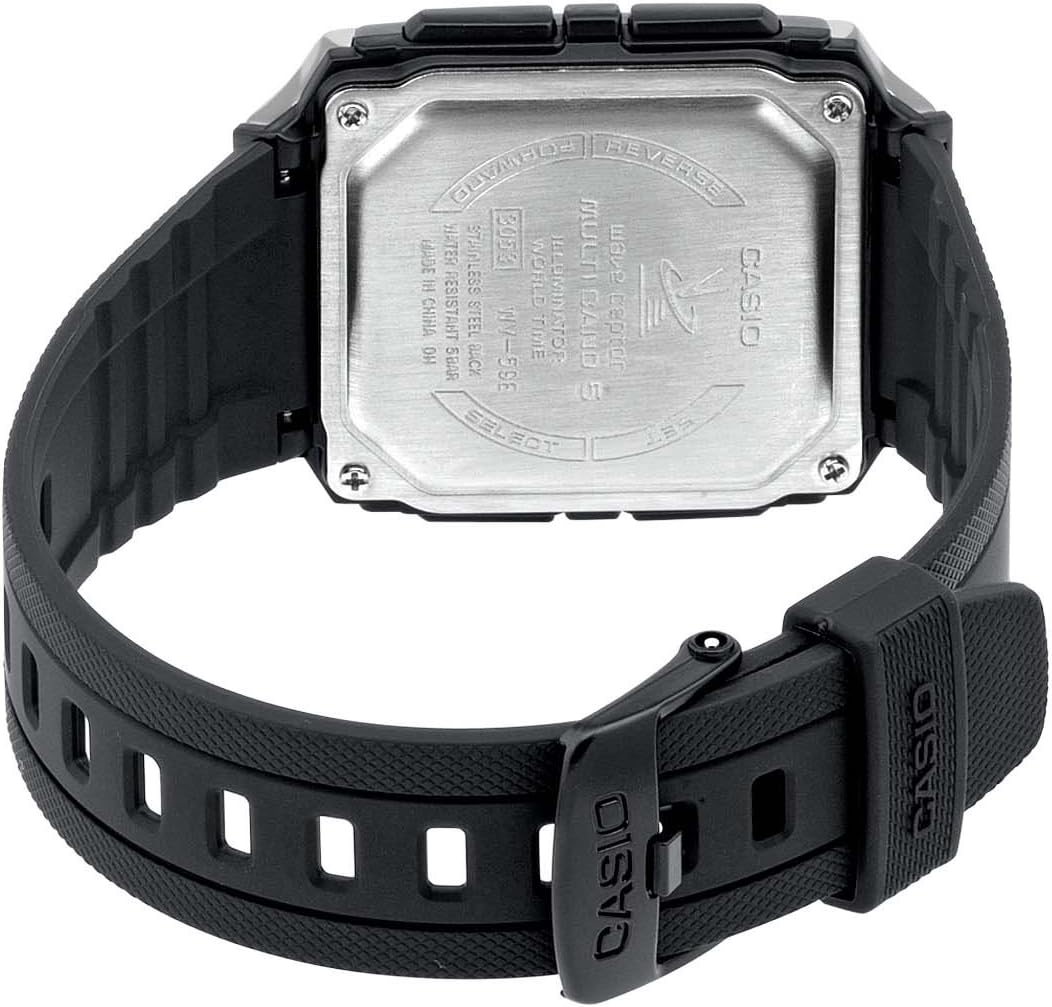
ຮູບທີ 3: ຫລັງ view of the Casio WV-59E-1AVEF watch, showing the stainless steel case back with model number WV-59E, water resistance rating, and 'Wave Ceptor' branding.
ຕັ້ງຄ່າ
Initial Time Setting and Time Zone
Upon first use or after a battery change, you may need to set your home city (time zone) manually. This is crucial for the watch to receive the correct time calibration signal.
- ໃນໂໝດການຈັບເວລາ, ໃຫ້ກົດຄ້າງໄວ້ ປັບ button (usually top-left) until the city code starts to flash.
- ໃຊ້ ສົ່ງຕໍ່ ແລະ ກັບຄືນ buttons (usually on the right side) to select your desired home city code. Refer to the world time map for city codes corresponding to your region.
- ກົດ ໂໝດ button (usually bottom-left) to cycle through other settings like DST (Daylight Saving Time) and 12/24-hour format. Adjust these as needed using the ສົ່ງຕໍ່ ແລະ ກັບຄືນ ປຸ່ມ.
- ກົດ ປັບ button again to exit the setting screen.
Radio Signal Reception (Wave Ceptor)
Your watch automatically receives time calibration signals to maintain accurate time. Automatic reception typically occurs in the early hours of the morning. For best reception, place the watch near a window overnight.
To manually initiate signal reception:
- ໃນໂໝດການຈັບເວລາ, ໃຫ້ກົດຄ້າງໄວ້ ຮັບ button (refer to watch diagram for exact button, often bottom-right) for about two seconds.
- The watch will display "RCV" or "GET" to indicate it is attempting to receive the signal.
- Keep the watch stationary and away from sources of interference (e.g., computers, televisions) during reception.
- Successful reception will be indicated by "OK" or "RCVD". If reception fails, "ERR" or "FAIL" will be displayed.

ຮູບທີ 4: The 'Wave Ceptor' logo, indicating the watch's radio-controlled timekeeping capability.
ຮູບແບບການເຮັດວຽກ
ກົດ ໂໝດ button (usually bottom-left) to cycle through the different modes:
- ໂໝດການຈັບເວລາ: ສະແດງເວລາ ແລະວັນທີປັດຈຸບັນ.
- ໂໝດເວລາໂລກ: ອະນຸຍາດໃຫ້ທ່ານ view the current time in various cities around the world.
- ແບບ Stopwatch: ມາດຕະການທີ່ຜ່ານໄປ.
- ໂມດແຈ້ງເຕືອນ: ຕັ້ງໂມງປຸກປະຈໍາວັນ.
ຮູບແບບເວລາໂລກ
ໃນໂຫມດເວລາໂລກ, ໃຫ້ໃຊ້ ສົ່ງຕໍ່ ແລະ ກັບຄືນ buttons to scroll through different city codes and view their current times.
ແບບ Stopwatch
- ເຂົ້າສູ່ໂໝດໂມງຈັບເວລາ.
- ກົດ ເລີ່ມ/ຢຸດ button (often top-right) to start and stop the stopwatch.
- ກົດ ຣີເຊັດ button (often bottom-right) to reset the stopwatch to zero.
ໂໝດປຸກ
- ເຂົ້າສູ່ໂໝດປຸກ.
- ໃຊ້ ສົ່ງຕໍ່ ແລະ ກັບຄືນ buttons to select an alarm number (if multiple are available).
- ກົດຄ້າງໄວ້ ປັບ ກົດປຸ່ມຈົນກວ່າເວລາປຸກຈະເລີ່ມກະພິບ.
- ໃຊ້ ສົ່ງຕໍ່ ແລະ ກັບຄືນ buttons to set the alarm hour and minute.
- ກົດ ປັບ ປຸ່ມເພື່ອບັນທຶກການຕັ້ງຄ່າປຸກ.
- ກົດ ເປີດ/ປິດ button (often top-right) to toggle the alarm on or off.
ແສງໄຟ
ກົດ ແສງສະຫວ່າງ button (usually top-right or a dedicated button) to illuminate the display for easy viewຢູ່ໃນສະພາບແສງ ໜ້ອຍ.
ບໍາລຸງຮັກສາ
ການປ່ຽນແບັດ
The watch is powered by a Lithium metal battery. When the display becomes dim or functions become unreliable, it is time to replace the battery. It is recommended to have battery replacement performed by a qualified watch technician to ensure proper sealing and water resistance.
Water Resistance (50 Meters / 5 Bar)
Your watch is water resistant to 50 meters (5 bar). This means it is suitable for everyday use and can withstand splashes, rain, showering, and shallow swimming. It is ບໍ່ suitable for diving, snorkeling, or high-impact water sports. Do not operate buttons while the watch is wet or submerged.
ທໍາຄວາມສະອາດ
Wipe the watch case and strap with a soft, dry cloth. For resin straps, you can use a mild soap solution and rinse thoroughly, then dry completely. Avoid using harsh chemicals or abrasive cleaners.
ການແກ້ໄຂບັນຫາ
- Time is incorrect or not synchronizing:
- Ensure your home city code is set correctly for your time zone.
- Place the watch near a window overnight for automatic reception.
- Manually initiate signal reception (refer to "Radio Signal Reception" section).
- Check for strong interference sources nearby (e.g., electronic devices).
- The battery may be low and require replacement.
- ຈໍສະແດງຜົນແມ່ນມືດ ຫຼືຫວ່າງເປົ່າ:
- ແບັດເຕີຣີອາດຈະໝົດ. ໃຫ້ປ່ຽນແບັດເຕີຣີ.
- Ensure the watch is not in a power-saving mode (if applicable to your model).
- ປຸ່ມບໍ່ຕອບສະໜອງ:
- Ensure the watch is not in a locked mode (if applicable).
- If the watch is wet, dry it thoroughly before operating buttons.
- A low battery can affect button responsiveness.
ຂໍ້ມູນຈໍາເພາະ

ຮູບທີ 5: Diagram illustrating the dimensions of the Casio WV-59E-1AVEF watch face, with measurements in millimeters and inches for reference.
| ຍີ່ຫໍ້ | ຄາຊິໂອ |
| ຊື່ຕົວແບບ | WV-59E |
| ໝາຍເລກຕົວແບບ | WV-59E-1AVEF |
| ຮູບຮ່າງລາຍການ | ຮຽບຮ້ອຍ |
| ປະເພດການສະແດງ | ດິຈິຕອລ |
| Case Material Type | ອະຄິລິກ |
| Dial Window ປະເພດວັດສະດຸ | ອະຄິລິກ |
| ປະເພດວັດສະດຸແຖບ | ຢາງ |
| ສີແຖບ | ດຳ |
| ສີໜ້າປັດ | ດຳ |
| ປະເພດ Clasp | ສາຍຮັດ |
| ເສັ້ນຜ່າສູນກາງຂອງກໍລະນີ | 39 ມິນລິແມັດ |
| ຄວາມຫນາຂອງກໍລະນີ | 12.5 ມິນລິແມັດ |
| ຄວາມກວ້າງຂອງແຖບ | 18 ມິນລິແມັດ |
| ນ້ໍາຫນັກລາຍການ | 40 ກຣາມ |
| ປະເພດການເຄື່ອນໄຫວ | Quartz |
| ຄວາມເລິກທົນທານຕໍ່ນ້ໍາ | 50 Meters (5 Bar) |
| ແຫຼ່ງພະລັງງານ | Battery Powered (1 Lithium metal battery included) |
| ຄຸນນະສົມບັດພິເສດ | Radio-controlled time, Stopwatch, Alarm, Illumination, World Time, Automatic Calendar |
| ອົງປະກອບລວມ | Resin strap |
| ລະຫັດມາດຕາສາກົນ | 04971850882220 |
ການຮັບປະກັນແລະການສະຫນັບສະຫນູນ
For warranty information and customer support, please refer to the warranty card included with your product or visit the official Casio webເວັບໄຊ. ຮັກສາໃບຮັບເງິນການຊື້ຂອງທ່ານໄວ້ເປັນຫຼັກຖານການຊື້.
For service or repairs, contact an authorized Casio service center.