
ແນະນຳ
ຂອບໃຈສໍາລັບການຊື້asing the Optimus F-1230 12-Inch Oscillating 3-Speed Table Fan. This manual provides essential information for the safe and efficient operation, maintenance, and care of your new fan. Please read these instructions thoroughly before use and retain them for future reference.

Figure 1: Optimus F-1230 12-Inch Oscillating 3-Speed Table Fan, White.
ຄໍາແນະນໍາຄວາມປອດໄພທີ່ສໍາຄັນ
- ອ່ານຄໍາແນະນໍາທັງຫມົດກ່ອນທີ່ຈະໃຊ້ພັດລົມນີ້.
- ຫ້າມໃຊ້ພັດລົມທີ່ມີສາຍໄຟ ຫຼືປລັກສຽບເສຍຫາຍ. ຖິ້ມພັດລົມ ຫຼືກັບຄືນໄປຫາສະຖານທີ່ບໍລິການທີ່ໄດ້ຮັບອະນຸຍາດເພື່ອກວດ ແລະ/ຫຼືສ້ອມແປງ.
- ຢ່າແລ່ນສາຍໄຟພາຍໃຕ້ຜ້າພົມ. ຫ້າມປົກສາຍດ້ວຍຜ້າປູບ່ອນຖິ້ມ, ເຄື່ອງແລ່ນ, ຫຼືຜ້າປົກທີ່ຄ້າຍຄືກັນ. ຈັດວາງສາຍໄຟໃຫ້ຫ່າງຈາກພື້ນທີ່ຈະລາຈອນ ແລະບ່ອນທີ່ມັນຈະບໍ່ຖືກຂ້າມໄປ.
- Always unplug the fan when moving it, cleaning, or when not in use.
- Do not insert fingers or any foreign objects into the grille openings.
- Do not use this fan near windows, in wet areas, or where it may come into contact with water.
- ໃຫ້ແນ່ໃຈວ່າພັດລົມຖືກວາງຢູ່ເທິງພື້ນຜິວທີ່ຄົງທີ່, ຮາບພຽງເພື່ອປ້ອງກັນການບິດ.
ເນື້ອໃນຊຸດ
Upon opening the package, ensure all components are present and undamaged. The Optimus F-1230 fan typically includes the following parts:
- Fan Motor Unit with Base and Control Panel
- Grille ຫນ້າ
- ຫລັງ Grille
- ແຟນເພລ
- Grille Retaining Nut
- ຫມວກກັນກະທົບຂອງແຜ່ນໃບ

Figure 2: Components of the Optimus F-1230 Table Fan.
ຄໍາແນະນໍາຂອງສະພາແຫ່ງ
The Optimus F-1230 fan is designed for no-tool assembly. Follow these steps to set up your fan:
- ຕິດກະເບື້ອງຫລັງ: Align the rear grille with the motor housing, ensuring the alignment pins on the motor housing fit into the corresponding holes on the rear grille. Secure it with the grille retaining nut by turning clockwise.
- ຕິດຕັ້ງພັດລົມ Blade: Slide the fan blade onto the motor shaft, making sure the notch on the blade aligns with the pin on the shaft. Secure it with the blade retaining cap by turning counter-clockwise.
- ຕິດກະເບື້ອງໜ້າ: Place the front grille over the rear grille, aligning the clips. Snap the front grille into place, ensuring it is securely fastened around the entire circumference.
- ຕໍາແຫນ່ງພັດລົມ: Place the assembled fan on a stable, flat surface.
ຄໍາແນະນໍາການດໍາເນີນງານ
Once assembled, your Optimus F-1230 fan is ready for use. Ensure the fan is plugged into a standard 120V AC electrical outlet.
ການຕັ້ງຄ່າພະລັງງານ ແລະຄວາມໄວ
The fan features a 4-position push button switch located on the base for controlling power and speed:
- Press the appropriate button to select one of the 3 ການຕັ້ງຄ່າຄວາມໄວ (Low, Medium, High).
- ກົດປຸ່ມ 'OFF' ເພື່ອປິດພັດລົມ.
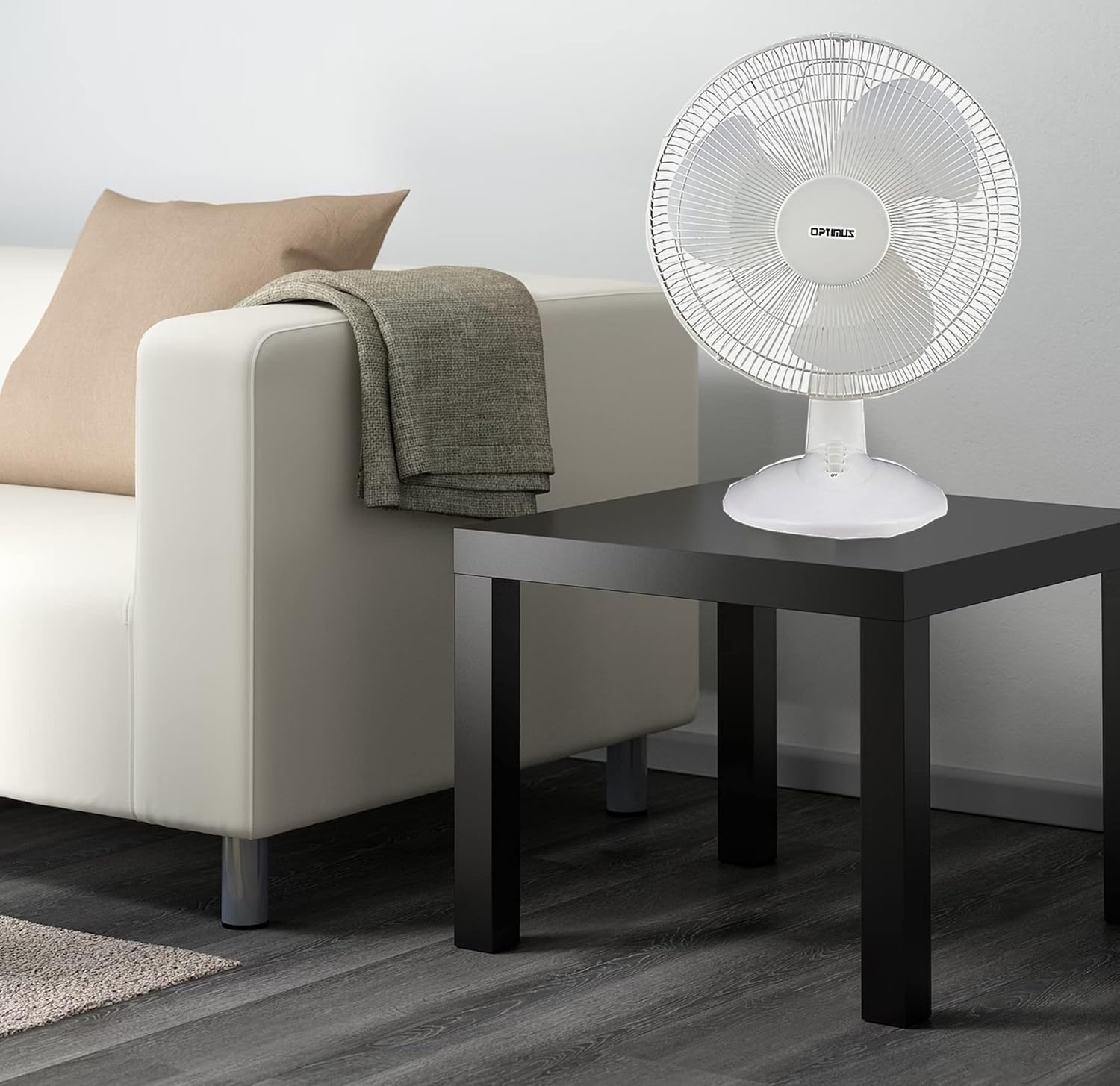
Figure 3: 4-Position Push Button Switch for speed control.
ຟັງຊັນ Oscillation
The fan offers a full room of directional 90-degree oscillation to distribute air across a wider area:
- To start oscillation, push down the oscillation knob located on top of the motor housing.
- ເພື່ອຢຸດການສັ່ນ ແລະ ຄວບຄຸມກະແສລົມໃນຕຳແໜ່ງຄົງທີ່, ໃຫ້ດຶງປຸ່ມສັ່ນຂຶ້ນ.
Adjustable Tilt/Angle Head
The fan head can be adjusted vertically to direct airflow precisely where needed:
- To adjust the tilt, gently push the fan head up or down to the desired angle. The fan head will remain in the selected position.

Figure 4: Adjustable tilt/angle head for vertical airflow adjustment.
ການບໍາລຸງຮັກສາແລະການທໍາຄວາມສະອາດ
Regular cleaning and maintenance will ensure optimal performance and extend the life of your fan.
ທໍາຄວາມສະອາດ
- ຖອດພັດລົມອອກຈາກປລັກສຽບໄຟກ່ອນທຳຄວາມສະອາດທຸກຄັ້ງ.
- ໃຊ້ອ່ອນ, ງamp ຜ້າເຊັດຜິວດ້ານນອກຂອງພັດລົມ. ຢ່າໃຊ້ເຄື່ອງເຮັດຄວາມສະອາດຂັດຫຼືສານລະລາຍ.
- To clean the fan blades, you may need to carefully remove the front grille. Refer to the assembly instructions in reverse order for safe removal and reattachment.
- ໃຫ້ແນ່ໃຈວ່າທຸກພາກສ່ວນແຫ້ງຫມົດກ່ອນທີ່ຈະສຽບພັດລົມຄືນ.
ການເກັບຮັກສາ
ເມື່ອບໍ່ໄດ້ໃຊ້ເປັນເວລາດົນ, ໃຫ້ເກັບຮັກສາພັດລົມໄວ້ໃນບ່ອນທີ່ເຢັນ, ແຫ້ງ, ດີກວ່າຢູ່ໃນການຫຸ້ມຫໍ່ຕົ້ນສະບັບຂອງມັນ, ເພື່ອປົກປ້ອງມັນຈາກຝຸ່ນແລະຄວາມເສຍຫາຍ.
ການແກ້ໄຂບັນຫາ
ຖ້າພັດລົມຂອງທ່ານເຮັດວຽກບໍ່ຖືກຕ້ອງ, ປຶກສາບັນຫາທົ່ວໄປ ແລະວິທີແກ້ໄຂບັນຫາຕໍ່ໄປນີ້:
- ພັດລົມບໍ່ເປີດ:
- ກວດໃຫ້ແນ່ໃຈວ່າໄດ້ສຽບສາຍໄຟເຂົ້າກັບປລັກໄຟຟ້າທີ່ເຮັດວຽກຢ່າງປອດໄພ.
- Check if the outlet is receiving power by plugging in another appliance.
- Verify that the speed control button is pressed to an 'ON' setting (1, 2, or 3).
- ພັດລົມມີສຽງດັງ:
- ໃຫ້ແນ່ໃຈວ່າພັດລົມຖືກວາງຢູ່ເທິງພື້ນຜິວທີ່ມີລະດັບຄວາມຫມັ້ນຄົງ.
- Check for any loose parts or obstructions within the fan grilles or around the blades.
- Clean the fan blades and grilles to remove any dust buildup that might cause imbalance.
- Fan does not oscillate:
- Ensure the oscillation knob on top of the motor housing is pushed down.
ຖ້າບັນຫາຍັງຄົງຢູ່ຫຼັງຈາກພະຍາຍາມແກ້ໄຂເຫຼົ່ານີ້, ກະລຸນາຕິດຕໍ່ຝ່າຍຊ່ວຍເຫຼືອລູກຄ້າ.
ຂໍ້ມູນຈໍາເພາະ
| ຍີ່ຫໍ້ | Optimus |
| ໝາຍເລກຕົວແບບ | F-1230 |
| ການອອກແບບພັດລົມໄຟຟ້າ | ພັດລົມໂຕະ |
| ສີ | ສີຂາວ |
| ແຫຼ່ງພະລັງງານ | ໄຟຟ້າສາຍ |
| ຈໍານວນຄວາມໄວ | 3 |
| ຄຸນນະສົມບັດພິເສດ | ສະຫຼັບກັນ |
| ປະເພດການຕິດຕັ້ງ | ພູຕັ້ງໂຕະ |
| ປະເພດການຄວບຄຸມ | ການຄວບຄຸມປຸ່ມ |
| ວັດtage | 50 ວັດ |
| ສະບັບtage | 120 ໂວນ |
| ນ້ໍາຫນັກລາຍການ | 4.95 ປອນ |
| ປະເພດວັດສະດຸ | ພາດສະຕິກ |
| ການນຳໃຊ້ພາຍໃນ/ນອກ | ພາຍໃນ |
ການຮັບປະກັນ ແລະການຊ່ວຍເຫຼືອລູກຄ້າ
ຂໍ້ມູນການຮັບປະກັນ
This Optimus F-1230 fan comes with a 1 ປີສ່ວນແລະແຮງງານ warranty. Please retain your proof of purchase for any warranty claims.
ການຊ່ວຍເຫຼືອລູກຄ້າ
For technical assistance, troubleshooting not covered in this manual, or warranty service, please contact Optimus Enterprises. The manufacturer's contact information is: SEATTLE, WA, 98109 US.
You may also visit the official Optimus webເວັບໄຊທ໌ສໍາລັບຊັບພະຍາກອນສະຫນັບສະຫນູນເພີ່ມເຕີມ.