
1. ບົດແນະນຳ
This manual provides detailed instructions for the setup, operation, and maintenance of your Bushnell Onix 200 Portable GPS Navigator. The Onix 200 is designed for outdoor use, offering navigation capabilities with satellite and aerial photos on a 2.7-inch sunlight-readable LCD screen. It features a rugged, waterproof design (IPX7) and 32 MB of internal memory for storing navigational data.
2. ຜະລິດຕະພັນເກີນview
2.1 ລັກສະນະທີ່ສໍາຄັນ
- Navigation with satellite and aerial photos.
- Rugged rubber armor and IPX7 waterproof rating.
- Sunlight-readable 2.7-inch LCD screen.
- ຜູ້ໃຊ້ Profiles for customized activity settings.
- Night-mode screen viewທາງເລືອກ.
- 32 MB internal memory.
- ການເຊື່ອມຕໍ່ USB.
2.2 ອົງປະກອບ
The Bushnell Onix 200 package typically includes:
- Bushnell Onix 200 GPS Unit
- Wrist Mount
- ສາຍ USB (ສໍາລັບການໂອນຂໍ້ມູນແລະການສາກໄຟ)
- ຄູ່ມືຜູ້ໃຊ້ (ເອກະສານນີ້)
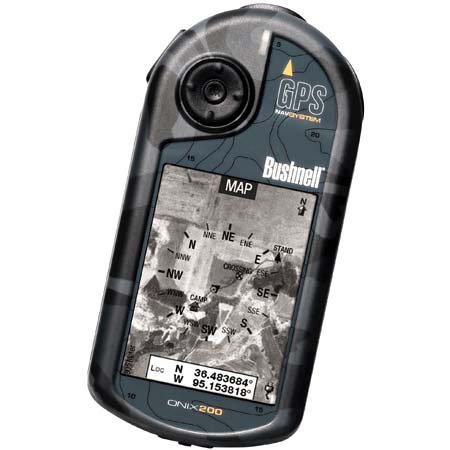
Figure 1: Bushnell Onix 200 handheld GPS unit, showing its rugged design and screen.
3. ຕັ້ງຄ່າ
3.1 ການຕິດຕັ້ງຫມໍ້ໄຟ
The Bushnell Onix 200 does not include batteries. It requires standard AA batteries (not included). To install:
- ຊອກຫາຝາປິດຊ່ອງໃສ່ຫມໍ້ໄຟຢູ່ດ້ານຫຼັງຂອງໜ່ວຍ.
- ເປີດຝາປິດໂດຍການເລື່ອນ ຫຼື ປົດລັອກມັນຕາມເຄື່ອງໝາຍ.
- ໃສ່ຈໍານວນທີ່ກໍານົດໄວ້ຂອງຫມໍ້ໄຟ AA, ຮັບປະກັນ polarity ທີ່ຖືກຕ້ອງ (+/-).
- Securely close the battery compartment cover to maintain the waterproof seal.
3.2 ການເປີດເຄື່ອງເບື້ອງຕົ້ນ ແລະການຕັ້ງຄ່າພື້ນຖານ
- ກົດປຸ່ມເປີດປິດຄ້າງໄວ້ຈົນກວ່າໜ້າຈໍຈະສະຫວ່າງ.
- Upon first use, the device may prompt you to set basic preferences such as language, time zone, and measurement units. Follow the on-screen instructions.
- Allow the device to acquire a GPS signal. This may take several minutes, especially during the first use or after a long period of inactivity. Ensure you are in an open area with a clear view ຂອງທ້ອງຟ້າ.
3.3 ເຊື່ອມຕໍ່ກັບຄອມພິວເຕີ້
Use the provided USB cable to connect the Onix 200 to your computer for data transfer, map updates, or firmware updates. The device is compatible with Windows operating systems.
4. ຄໍາແນະນໍາການດໍາເນີນງານ
4.1 Navigation with Satellite/Aerial Photos
The Onix 200 allows you to overlay navigation information directly onto satellite or aerial photographs. This feature provides enhanced situational awareness, especially in unfamiliar terrain.
- Access the map view ຈາກເມນູຫຼັກ.
- Select the desired map type (e.g., satellite, aerial, USGS map) from the display options.
- Use the touch screen or voice controls to pan, zoom, and interact with the map.
- Your current position will be indicated on the map, along with any loaded waypoints or routes.
4.2 User Profiles
The "User Profiles" feature allows you to customize the device's settings and menu options based on your activity (e.g., hiking, fishing, hunting). This streamlines access to relevant functions.
- ໄປທີ່ "Pro"files" section in the main menu.
- ເລືອກມືອາຊີບທີ່ມີຢູ່ແລ້ວfile ຫຼືສ້າງອັນໃໝ່.
- Customize settings such as display preferences, data fields, and shortcut menus for that specific activity.
- Activate the desired profile before starting your activity.
4.3 ໂໝດກາງຄືນ
For low-light conditions, activate the night-mode screen viewing option. This adjusts the display's backlight and color scheme to reduce eye strain and improve visibility in the dark.
- Access display settings from the main menu.
- Toggle the "Night Mode" option to ON.
4.4 ວິທີການຄວບຄຸມ
The Onix 200 supports both touch screen and voice control for interacting with the device. Refer to the on-screen prompts and the device's internal help system for specific voice commands.
5. ບໍາລຸງຮັກສາ
5.1 ການທໍາຄວາມສະອາດອຸປະກອນ
- ເຊັດໜ້າຈໍ ແລະ ພາຍນອກດ້ວຍຜ້າອ່ອນ, ງamp, ຜ້າບໍ່ມີ lint.
- Do not use abrasive cleaners, solvents, or aerosol sprays, as these can damage the device's finish and screen.
- Ensure all ports are dry before connecting cables.
5.2 ການດູແລກັນນ້ໍາ (IPX7)
The Onix 200 is waterproof to IPX7 standards, meaning it can withstand immersion in water up to 1 meter for 30 minutes. To maintain this rating:
- Ensure the battery compartment cover and any port covers are securely closed before exposure to water.
- Do not intentionally submerge the device beyond its rated depth or duration.
- If the device gets wet, dry it thoroughly before opening any compartments or connecting to power.
5.3 ການເກັບຮັກສາ
Store the device in a cool, dry place away from direct sunlight and extreme temperatures when not in use. Remove batteries if storing for extended periods to prevent leakage.
6. ການແກ້ໄຂບັນຫາ
6.1 ບໍ່ມີພະລັງງານ
- Check if batteries are correctly installed and fully charged.
- ປ່ຽນແບັດເກົ່າດ້ວຍອັນໃໝ່.
- ໃຫ້ແນ່ໃຈວ່າກົດປຸ່ມເປີດປິດແລະຖືພຽງພໍ.
6.2 ການສູນເສຍສັນຍານ GPS ຫຼື ຄວາມບໍ່ຖືກຕ້ອງ
- ໃຫ້ແນ່ໃຈວ່າທ່ານຢູ່ໃນພື້ນທີ່ເປີດທີ່ມີຄວາມຊັດເຈນ view of the sky, away from tall buildings, dense foliage, or strong electromagnetic interference.
- Allow the device more time to acquire a signal.
- Perform a soft reset (refer to the device's internal menu for this option, if available).
6.3 ໜ້າຈໍບໍ່ຕອບສະໜອງ
- ໃຫ້ແນ່ໃຈວ່າຫນ້າຈໍສະອາດແລະແຫ້ງ.
- If the touch screen is resistive, apply firm but gentle pressure.
- ປິດເປີດອຸປະກອນຄືນໃໝ່.
6.4 Device Not Connecting to Computer
- Verify the USB cable is securely connected to both the device and the computer.
- ລອງໃຊ້ພອດ USB ອື່ນໃນຄອມພິວເຕີຂອງທ່ານ.
- Ensure necessary drivers are installed on your Windows operating system.
For further assistance, please refer to the official Bushnell support resources.
7. ຂໍ້ມູນຈໍາເພາະ
| ຄຸນສົມບັດ | ຂໍ້ມູນຈໍາເພາະ |
|---|---|
| ຍີ່ຫໍ້ | Bushnell |
| ຊື່ຕົວແບບ | Onix 200 |
| ໝາຍເລກຕົວແບບ | 36-2000 |
| ຂະໜາດໜ້າຈໍ | 2.7 ນິ້ວ |
| ຄວາມລະອຽດ | 160 x 240 |
| ປະເພດການສະແດງ | ຈໍ LCD |
| ປະເພດຫນ້າຈໍສໍາຜັດ | ຕ້ານທານ |
| ຄວາມອາດສາມາດເກັບຮັກສາຫນ່ວຍຄວາມຈໍາ | 32 MB |
| ເຕັກໂນໂລຊີການເຊື່ອມຕໍ່ | USB |
| ປະເພດແຜນທີ່ | ດາວທຽມ |
| ຮອງຮັບລະບົບນຳທາງດາວທຽມ | GPS |
| ຄຸນນະສົມບັດພິເສດ | ກັນນໍ້າ (IPX7) |
| ວິທີການຄວບຄຸມ | ແຕະ, ສຽງ |
| ລະບົບປະຕິບັດການ | Windows (for PC connection) |
| ຂະໜາດ (ກວ້າງ x ສູງ x ຍາວ) | 1.1 x 8.0 x 2.2 ນິ້ວ |
| ນ້ໍາຫນັກລາຍການ | 15.2 ອອນ |
| ແບດເຕີລີ່ລວມ | No (Requires AA) |
| UPC | 029757362001 |
8. ການຮັບປະກັນແລະການສະຫນັບສະຫນູນ
For detailed warranty information, product registration, and technical support, please visit the official Bushnell webເວັບໄຊ ຫຼືຕິດຕໍ່ພະແນກບໍລິການລູກຄ້າຂອງເຂົາເຈົ້າ.
ທ່ານສາມາດຊອກຫາຂໍ້ມູນເພີ່ມເຕີມແລະຊັບພະຍາກອນສະຫນັບສະຫນູນໄດ້ທີ່ Bushnell Store ໃນ Amazon.