
ແນະນຳ
This manual provides essential information for the installation, operation, and maintenance of the HP Procurve 3500yl-48G-PWR Managed Ethernet Switch. This device is designed to offer advanced intelligent edge switching capabilities, supporting demanding networking features such as Quality of Service (QoS) and security. It features a variety of Gigabit interfaces, integrated Power over Ethernet (PoE) on all 10/100/1000Base-T ports, and 10-Gigabit Ethernet (10-GbE) capability.
ສິນຄ້າເກີນview
The HP Procurve 3500yl-48G-PWR is a robust managed Ethernet switch. It is equipped with 44 x 10/100/1000Base-T ports and 4 x 10/100/1000Base-T ports, providing extensive connectivity options for various network environments. The integrated PoE functionality simplifies deployment of IP phones, wireless access points, and other PoE-powered devices.
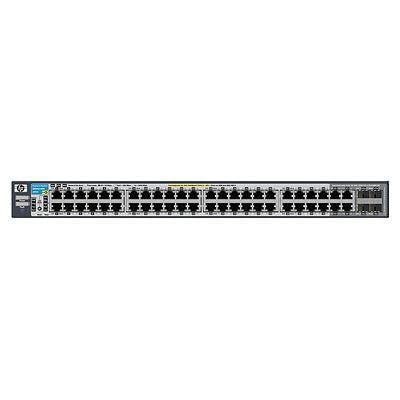
ຮູບ 1: ດ້ານຫນ້າ view of the HP Procurve 3500yl-48G-PWR Managed Ethernet Switch, showing the 48 Ethernet ports and status indicators.
ຕັ້ງຄ່າ
1. ການຫຸ້ມຫໍ່ແລະການກວດກາ
ຄ່ອຍໆເອົາສະວິດອອກຈາກການຫຸ້ມຫໍ່. ກວດສອບອຸປະກອນເພື່ອຊອກຫາຮ່ອງຮອຍຂອງຄວາມເສຍຫາຍທາງດ້ານຮ່າງກາຍ. ລາຍງານຄວາມເສຍຫາຍໃດໆຕໍ່ຜູ້ສະໜອງຂອງທ່ານທັນທີ.
2. ການຕິດຕັ້ງ Rack (ທາງເລືອກ)
The switch is designed for standard 19-inch rack mounting. Use the provided rack-mount kit and screws to secure the switch in the rack. Ensure adequate ventilation around the unit.
3. ການເຊື່ອມຕໍ່ພະລັງງານ
- ເຊື່ອມຕໍ່ສາຍໄຟເຂົ້າກັບຊ່ອງສຽບໄຟ AC ທີ່ຢູ່ດ້ານຫຼັງຂອງສະວິດ.
- ສຽບສາຍໄຟອີກດ້ານໜຶ່ງເຂົ້າໄປໃນປ້ຳໄຟຟ້າທີ່ມີສາຍດິນ.
- ກວດສອບວ່າໄຟ LED ພະລັງງານຢູ່ເທິງແຜງດ້ານໜ້າສະຫວ່າງຂຶ້ນ, ຊີ້ບອກວ່າສະວິດກຳລັງຮັບພະລັງງານ.
4. ການເຊື່ອມຕໍ່ເຄືອຂ່າຍ
Connect Ethernet cables from your network devices (computers, servers, other switches, access points) to the RJ45 ports on the front panel of the switch. The switch supports 10/100/1000Base-T connections. For PoE devices, simply connect them to any of the 48 ports; the switch will automatically detect and provide power if the device is PoE-compatible.
5. ການເຂົ້າເຖິງການຕັ້ງຄ່າເບື້ອງຕົ້ນ
For initial configuration, connect a console cable (typically RJ45 to DB9) from your management workstation to the console port on the switch. Use a terminal emulation program (e.g., PuTTY, Tera Term) with the following settings: 9600 baud, 8 data bits, no parity, 1 stop bit, no flow control. Alternatively, if the switch has a default IP address, you can connect via a web browser or SSH/Telnet after assigning your workstation an IP address in the same subnet.
ຄໍາແນະນໍາການດໍາເນີນງານ
1. ເປີດເຄື່ອງ
Once connected to power, the switch will automatically power on. Observe the front panel LEDs for status indications.
2. ຕົວຊີ້ວັດ LED
- ໄຟ LED: Indicates power status. Solid green for normal operation.
- LED ສະຖານະພອດ: Each port has an LED indicating link status and activity. Typically, solid green indicates a link, and blinking green indicates activity. Amber may indicate a 10/100 Mbps link, while green indicates a 1000 Mbps link, depending on the specific model's LED scheme. Refer to the detailed LED guide in the full product documentation for precise interpretations.
- PoE Status LEDs: Indicate Power over Ethernet status for each port.
3. Basic Network Operation
The switch operates as a Layer 2 device, forwarding Ethernet frames between connected devices. With its managed capabilities, you can configure VLANs, Spanning Tree Protocol (STP), Link Aggregation (LAG), and other advanced features via the command-line interface (CLI) or web-based ການໂຕ້ຕອບການຄຸ້ມຄອງ.
4. ຄຸນສົມບັດຂັ້ນສູງ
The Procurve 3500yl-48G-PWR supports advanced features such as Quality of Service (QoS) for prioritizing network traffic, robust security features to protect your network, and 10-GbE uplink capabilities (if equipped with optional modules) for high-bandwidth connections.
ບໍາລຸງຮັກສາ
1. ທໍາຄວາມສະອາດ
Periodically clean the exterior of the switch with a soft, dry cloth. Do not use liquid or aerosol cleaners. Ensure ventilation openings are free from dust and obstructions to maintain proper airflow.
2. ອັບເດດເຟີມແວ
ກວດສອບຜູ້ຜະລິດເປັນປະຈຳ webເວັບໄຊທ໌ສຳລັບການອັບເດດເຟີມແວ. ການຮັກສາເຟີມແວໃຫ້ທັນສະໄໝຢູ່ສະເໝີຮັບປະກັນປະສິດທິພາບ, ຄວາມປອດໄພ ແລະ ການເຂົ້າເຖິງຄຸນສົມບັດໃໝ່ໆທີ່ດີທີ່ສຸດ. ປະຕິບັດຕາມຄຳແນະນຳທີ່ມີໃຫ້ພ້ອມກັບຊຸດອັບເດດເຟີມແວຢ່າງລະມັດລະວັງ.
3. ການພິຈາລະນາດ້ານສິ່ງແວດລ້ອມ
Operate the switch within its specified temperature range (up to 40 degrees Celsius). Avoid exposing the device to excessive heat, humidity, or direct sunlight. Ensure proper airflow around the unit to prevent overheating.
ການແກ້ໄຂບັນຫາ
1. ບໍ່ມີພະລັງງານ
- ກວດສອບໃຫ້ແນ່ໃຈວ່າສາຍໄຟໄດ້ເຊື່ອມຕໍ່ກັບທັງສະວິດ ແລະ ປລັກໄຟຟ້າຢ່າງແໜ້ນໜາແລ້ວ.
- ກວດເບິ່ງປລັກສຽບໄຟກັບອຸປະກອນອື່ນເພື່ອຮັບປະກັນວ່າມັນສາມາດໃຊ້ໄດ້.
- Ensure the power supply unit (if external) is properly connected and functional.
2. No Link on a Port
- ກວດເບິ່ງສາຍອີເທີເນັດສໍາລັບຄວາມເສຍຫາຍແລະໃຫ້ແນ່ໃຈວ່າມັນຖືກສຽບຢ່າງປອດໄພກັບພອດສະວິດແລະອຸປະກອນທີ່ເຊື່ອມຕໍ່.
- ກວດສອບວ່າອຸປະກອນທີ່ເຊື່ອມຕໍ່ນັ້ນເປີດແລະເຮັດວຽກຖືກຕ້ອງ.
- ລອງຜອດອື່ນຢູ່ໃນສະວິດ ຫຼືສາຍອີເທີເນັດອື່ນ.
- Check the port configuration in the switch's management interface to ensure it is enabled and correctly configured.
3. ບັນຫາການເຊື່ອມຕໍ່ເຄືອຂ່າຍ
- Confirm IP address settings on connected devices and the switch.
- Check for conflicting IP addresses on the network.
- Review switch configuration for VLANs, routing, or security policies that might be blocking traffic.
- ປິດເປີດສະວິດ ແລະອຸປະກອນທີ່ເຊື່ອມຕໍ່ຄືນໃໝ່.
If issues persist, consult the comprehensive troubleshooting guide available on the manufacturer's support webສະຖານທີ່ຫຼືຕິດຕໍ່ສະຫນັບສະຫນູນດ້ານວິຊາການ.
ຂໍ້ມູນຈໍາເພາະ
| ຄຸນສົມບັດ | ຂໍ້ມູນຈໍາເພາະ |
|---|---|
| ຍີ່ຫໍ້ | HEWLETT PACKARD |
| ໝາຍເລກຕົວແບບ | J8693A |
| ຈໍານວນພອດ | 48 (44 x 10/100/1000Base-T, 4 x 10/100/1000Base-T) |
| ອັດຕາການໂອນຂໍ້ມູນ | 1000 Megabits ຕໍ່ວິນາທີ |
| ການໂຕ້ຕອບ | PoE, RJ45 |
| ປະເພດສະຫຼັບ | ຄຸ້ມຄອງ |
| ສະບັບtage | 48 ໂວນ (DC) |
| ນ້ໍາຫນັກລາຍການ | 16.1 ປອນ |
| ລະດັບອຸນຫະພູມສູງສຸດ | 40 ອົງສາ Celsius |
| Case Material Type | ໂລຫະ |
| ອຸປະກອນທີ່ເຂົ້າກັນໄດ້ | ເດັສທັອບ |
ການຮັບປະກັນແລະການສະຫນັບສະຫນູນ
This product is subject to the manufacturer's warranty policy. For specific details regarding warranty length and coverage, please contact the manufacturer directly. Please note that returns for non-defective items may be subject to a restocking fee. Any merchandise returned for repair and found not to be defective by technicians will incur a 25% restocking fee. By purchasing this product, you acknowledge and accept these procedures.
For technical support, documentation, and additional resources, please visit the official HP Procurve support webເວັບໄຊ ຫຼືຕິດຕໍ່ພະແນກບໍລິການລູກຄ້າຂອງເຂົາເຈົ້າ.