
1. ບົດແນະນຳ
Welcome to the user manual for your new Singing Machine SMVG-620 CD+G Karaoke System. This system is designed to provide hours of entertainment with its CD+G playback capabilities, built-in camera, 5.5-inch monitor, and AM/FM radio. Please read this manual thoroughly before operating your unit to ensure proper use and to maximize your enjoyment.
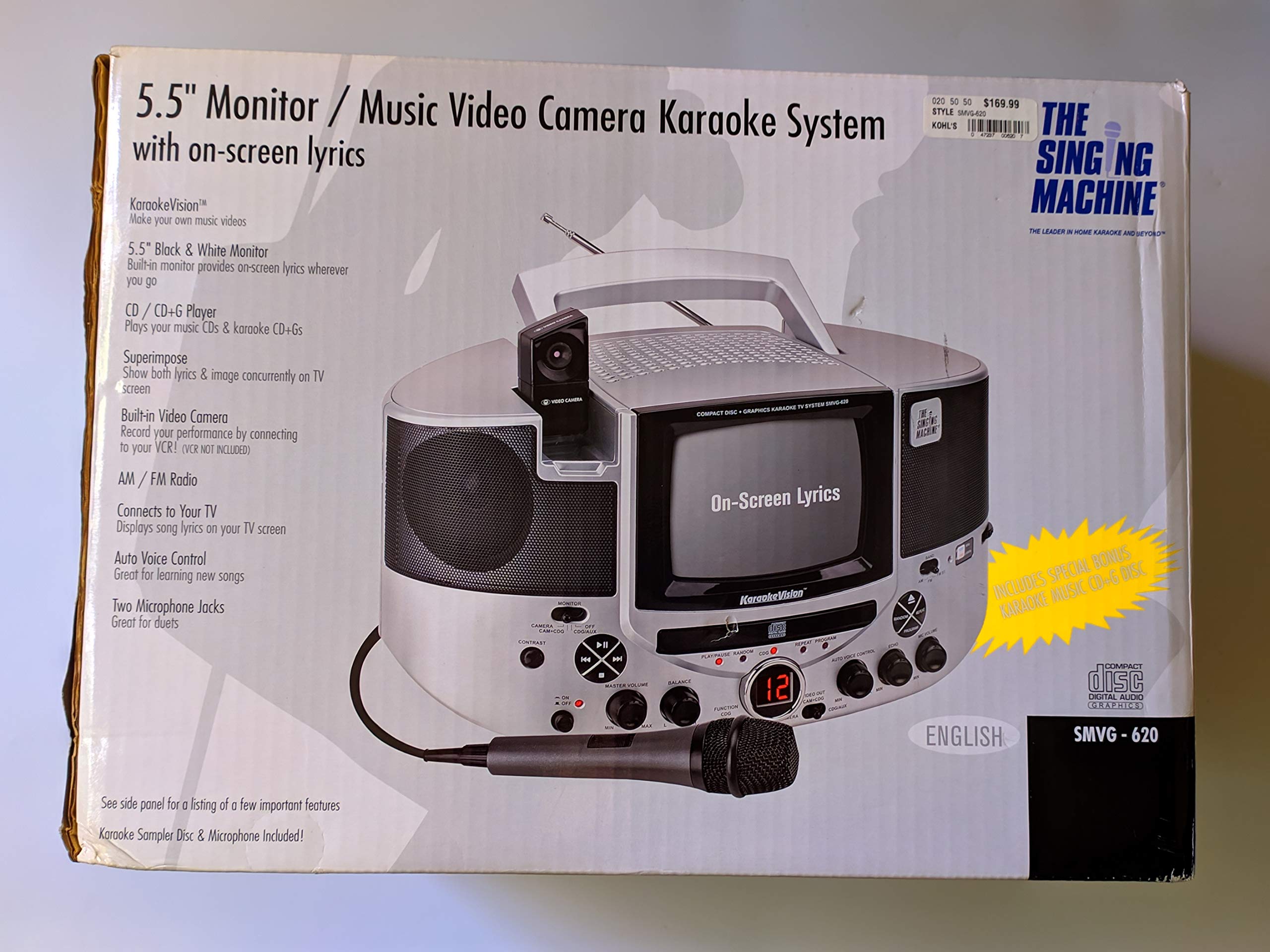
ຮູບທີ 1.1: The Singing Machine SMVG-620 CD+G Karaoke System.
For optimal performance and safety, always follow the instructions and warnings provided.
2. ຂໍ້ມູນຄວາມປອດໄພທີ່ສໍາຄັນ
- ອ່ານຄໍາແນະນໍາ: ຄໍາແນະນໍາດ້ານຄວາມປອດໄພ ແລະການປະຕິບັດງານທັງໝົດຄວນອ່ານກ່ອນທີ່ເຄື່ອງໃຊ້ຈະເຮັດວຽກ.
- ຮັກສາຄໍາແນະນໍາ: ຄໍາແນະນໍາດ້ານຄວາມປອດໄພແລະການດໍາເນີນງານຄວນໄດ້ຮັບການເກັບຮັກສາໄວ້ສໍາລັບການອ້າງອີງໃນອະນາຄົດ.
- ຄຳເຕືອນໃຫ້ລະວັງ: ຄໍາເຕືອນທັງຫມົດກ່ຽວກັບເຄື່ອງໃຊ້ແລະໃນຄໍາແນະນໍາການດໍາເນີນງານຄວນໄດ້ຮັບການປະຕິບັດຕາມ.
- ປະຕິບັດຕາມຄໍາແນະນໍາ: ຄໍາແນະນໍາການປະຕິບັດແລະການນໍາໃຊ້ທັງຫມົດຄວນໄດ້ຮັບການປະຕິບັດຕາມ.
- ນ້ໍາແລະຄວາມຊຸ່ມ: ຢ່າໃຊ້ອຸປະກອນນີ້ຢູ່ໃກ້ກັບນ້ໍາ.
- ທໍາຄວາມສະອາດ: ເຮັດຄວາມສະອາດດ້ວຍຜ້າແຫ້ງເທົ່ານັ້ນ.
- ການລະບາຍອາກາດ: ຫ້າມປິດຊ່ອງລະບາຍອາກາດໃດໆ. ຕິດຕັ້ງຕາມຄໍາແນະນໍາຂອງຜູ້ຜະລິດ.
- ຄວາມຮ້ອນ: ຫ້າມຕິດຕັ້ງໃກ້ກັບແຫຼ່ງຄວາມຮ້ອນເຊັ່ນລັງສີ, ເຄື່ອງບັນທຶກຄວາມຮ້ອນ, ເຕົາຫຼືອຸປະກອນອື່ນໆ (ລວມທັງ. amplifiers) ທີ່ຜະລິດຄວາມຮ້ອນ.
- ການປົກປ້ອງສາຍໄຟ: ປົກປ້ອງສາຍໄຟຈາກການຖືກສຽບ ຫຼື ສຽບ, ໂດຍສະເພາະຢູ່ປລັກສຽບ, ກ່ອງຮັບສະດວກ, ແລະຈຸດທີ່ພວກມັນອອກຈາກອຸປະກອນ.
- ໄຟລ໌ແນບ/ອຸປະກອນເສີມ: ໃຊ້ໄຟລ໌ແນບ/ອຸປະກອນເສີມທີ່ຜູ້ຜະລິດລະບຸໄວ້ເທົ່ານັ້ນ.
- ຟ້າຜ່າ: ຖອດອຸປະກອນນີ້ອອກໃນລະຫວ່າງການມີພາຍຸຟ້າຜ່າ ຫຼືເມື່ອບໍ່ໄດ້ໃຊ້ເປັນເວລາດົນນານ.
- ການບໍລິການ: ອ້າງເຖິງການບໍລິການທັງtoົດໃຫ້ກັບພະນັກງານບໍລິການທີ່ມີຄຸນວຸດທິ. ຕ້ອງການການບໍລິການເມື່ອອຸປະກອນໄດ້ຮັບຄວາມເສຍຫາຍໃນທາງໃດທາງ ໜຶ່ງ.
3. ເນື້ອໃນຊຸດ
Carefully unpack your Singing Machine SMVG-620 system and ensure all items listed below are present and in good condition.
- SMVG-620 CD+G Karaoke System
- One (1) Microphone
- Sampler CD+G Disc
- Audio/Video RCA Cables
- ເຄື່ອງປັບໄຟຟ້າ AC
- ຄູ່ມືການສອນ

ຮູບທີ 3.1: Contents of the box, including the microphone, RCA cables, and the instruction manual.
4. ຜະລິດຕະພັນເກີນview
Familiarize yourself with the various parts and controls of your SMVG-620 Karaoke System.

ຮູບທີ 4.1: ຫລັງ view of the product packaging highlighting key features and components of the SMVG-620 system.
ຄຸນນະສົມບັດທີ່ສໍາຄັນ:
- 5.5" Black & White Monitor: For on-screen lyrics from CD+G discs.
- Built-in Color Camera: Allows you to see yourself on the monitor or connected TV.
- Dual Microphone Jacks: Connect two microphones for duets (one microphone included).
- ວິທະຍຸ AM/FM: ຕິດຕາມສະຖານີວິທະຍຸທີ່ທ່ານມັກ.
- ເຄື່ອງຫຼິ້ນ CD+G: Plays standard audio CDs and CD+Graphics discs.
- ການຄວບຄຸມດ້ວຍສຽງອັດຕະໂນມັດ (AVC): Helps maintain vocal balance by automatically reducing the main vocal track when you sing.
- ການຄວບຄຸມສຽງສະທ້ອນ: Adds depth and resonance to your voice.
- Professional Style Microphone: For clear vocal pickup.
- ສຽງ/ວິດີໂອອອກ: Connects to your TV for larger screen display and enhanced audio.
5. ຕັ້ງຄ່າ
5.1 ການເຊື່ອມຕໍ່ພະລັງງານ
- ໃຫ້ແນ່ໃຈວ່າເຄື່ອງໄດ້ຖືກວາງຢູ່ເທິງພື້ນຜິວທີ່ຫມັ້ນຄົງ, ຮາບພຽງ.
- Connect the AC power adapter to the DC IN jack on the back of the SMVG-620 unit.
- Plug the other end of the AC power adapter into a standard wall outlet (AC 120V ~ 60Hz).
5.2 ການເຊື່ອມຕໍ່ກັບໂທລະພາບ
ເຖິງ view lyrics on a larger screen and enhance audio, connect the SMVG-620 to your television using the supplied Audio/Video RCA cables.
- Locate the AUDIO OUT (white and red) and VIDEO OUT (yellow) jacks on the back of the SMVG-620.
- Connect the white plug of the RCA cable to the white AUDIO OUT jack on the karaoke system and to the white AUDIO IN jack on your TV.
- Connect the red plug of the RCA cable to the red AUDIO OUT jack on the karaoke system and to the red AUDIO IN jack on your TV.
- Connect the yellow plug of the RCA cable to the yellow VIDEO OUT jack on the karaoke system and to the yellow VIDEO IN jack on your TV.
- Turn on your TV and select the correct A/V input source (e.g., AV1, Video 1) that corresponds to the jacks you used.
5.3 ການເຊື່ອມຕໍ່ໄມໂຄຣໂຟນ
Plug the microphone into either the MIC 1 or MIC 2 jack on the front of the SMVG-620 unit.
6. ການດໍາເນີນງານ
6.1 ການເປີດ/ປິດ
ກົດ ພະລັງງານ button located on the front panel to turn the unit ON or OFF.
6.2 CD+G Playback
- Open the CD compartment door and carefully place a CD+G disc (or standard audio CD) onto the spindle with the label side facing up. Close the door.
- ເລືອກ CD+G mode using the FUNCTION selector.
- ກົດ ຫຼິ້ນ/ຢຸດຊົ່ວຄາວ ປຸ່ມເພື່ອເລີ່ມຕົ້ນການຫຼິ້ນ
- ປັບ ໝວດ MASTER VOLUME ປຸ່ມເພື່ອລະດັບການຟັງທີ່ທ່ານຕ້ອງການ.
- ໃຊ້ ຂ້າມ ປຸ່ມ (<< or >>) to navigate between tracks.
- ເພື່ອຢຸດຊົ່ວຄາວ, ໃຫ້ກົດ ຫຼິ້ນ/ຢຸດຊົ່ວຄາວ ອີກເທື່ອໜຶ່ງ. ກົດອີກຄັ້ງເພື່ອສືບຕໍ່.
- ເພື່ອຢຸດການຫຼີ້ນ, ກົດປຸ່ມ ຢຸດ ປຸ່ມ.
6.3 ການນຳໃຊ້ໄມໂຄຣໂຟນ
- Ensure the microphone is connected to a MIC jack.
- ປັບ ລະດັບສຽງ MIC knob to control the microphone's output level.
- ຫັນ ແອັກໂກ້ ປຸ່ມເພື່ອເພີ່ມຜົນກະທົບສຽງສະທ້ອນໃສ່ສຽງຂອງທ່ານ.
- ໄດ້ AUTO VOICE CONTROL (AVC) switch can be toggled ON/OFF. When ON, the original vocal track on a CD+G disc will be reduced when you sing into the microphone.
6.4 ໂມງເຊົ້າ/ວິທະຍຸ FM
- ເລືອກ AM or FM mode using the FUNCTION selector.
- ໃຫ້ຂະຫຍາຍເສົາອາກາດ FM ເພື່ອໃຫ້ຮັບສັນຍານໄດ້ດີຂຶ້ນ.
- ຫັນ Tuning ປຸ່ມເພື່ອເລືອກສະຖານີວິທະຍຸທີ່ທ່ານຕ້ອງການ.
- ປັບ ໝວດ MASTER VOLUME ລູກບິດ.
6.5 ຟັງຊັນກ້ອງຖ່າຍຮູບ
The built-in camera allows you to display your image on the 5.5-inch monitor or a connected TV.
- Ensure the unit is powered on and connected to a TV if you wish to use an external display.
- The camera feed will automatically display when the unit is in CD+G or Video mode, or when no other video source is active.
7. ບໍາລຸງຮັກສາ
7.1 ການທໍາຄວາມສະອາດຫນ່ວຍງານ
- ຖອດປລັກເຄື່ອງອອກຈາກປລັກສຽບໄຟກ່ອນທຳຄວາມສະອາດທຸກຄັ້ງ.
- ໃຊ້ຜ້າປຽກອ່ອນໆເພື່ອເຮັດຄວາມສະອາດດ້ານນອກ.
- ຢ່າໃຊ້ເຄື່ອງເຮັດຄວາມສະອາດຂັດ, ຂີ້ເຜີ້ງ, ຫຼືສານລະລາຍເພາະວ່າພວກມັນອາດຈະທໍາລາຍການສໍາເລັດຮູບ.
- ສຳລັບເລນຊີດີ, ໃຫ້ໃຊ້ແຜ່ນທຳຄວາມສະອາດເລນຊີດີແບບພິເສດ.
7.2 ຊີດີ ແຄຣ໌
- ຈັບຊີດີດ້ວຍຂອບຂອງມັນເພື່ອຫຼີກລ່ຽງຮອຍນິ້ວມືເທິງໜ້າດິນທີ່ຫຼິ້ນ.
- Keep discs in their cases when not in use to prevent scratches.
- ລ້າງແຜ່ນດິສດ້ວຍຜ້າອ່ອນໆ, ບໍ່ມີເສັ້ນດ່າງ, ເຊັດຈາກກາງອອກໄປຂ້າງນອກ.
8. ການແກ້ໄຂບັນຫາ
If you encounter any issues with your SMVG-620, please refer to the following common problems and solutions.
| ບັນຫາ | ສາເຫດທີ່ເປັນໄປໄດ້ | ການແກ້ໄຂ |
|---|---|---|
| ບໍ່ມີພະລັງງານ | ສາຍໄຟບໍ່ໄດ້ເຊື່ອມຕໍ່ຢ່າງຖືກຕ້ອງ. | ໃຫ້ແນ່ໃຈວ່າອະແດບເຕີ AC ໄດ້ສຽບເຂົ້າກັບເຄື່ອງຢ່າງແໜ້ນໜາ ແລະ ປລັກສຽບທີ່ໃຊ້ງານໄດ້. |
| ບໍ່ມີສຽງຈາກ ລຳ ໂພງ | Master Volume is too low. ເລືອກໂໝດຟັງຊັນທີ່ບໍ່ຖືກຕ້ອງ. | Increase the MASTER VOLUME. Select the correct FUNCTION (CD+G, AM, FM). |
| ບໍ່ມີສຽງຈາກໄມໂຄຣໂຟນ | ບໍ່ໄດ້ເຊື່ອມຕໍ່ໄມໂຄຣໂຟນ. MIC VOLUME is too low. ສະວິດໄມໂຄຣໂຟນປິດຢູ່. | Plug microphone into MIC 1 or MIC 2 jack. Increase the MIC VOLUME. Ensure microphone switch is ON. |
| No video on TV / No lyrics | RCA cables not connected correctly. ເລືອກອິນພຸດໂທລະພາບທີ່ບໍ່ຖືກຕ້ອງ. Not a CD+G disc. | Check all RCA cable connections (yellow for video). Select the correct A/V input on your TV. Ensure you are playing a CD+G disc for lyrics. |
| CD skipping | ແຜ່ນດິດແມ່ນເປື້ອນຫລືຂູດ. ຫນ່ວຍງານຢູ່ເທິງພື້ນຜິວທີ່ບໍ່ຫມັ້ນຄົງ. | Clean the disc or try another disc. Place the unit on a stable, vibration-free surface. |
9. ຂໍ້ມູນຈໍາເພາະ
| ໝາຍເລກຕົວແບບ | SMVG-620 (SIN SMVG620) |
| ແຫຼ່ງພະລັງງານ | AC 120V ~ 60Hz (via AC Adapter) |
| ຕິດຕາມກວດກາ | 5.5-inch Black & White |
| ຈຳນວນລຳໂພງ | 2 |
| ອຸປະກອນທີ່ເຂົ້າກັນໄດ້ | ໂທລະພາບ |
| ປະເພດສື່ | CD, CD+G |
| ຂະໜາດສິນຄ້າ (LxWxH) | 35.8 x 20.8 x 19.3 ຊມ (14.1 x 8.2 x 7.6 ນິ້ວ) |
| ນ້ໍາຫນັກລາຍການ | 3.9 ກິໂລ (8.6 ປອນ) |
10. ການຮັບປະກັນແລະການສະຫນັບສະຫນູນ
For warranty information and customer support, please refer to the warranty card included with your product or contact The Singing Machine directly. You may also consult your retailer for details regarding their return and warranty policies.
ຜູ້ຜະລິດ: ເຄື່ອງຮ້ອງເພງ