
ແນະນຳ
This manual provides essential instructions for the installation, operation, maintenance, and troubleshooting of the IBM 49P1599 FRU System Board. This system board is designed for personal computers, featuring a 400/533 Front Side Bus, integrated 10/100 Ethernet, and support for DDR2 memory.
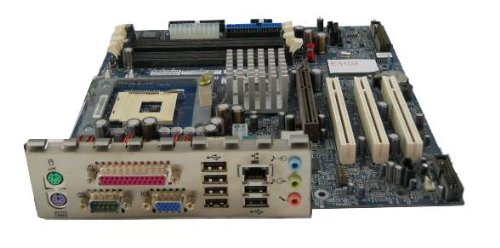
Image: The IBM 49P1599 FRU System Board. This image displays the main components and layout of the motherboard, including CPU socket, memory slots, and various connectors.
ການຕິດຕັ້ງແລະການຕິດຕັ້ງ
Careful installation is crucial for the proper functioning of your system board. Always handle the board by its edges to avoid static discharge.
1. ການກະກຽມການຕິດຕັ້ງ
- Ensure your computer case is compatible with the system board's form factor.
- ລວບລວມເຄື່ອງມືທີ່ຈໍາເປັນ: screwdriver ຫົວ Phillips, ສາຍ wrist ຕ້ານ static.
- Unplug the power supply from the wall outlet before beginning.
2. Installing the System Board
- ຕິດຕັ້ງ I/O ໄສ້ເຂົ້າໄປໃນການເປີດດ້ານຫລັງຂອງກໍລະນີຄອມພິວເຕີຂອງທ່ານ.
- Carefully align the system board with the standoffs in the case.
- Secure the system board with screws, ensuring it is firmly seated.
3. ການຕິດຕັ້ງອົງປະກອບ
ໂປເຊດເຊີ (CPU)
This system board is supplied without a processor. Refer to your CPU's manual for specific installation instructions. Ensure the CPU is correctly oriented in the socket before securing the retention lever.
ໜ່ວຍຄວາມຈຳ (RAM)
The board supports DDR2 RAM and has 2 memory slots.
- ເປີດຄລິບຢູ່ທັງສອງສົ້ນຂອງຊ່ອງຄວາມຈຳ.
- ວາງໂມດູນໜ່ວຍຄວາມຈຳກັບຊ່ອງສຽບ, ຮັບປະກັນວ່າຮອຍບັ້ງຢູ່ໃນໂມດູນກົງກັບກະແຈໃນຊ່ອງສຽບ.
- ກົດລົງໃຫ້ແໜ້ນທັງສອງສົ້ນຂອງໂມດູນ ຈົນກວ່າຄລິບຈະເຂົ້າໃສ່.
ບັດກາຟິກ
The system board features an Integrated Graphics Card Interface and a PCI-Express x16 slot for dedicated graphics cards.
- Locate the PCI-Express x16 slot.
- ເອົາຝາປິດຊ່ອງສຽບທີ່ສອດຄ້ອງກັນອອກຈາກກໍລະນີຂອງເຈົ້າ.
- Insert the graphics card firmly into the slot until it clicks. Secure it with a screw to the case.
4. ສາຍເຊື່ອມຕໍ່
- ຕົວເຊື່ອມຕໍ່ພະລັງງານ: Connect the main 24-pin ATX power connector and the 4-pin CPU power connector from your power supply to the system board.
- ອຸປະກອນ SATA: Connect SATA 3 data cables from your storage devices (hard drives, SSDs) to the SATA ports on the system board.
- ຕົວເຊື່ອມຕໍ່ແຜງໜ້າ: Connect the power button, reset button, HDD LED, power LED, and USB ports from your case to the corresponding headers on the system board. Refer to the board's silkscreen labels for correct orientation.
- ອີເທີເນັດ: The board has integrated 10/100 Ethernet. Connect your network cable to the RJ-45 port on the I/O panel.
ຄໍາແນະນໍາການດໍາເນີນງານ
After completing the physical installation, you can proceed with the initial boot and operating system setup.
1. Initial Boot
- ໃຫ້ແນ່ໃຈວ່າອົງປະກອບທັງຫມົດເຊື່ອມຕໍ່ຢ່າງປອດໄພ.
- ເຊື່ອມຕໍ່ຈໍພາບ, ແປ້ນພິມ, ແລະເມົ້າຂອງທ່ານ.
- Plug in the power supply and turn on the system.
- ລະບົບຄວນຈະເປີດ, ແລະ ທ່ານຄວນເຫັນຈໍສະແດງຜົນຢູ່ເທິງຈໍພາບຂອງທ່ານ.
2. ຕັ້ງຄ່າ BIOS/UEFI
During the initial boot sequence, press the designated key (commonly DEL, F2, F10, or F12) to enter the BIOS/UEFI setup utility. Here you can configure boot order, system time, and other hardware settings. Save changes before exiting.
3. ການຕິດຕັ້ງລະບົບປະຕິບັດການ
This system board is compatible with platforms such as Windows 10. Insert your operating system installation media (USB drive or DVD) and follow the on-screen prompts to install the operating system. Ensure all necessary drivers for the system board components are installed after the OS installation.
ບໍາລຸງຮັກສາ
Regular maintenance helps ensure the longevity and stable performance of your system board.
- ທໍາຄວາມສະອາດ: Periodically clean dust from the system board and components using compressed air. Ensure the system is powered off and unplugged before cleaning.
- ອັບເດດ BIOS: Check the official IBM support website for BIOS updates. BIOS updates can improve compatibility, stability, and performance. Follow the provided instructions carefully when updating the BIOS.
- ການກວດສອບອົງປະກອບ: Ensure all cables and components remain securely connected.
ການແກ້ໄຂບັນຫາ
ຖ້າເຈົ້າພົບບັນຫາ, ເບິ່ງຂັ້ນຕອນການແກ້ໄຂບັນຫາທົ່ວໄປຕໍ່ໄປນີ້:
ບໍ່ມີພະລັງງານ
- Verify the power supply is connected to the wall outlet and turned on.
- Check that the 24-pin and 4-pin power connectors are securely attached to the system board.
- Ensure the front panel power button cable is correctly connected to the system board header.
ບໍ່ມີຈໍສະແດງຜົນ
- Confirm the monitor is powered on and connected to the correct video output (either integrated or dedicated graphics card).
- ໃສ່ກາດກຣາບຟິກ ແລະ ໂມດູນໜ່ວຍຄວາມຈຳຄືນ (ຖ້າມີ).
- ຖ້າເປັນໄປໄດ້, ທົດສອບດ້ວຍຈໍພາບ ຫຼື ສາຍວິດີໂອອື່ນ.
ລະບົບບໍ່ສາມາດ Boot ໄດ້
- Check for any loose cables or components.
- Ensure the CPU is properly seated and its cooler is installed correctly.
- Try booting with only one memory module installed, rotating through the modules and slots to identify a faulty one.
- Reset the BIOS to default settings (refer to your system board's specific instructions for clearing CMOS).
ຂໍ້ມູນຈໍາເພາະ
ການຮັບປະກັນແລະການສະຫນັບສະຫນູນ
For warranty information and technical support, please refer to the official IBM website or contact your point of purchase. Keep your proof of purchase for warranty claims. IBM provides resources and support for its products to ensure customer satisfaction.
ສໍາລັບການຊ່ວຍເຫຼືອເພີ່ມເຕີມ, ໄປຢ້ຽມຢາມ ສະຫນັບສະຫນູນ IBM webເວັບໄຊ.
Ask a question about this manual
Ask about setup, troubleshooting, compatibility, parts, safety, or missing instructions. Manuals+ will review the question and use this page’s manual context to help answer it.
Posting as .
| ຄຸນສົມບັດ | ຂໍ້ມູນຈໍາເພາະ |
|---|---|
| ໝາຍເລກຕົວແບບ | 49P1599 FRU |
| ລົດເມດ້ານໜ້າ (FSB) | 400/533 MHz |
| ເທກໂນໂລຍີຫນ່ວຍຄວາມຈໍາ RAM | DDR2 |
| ຄວາມໄວໂມງຄວາມຈຳ | 2133 MHz |
| ສະລັອດຕິງຫນ່ວຍຄວາມຈໍາສາມາດໃຊ້ໄດ້ | 2 |
| ການໂຕ້ຕອບບັດກາຟິກ | ປະສົມປະສານ, PCI-Express x16 |
| ຮອງຮັບລະບົບລົດເມມາດຕະຖານ | SATA 3 |
| Integrated Ethernet | 10/100 Mbps |
| ອຸປະກອນທີ່ເຂົ້າກັນໄດ້ | ຄອມພິວເຕີສ່ວນບຸກຄົນ |
| ຄວາມເຂົ້າກັນໄດ້ຂອງເວທີ | Windows 10 |
| ນ້ໍາຫນັກລາຍການ | 8 ປອນ |