
1. ບົດແນະນຳ
The Buffalo DriveStation HD-HB250U2 is an external hard drive designed for reliable data storage and backup. It offers a 250 GB capacity, allowing users to store large files, digital images, and documents without consuming space on a computer's main drive. This device features a fanless design for quiet operation and a heat sink chassis to maintain optimal internal temperatures. Its versatile design supports both vertical and horizontal placement.
This manual provides instructions for setting up, operating, and maintaining your DriveStation HD-HB250U2.
2. ສິ່ງທີ່ຢູ່ໃນກ່ອງ
ກວດສອບວ່າລາຍການທັງຫມົດແມ່ນມີຢູ່ໃນຊຸດ:
- Buffalo DriveStation HD-HB250U2 External Hard Drive
- ສາຍໄຟ
- ສາຍ USB
- Quick Setup Guide
- ຖະແຫຼງການຮັບປະກັນ
3. ຕັ້ງຄ່າ
The DriveStation HD-HB250U2 is designed for easy installation and is pre-formatted for immediate use.
-
ການຈັດວາງ: Position the DriveStation vertically or horizontally on a stable surface. The unique chassis design allows for flexible placement to conserve desktop space.
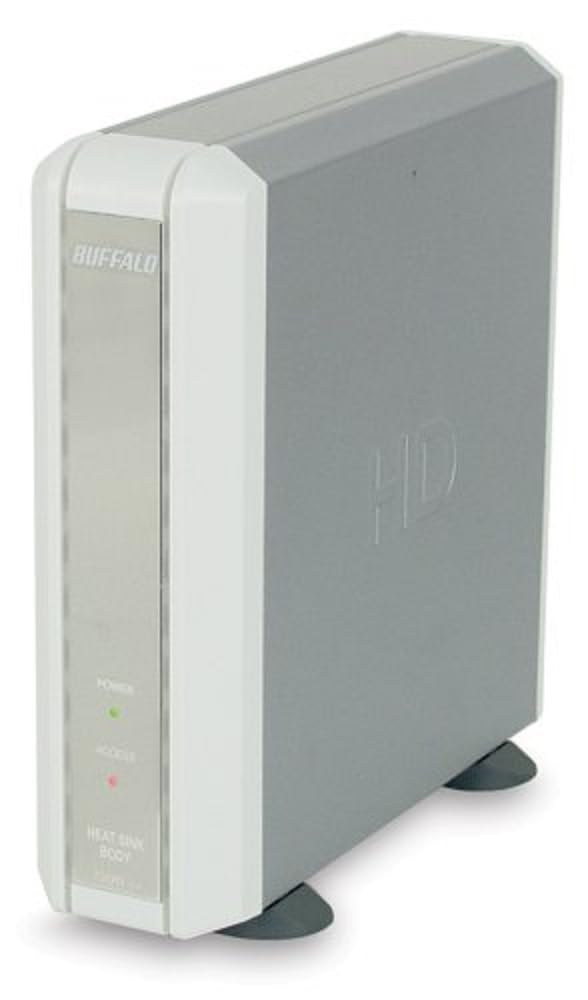
Image 1: Buffalo DriveStation HD-HB250U2. This image displays the Buffalo DriveStation HD-HB250U2 external hard drive in a vertical orientation. The front panel features the 'BUFFALO' logo, a green 'POWER' indicator light, and a red 'ACCESS' indicator light. The device has a sleek, grey and white design, with small black feet for stability.
- ເຊື່ອມຕໍ່ພະລັງງານ: Connect the power cord to the DriveStation and then plug it into an electrical outlet.
- ເຊື່ອມຕໍ່ກັບຄອມພິວເຕີ: Use the provided USB cable to connect the DriveStation to an available USB port on your computer. The DriveStation supports both USB 2.0 and USB 1.1 interfaces.
- ຕັ້ງຄ່າອັດຕະໂນມັດ: For most operating systems (Windows 2000/XP/Vista/7/8/10, macOS), the DriveStation will be automatically detected and configured. No driver installation is typically required, except for older operating systems like Windows 98/98SE.
4. Operating the DriveStation
Once connected, the DriveStation is ready for use as an external storage device.
- Auto Power-On: The DriveStation features an auto power-on function. It will automatically power on or off in conjunction with your attached computer's power state.
- ການໂອນຂໍ້ມູນ: ທ່ານສາມາດລາກແລະວາງໄດ້ files to and from the DriveStation, or use it as a target for backup software.
- Backup Software: The included backup utility allows you to customize backup scheduling for data protection. Refer to the Quick Setup Guide for instructions on using the backup software.
- Power-Saving Shutdown: Utilize the power-saving shutdown feature to schedule when the DriveStation powers off, helping to conserve energy.
5. ບໍາລຸງຮັກສາ
The DriveStation HD-HB250U2 is designed for minimal maintenance.
- ຄວາມເຢັນ: The fanless design ensures silent operation, while the integrated heat sink chassis effectively cools internal components, preventing overheating. Ensure adequate airflow around the device.
- ທໍາຄວາມສະອາດ: ໃຊ້ຜ້າອ່ອນແລະແຫ້ງເພື່ອທຳຄວາມສະອາດດ້ານນອກຂອງອຸປະກອນ. ຢ່າໃຊ້ນ້ຳຢາທຳຄວາມສະອາດ ຫຼື ຕົວລະລາຍ.
- ການອັບເດດເຟີມແວ: Periodically check the official Buffalo webເວັບໄຊທ໌ສໍາລັບການອັບເດດເຟີມແວທີ່ມີຢູ່ສໍາລັບຮູບແບບຂອງທ່ານເພື່ອຮັບປະກັນການປະຕິບັດທີ່ດີທີ່ສຸດແລະຄວາມເຂົ້າກັນໄດ້.
6. ການແກ້ໄຂບັນຫາ
If you encounter issues with your DriveStation, consider the following:
-
ອຸປະກອນບໍ່ກວດພົບ:
- Ensure the power cord is securely connected and the device is powered on.
- Verify the USB cable is firmly connected to both the DriveStation and your computer.
- ລອງເຊື່ອມຕໍ່ກັບຜອດ USB ອັນອື່ນຢູ່ໃນຄອມພິວເຕີຂອງທ່ານ.
- ປິດເປີດຄອມພິວເຕີຂອງທ່ານຄືນໃໝ່.
-
ປະສິດທິພາບຊ້າ:
- Ensure you are using a USB 2.0 port for optimal transfer speeds.
- Close any unnecessary applications running on your computer.
-
ໄຟສະແດງພະລັງງານບໍ່ເປີດ:
- Check the power cord connection and the electrical outlet.
- Ensure your computer is powered on if using the auto power-on feature.
ສໍາລັບການຊ່ວຍເຫຼືອເພີ່ມເຕີມ, ເບິ່ງຂໍ້ມູນການຊ່ວຍເຫຼືອໃນພາກທີ 8.
7. ຂໍ້ມູນຈໍາເພາະ
| ຄຸນສົມບັດ | ລາຍລະອຽດ |
|---|---|
| ໝາຍເລກຕົວແບບ | HD-HB250U2 |
| ຍີ່ຫໍ້ | ບັກຟາໂລ |
| ຄວາມອາດສາມາດເກັບຮັກສາດິຈິຕອນ | 250 GB |
| ຄວາມໄວການຫມຸນຂອງຮາດດິດ | 7200 RPM |
| ການໂຕ້ຕອບຮາດແວ | USB 2.0, USB 1.1 |
| ອຸປະກອນທີ່ເຂົ້າກັນໄດ້ | ຄອມພິວເຕີຕັ້ງໂຕະ |
| ຄຸນນະສົມບັດພິເສດ | Compact, Fanless Design, Heat Sink Chassis, Auto Power-On, Power-Saving Shutdown |
| ສີ | Black (Note: Product image shows grey/white casing, but specification lists black) |
| ຂະໜາດ (ປະມານ) | 34.04 x 22.35 x 12.19 ຊຕມ (Parcel Dimensions) |
| ນ້ຳໜັກ (ປະມານ) | 2.06 ກິໂລກຣາມ |
8. ການຮັບປະກັນແລະການສະຫນັບສະຫນູນ
Your Buffalo DriveStation HD-HB250U2 is backed by a limited 1-year warranty.
For technical assistance, Buffalo offers toll-free 24/7 technical support. Please refer to the warranty statement included in your product package for detailed terms and contact information.
You can also visit the official Buffalo website for product registration, driver downloads, and frequently asked questions.