
Astatic RD104E (302-10036)
Astatic RD104E Road Devil Amplified 4-Pin CB Microphone User Manual
Model: RD104E (302-10036)
ແນະນຳ
The Astatic RD104E Road Devil is an amplified 4-pin CB microphone designed for clear and powerful communication in automotive and truck environments. It features a high-gain amplifier with electronic equalization and noise-canceling capabilities to ensure maximum talk power and intelligibility, even in noisy conditions. This manual provides essential information for the proper setup, operation, maintenance, and troubleshooting of your RD104E microphone.
ຄຸນສົມບັດ
- Designed for CB Radio-Automotive and Truck Use.
- Features a High Gain Amplifier with Electronic Equalization.
- Provides Maximum Talk Power and Intelligibility even Under Noisy Conditions.
- Designed for Close Talking Handheld Applications.
- ລວມມີ Amplifier & 6 Wire Cable.
- Polyurethane Coated Steel Grille Screen for durability.
- Volume Control boosts power and amplifies microphone output.
- Electret Noise Canceling Element assures clarity in noisy conditions.
- Super High Quality Heavy Duty Cord.
ຕັ້ງຄ່າ
Follow these steps to set up your Astatic RD104E microphone:
- ການຕິດຕັ້ງຫມໍ້ໄຟ: The RD104E requires one 9V battery for its internal ampມີຊີວິດຊີວາ.
- Carefully open the microphone casing ເພື່ອເຂົ້າເຖິງຊ່ອງໃສ່ແບັດເຕີຣີ.
- Connect a fresh 9V battery to the battery clips, ensuring correct polarity.
- Securely close the microphone casing.
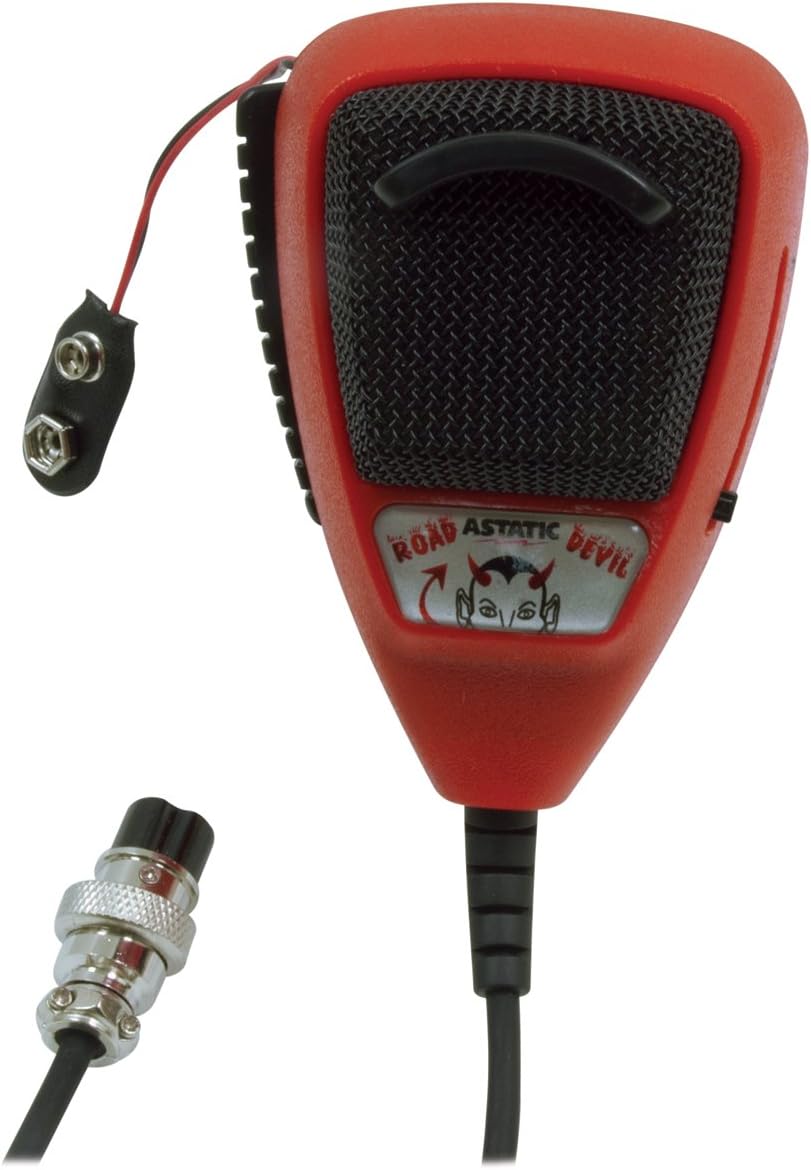
Image: The Astatic RD104E microphone with its internal battery wires visible, ready for 9V battery connection.
- Connecting to CB Radio: The microphone is equipped with a 4-pin connector.
- Locate the 4-pin microphone input on your CB radio.
- Align the pins of the microphone connector with the corresponding holes on the radio's input.
- Gently push and twist the connector clockwise until it is securely fastened.

Image: The Astatic RD104E microphone showing its coiled cord and the 4-pin connector for attachment to a CB radio.
ຄໍາແນະນໍາການດໍາເນີນງານ
To achieve optimal performance from your RD104E microphone, follow these operating guidelines:
- ເປີດ/ປິດ: The microphone's amplifier is powered by the installed 9V battery. There is no separate power switch on the microphone itself; it activates when connected to the CB radio and the radio is powered on.
- ປຸ່ມ Push-To-Talk (PTT):
- To transmit, press and hold the PTT button located on the side of the microphone.
- Speak clearly into the microphone while holding the PTT button.
- ປ່ອຍປຸ່ມ PTT ເພື່ອຢຸດການຖ່າຍທອດ ແລະກັບຄືນສູ່ໂໝດຮັບ.
- Volume/Gain Adjustment: The RD104E features a volume control slider on the side of the microphone.
- Slide the control to adjust the microphone's output gain. Start with a lower setting and gradually increase it to find the optimal level for your voice and radio.
- Avoid setting the gain too high, as this can cause distortion and over-modulation, making your transmissions unclear.

ຮູບພາບ: A close-up view of the Astatic RD104E microphone, highlighting the adjustable volume control slider on its side.
- Optimal Speaking Distance: For best audio clarity and to utilize the noise-canceling feature effectively, hold the microphone close to your mouth (approximately 1-2 inches) while speaking.

Image: A person holding and speaking into the Astatic RD104E microphone inside a vehicle, demonstrating typical usage.
ບໍາລຸງຮັກສາ
Proper maintenance will extend the life and performance of your microphone:
- ທໍາຄວາມສະອາດ: ໃຊ້ຜ້າອ່ອນໆແຫ້ງເຊັດດ້ານນອກຂອງໄມໂຄຣໂຟນ. ຫຼີກລ່ຽງການໃຊ້ສານເຄມີທີ່ຮຸນແຮງ ຫຼື ນໍ້າຢາເຮັດຄວາມສະອາດທີ່ມີສີຂັດ.
- ການປ່ຽນແບັດເຕີຣີ: Replace the 9V battery when you notice a decrease in audio output or clarity, or if the microphone stops functioning. Always use a fresh, high-quality 9V battery.
- ການດູແລສາຍໄຟ: Avoid excessive pulling, twisting, or kinking of the coiled cord to prevent internal wire damage.
- ການເກັບຮັກສາ: When not in use, store the microphone in a clean, dry place away from extreme temperatures and direct sunlight.
ການແກ້ໄຂບັນຫາ
If you encounter issues with your Astatic RD104E microphone, refer to the following common problems and solutions:
| ບັນຫາ | ສາເຫດທີ່ເປັນໄປໄດ້ | ການແກ້ໄຂ |
|---|---|---|
| No audio output or very low audio. |
|
|
| ສຽງບິດເບືອນ ຫຼື ບໍ່ຊັດເຈນ. |
|
|
| PTT button not engaging transmission. |
|
|
If the problem persists after attempting these solutions, please contact Astatic customer support or a qualified technician.
ຂໍ້ມູນຈໍາເພາະ
| ຊື່ຕົວແບບ | RD104E (302-10036) |
| ຍີ່ຫໍ້ | Astatic |
| ຕົວປະກອບແບບຟອມໄມໂຄຣໂຟນ | ມືຖື |
| ເຕັກໂນໂລຊີການເຊື່ອມຕໍ່ | XLR (4-Pin Connector) |
| ແຫຼ່ງພະລັງງານ | Battery Powered (1 x 9V Lithium Ion battery required for ampຊີວິດ) |
| ວັດສະດຸ | ພາດສະຕິກ |
| ສີ | ດຳ |
| ຮູບແບບຂົ້ວໂລກ | Unidirectional |
| ອັດຕາສ່ວນສັນຍານເຖິງສຽງດັງ | 80 dB |
| ນ້ໍາຫນັກລາຍການ | 0.01 ອອນ |
| ຂະໜາດສິນຄ້າ (L x W x H) | 10.25 x 2.9 x 8.3 ນິ້ວ |
| ອຸປະກອນທີ່ເຂົ້າກັນໄດ້ | ວິທະຍຸ CB |
| ຄຸນນະສົມບັດພິເສດ | Runs on Plug-In Power (for connection to CB radio) |
ຂໍ້ມູນການຮັບປະກັນ
For detailed warranty information regarding your Astatic RD104E Road Devil Amplified 4-Pin CB Microphone, please refer to the official Astatic website or the warranty card included with your product packaging. Warranty terms and conditions may vary.
ສະຫນັບສະຫນູນ
If you require further assistance, have questions not covered in this manual, or need technical support, please contact Astatic customer service. Contact information can typically be found on the official Astatic webເວັບໄຊ ຫຼືການຫຸ້ມຫໍ່ຜະລິດຕະພັນຂອງທ່ານ.
Ask a question about this manual
Ask about setup, troubleshooting, compatibility, parts, safety, or missing instructions. Manuals+ will review the question and use this page’s manual context to help answer it.