
ແນະນຳ
This manual provides detailed instructions for the installation, operation, and maintenance of your Russound SDB4.1 Speaker Selector. The SDB4.1 is designed to distribute audio from up to two amplifiers to four pairs of speakers, featuring individual volume controls and impedance matching for optimal performance.
ຂໍ້ມູນຄວາມປອດໄພທີ່ສໍາຄັນ
- ອ່ານຄໍາແນະນໍາທັງຫມົດກ່ອນທີ່ຈະດໍາເນີນການອຸປະກອນ.
- ຢ່າເຮັດໃຫ້ເຄື່ອງໃຊ້ນີ້ຖືກຝົນ ຫຼືຄວາມຊຸ່ມຊື່ນ.
- ຮັບປະກັນການລະບາຍອາກາດທີ່ເຫມາະສົມຮອບຫນ່ວຍ.
- ຕັດການເຊື່ອມຕໍ່ໄຟກ່ອນທີ່ຈະເຮັດການເຊື່ອມຕໍ່ ຫຼື ການປັບໃດໆ.
- ອ້າງອີງການບໍລິການທັງໝົດໃຫ້ກັບພະນັກງານບໍລິການທີ່ມີຄຸນວຸດທິ.
ເນື້ອໃນຊຸດ
ກວດສອບວ່າມີລາຍການທັງຫມົດ:
- Russound SDB4.1 Speaker Selector
- ຄູ່ມືແນະ ນຳ (ເອກະສານນີ້)
- Printed room labels
ສິນຄ້າເກີນview
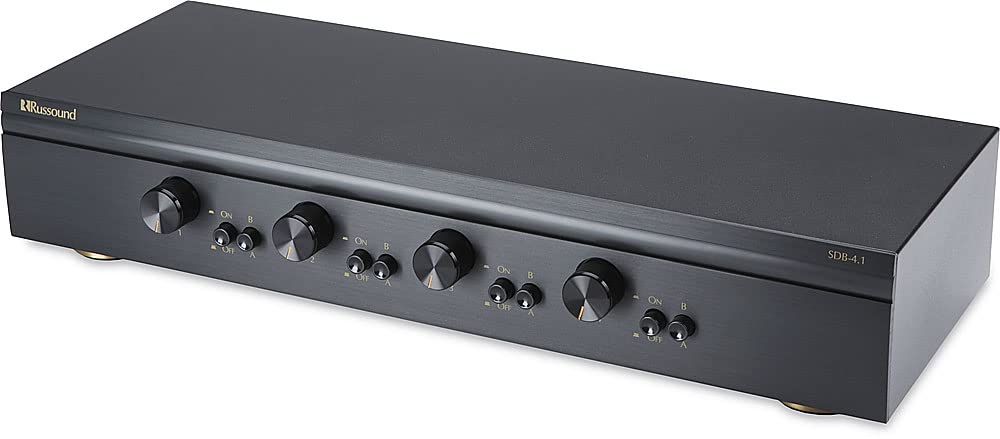
The Russound SDB4.1 is a high-quality speaker selector designed for multi-room audio distribution. It features dual amplifier inputs and supports up to four pairs of speakers, each with independent volume control. The unit incorporates autoformer-based impedance matching to maintain sound quality and protect your ampມີຊີວິດຊີວາ.
ການເຊື່ອມຕໍ່ແຜງດ້ານຫລັງ
The rear panel of the SDB4.1 provides all necessary connections for amplifiers and speakers. It includes color-coded detachable snap connectors for easy wire termination.
- AMP A / AMP B Inputs: ເຊື່ອມຕໍ່ຂອງທ່ານ amplifiers here. Each input supports Left (+) and (-), and Right (+) and (-) channels.
- SPEAKER 1-4 Outputs: Connect your speaker pairs here. Each output supports Left (+) and (-), and Right (+) and (-) channels.
ຕັ້ງຄ່າ
1. ບັນຈຸເຂົ້າຮຽນ
Place the SDB4.1 in a well-ventilated area, away from heat sources and direct sunlight. Ensure there is sufficient space around the unit for air circulation and cable management.
2. ການເຊື່ອມຕໍ່ສາຍໄຟ
ກ່ອນທີ່ຈະເຮັດການເຊື່ອມຕໍ່ໃດໆ, ໃຫ້ແນ່ໃຈວ່າຂອງທ່ານ amplifier(s) and the SDB4.1 are powered off and unplugged from the mains.
- ເຊື່ອມຕໍ່ລໍາໂພງ: For each speaker pair, connect the speaker wires to the corresponding SPEAKER output terminals (SPEAKER 1, SPEAKER 2, etc.) on the SDB4.1. Ensure correct polarity (Left+, Left-, Right+, Right-). The detachable snap connectors are color-coded for ease of use.
- ເຊື່ອມຕໍ່ Ampຊີວິດ: Connect the speaker outputs from your amplifier(s) to the AMP A ແລະ/ຫຼື AMP B input terminals on the SDB4.1. If using a single amplifier, connect it to AMP A. If using two amplifiers, connect the first to AMP A and the second to AMP B. Maintain correct polarity.
3. Impedance Matching Settings
The SDB4.1 features selectable impedance matching to accommodate various speaker configurations (4-ohm or 8-ohm speakers) and protect your amplifier. The impedance matching setting is typically located inside the unit. It is crucial to verify and adjust this setting according to your speaker setup to prevent damage to your amplifier. Consult the internal diagrams or markings for the correct jumper or switch positions for 2X, 4X, or 8X impedance matching. The factory default setting may vary, so always confirm it before operation.
ການດໍາເນີນງານ
1. ເປີດເຄື່ອງ
Once all connections are secure, plug in and power on your amplifier(s) and then the SDB4.1.
2. Selecting an Amplifier ແຫຼ່ງ
The SDB4.1 allows you to select between Ampຕົວຊ່ວຍ A ແລະ Amplifier B for each speaker zone. Use the corresponding selector buttons on the front panel to choose the desired amplifier for each room.
3. Activating Speaker Zones
Each speaker zone has an individual button on the front panel. Press the button for the desired speaker zone to turn it on or off. Ensure the buttons are fully engaged when pressed.
4. ປັບລະດັບສຽງ
Each speaker zone is equipped with a rotary volume control knob. Turn the knob clockwise to increase the volume and counter-clockwise to decrease it. The volume controls have twelve detent positions for precise adjustment.
ບໍາລຸງຮັກສາ
- ທໍາຄວາມສະອາດ: ໃຊ້ຜ້າປຽກແຫ້ງເພື່ອເຮັດຄວາມສະອາດດ້ານນອກຂອງເຄື່ອງ. ຢ່າໃຊ້ນໍ້າສະອາດ ຫຼືສີດ aerosol.
- ການລະບາຍອາກາດ: ໃຫ້ແນ່ໃຈວ່າຊ່ອງລະບາຍອາກາດບໍ່ໄດ້ຖືກປິດກັ້ນ.
- ການເຊື່ອມຕໍ່: ກວດເບິ່ງທຸກສາຍເຊື່ອມຕໍ່ເປັນໄລຍະເພື່ອຮັບປະກັນວ່າພວກມັນປອດໄພ.
ການແກ້ໄຂບັນຫາ
| ບັນຫາ | ສາເຫດທີ່ເປັນໄປໄດ້ | ການແກ້ໄຂ |
|---|---|---|
| ບໍ່ມີສຽງຈາກລຳໂພງ. |
|
|
| ຄຸນນະພາບສຽງບິດເບືອນ ຫຼື ບໍ່ດີ. |
|
|
| Speaker zone button stuck. | ບັນຫາກົນຈັກ. | Gently try to free the button. If it remains stuck, contact Russound customer support for assistance. |
ຂໍ້ມູນຈໍາເພາະ
| ຕົວແບບ | SDB4.1 |
| Speaker Pairs Supported | 4 |
| Amplifier ວັດສະດຸປ້ອນ | 2 (AMP A, AMP B) |
| ການຈັດການພະລັງງານ | Up to 200W per channel RMS continuous |
| ການຈັບຄູ່ impedance | Selectable (accommodates 4- or 8-ohm speakers) |
| ການຄວບຄຸມປະລິມານ | Individual per zone, 12 detent positions |
| ຂະໜາດ (ກວ້າງ x ສູງ x ຍາວ) | 18.43 x 4.76 x 9.65 inches (Product dimensions) |
| ນ້ໍາຫນັກລາຍການ | 8.82 ປອນ |
| ສີ | ດຳ |
| ການເຊື່ອມຕໍ່ | Detachable snap connectors for bare speaker wire (L+ L- R+ R-) |
| ຜູ້ຜະລິດ | ປະເທດຣັດເຊຍ |
ໝາຍ ເຫດ: ຂໍ້ມູນສະເພາະແມ່ນມີການປ່ຽນແປງໂດຍບໍ່ຕ້ອງແຈ້ງ.
ການຮັບປະກັນແລະການສະຫນັບສະຫນູນ
For warranty information or technical support, please refer to the official Russound webເວັບໄຊ ຫຼືຕິດຕໍ່ພະແນກບໍລິການລູກຄ້າຂອງເຂົາເຈົ້າ. ຮັກສາໃບຮັບເງິນການຊື້ຂອງທ່ານໄວ້ເປັນຫຼັກຖານການຊື້ສໍາລັບການຮ້ອງຂໍການຮັບປະກັນ.
Russound Contact Information:
- Webເວັບໄຊ: www.russound.com
- ອ້າງເຖິງ website for current contact details and support resources.